dsh-minimax-usage
Run the following command in DeepSeek Harness:
dsh plugin install pan17/dsh-minimax-usage
Paste the following prompt into your AI chat to install this plugin:
Run dsh plugin install pan17/dsh-minimax-usage in your terminal to install, or visit https://github.com/pan17/dsh-minimax-usage for the source code.
About this plugin
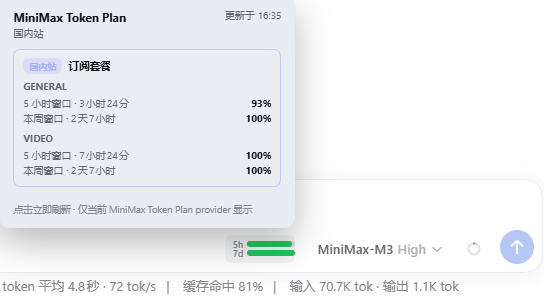
You have a MiniMax Token Plan subscription, but confirming remaining quota means leaving your DSH workflow and opening the MiniMax console. dsh-minimax-usage renders a compact usage bar right next to the model selector in the DSH Web UI, so both the 5-hour and 7-day windows are visible at a glance without switching tabs.
Hover over the bar to see plan name, window progress, and reset countdown; if both domestic and international keys are configured, the detail panel shows two account cards side by side. Clicking the bar triggers an immediate refresh without disturbing your model selection or message sending. The polling strategy is deliberately restrained: a 30-second pull loop only starts while an active Agent is actually calling a MiniMax provider, then backs off with an exponential heartbeat (2 minutes up to a 24-hour cap) once the Agent goes idle. Credentials are read from the existing DSH model settings, so the browser never sees the raw key.
This plugin is a good fit for developers who run DSH as their everyday client and hold a MiniMax Token Plan subscription. The usage bar appears automatically the moment you pick a MiniMax model and disappears when you switch to any other provider. A subscription key is not interchangeable with a standard pay-as-you-go API key; the plugin surfaces a clear hint the moment the API rejects a non-subscription credential, saving you a round of debugging.
Screenshots
Use Cases
- Check MiniMax 5h and 7d remaining quota at a glance while chatting in DSH Web UI
- Compare window progress and reset countdown when switching between models
- View domestic and international account usage side by side in one hover panel
- Auto-poll while an Agent is active, then back off to a slow heartbeat once idle
Best For
- DSH users who hold a MiniMax Token Plan subscription
- Developers who switch models often and want to track quota usage
- Engineers using both domestic and international MiniMax API keys
Related Plugins
A service-oriented sidebar framework for DSH, offering a full workbench with file explorer, embedded browser, real terminal, Git panel, and extensible plugin services.

A beautiful, practical Claude Code-style TUI plugin with pixel whale top bar, flowing glow title, real-time status line, streaming thought expansion, time rewind, context progress bar and TPS gauge — zero core changes.

The plugin market for DeepSeek Harness: browse/search/one-click install community plugins and themes, with updates, backup/restore, hot disable, diagnostics, and AI fix.

A persistent whale widget on the DSH web UI that shows DeepSeek balance, today's usage, and per-turn cost, with drag-and-snap and sound effects.