dsh-desktop-notify
Run the following command in DeepSeek Harness:
dsh plugin install crazy-L118/dsh-desktop-notify
Paste the following prompt into your AI chat to install this plugin:
Install it in DeepSeek Harness by running dsh plugin install crazy-L118/dsh-desktop-notify; the source is available at https://github.com/crazy-L118/dsh-desktop-notify .
About this plugin
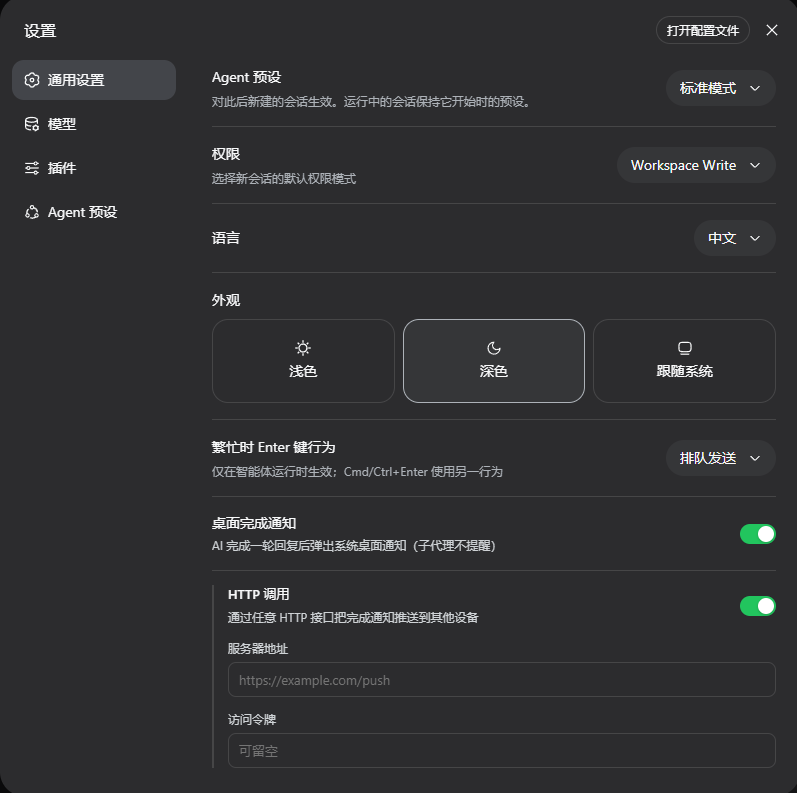
If you run long dsh sessions or juggle multiple workspaces, the most annoying part is not the wait itself but discovering—only after switching back—that the AI already finished its reply. dsh-desktop-notify closes that gap: the moment a reply is complete, a native system notification pops up with a text preview and the workspace / session label, so you can context-switch freely and still know the second the work is done. Beyond the local pop-up, the plugin can push the same completion event over HTTP to as many remote devices as you like—phones, other machines—each configured independently; one failure never blocks the others. Sub-agent background tasks stay quiet in the main conversation rather than spamming alerts, and the desktop channel and the HTTP channel are fully independent: enable either or both. It is built for dsh users who batch-process tasks, run several workspaces in parallel, or simply want a reliable nudge on their phone the instant the AI is done, turning idle wait time into genuinely free time.
Screenshots
Use Cases
- Switching to emails or docs and getting an instant native alert the moment the AI finishes replying
- Walking away from the desk and receiving the completion ping on a phone via the HTTP channel
- Running tasks across multiple workspaces and telling at a glance which session just wrapped up
Best For
- Users who run long dsh tasks and hate repeatedly switching back to poll status
- Developers who need the AI-done alert to reach their phone or second machine
- DSH power users juggling parallel workspaces and relying on notifications to track context
Related Plugins
A service-oriented sidebar framework for DSH, offering a full workbench with file explorer, embedded browser, real terminal, Git panel, and extensible plugin services.

A beautiful, practical Claude Code-style TUI plugin with pixel whale top bar, flowing glow title, real-time status line, streaming thought expansion, time rewind, context progress bar and TPS gauge — zero core changes.

The plugin market for DeepSeek Harness: browse/search/one-click install community plugins and themes, with updates, backup/restore, hot disable, diagnostics, and AI fix.

A persistent whale widget on the DSH web UI that shows DeepSeek balance, today's usage, and per-turn cost, with drag-and-snap and sound effects.