dsh.plus
Run the following command in DeepSeek Harness:
dsh plugin install zhaimingyou/dsh.plus
Paste the following prompt into your AI chat to install this plugin:
Run dsh plugin install zhaimingyou/dsh.plus in the DeepSeek Harness terminal to install; the source repository is available at https://github.com/zhaimingyou/dsh.plus .
About this plugin
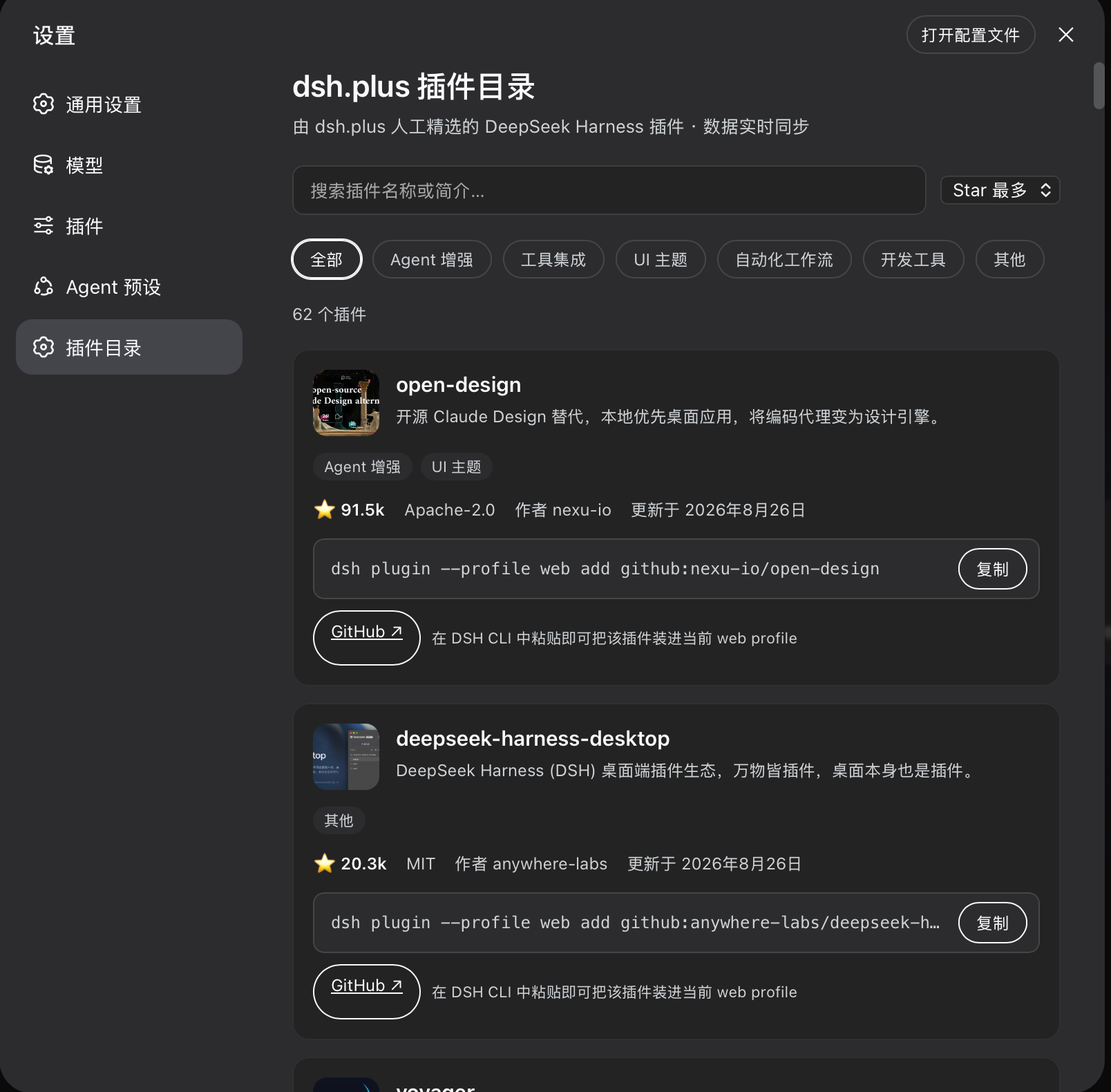
Managing plugins in DSH usually means leaving the app, opening a browser, searching an external directory, and copying a repository URL by hand. dsh.plus is the bilingual ecosystem portal and curated plugin directory for the DSH community, yet there was no built-in entry point inside DSH itself. This plugin closes that gap: once installed, a Plugin Catalog page appears under DSH Settings, so you can browse, search, and compare every curated plugin on dsh.plus without ever switching to a browser.
The catalog data is fetched live from the dsh.plus public API at runtime, so site updates appear instantly with no extra deployment. Each plugin card shows its name, bilingual summary, star count, license, publisher, last-updated time, and cover image, along with a direct link to the GitHub repository. You can search by name or summary, filter across six categories, sort by stars or update time, and copy the install command with one click. The entire experience is strictly read-only: nothing is installed, no plugin code is executed, and your profile is never modified. All remote fields are sanitized and URLs are re-validated against the DSH Community Market contract.
If you are deep into DSH and want to extend your workflow, this plugin is made for you. Whether you are hunting for a specific tool, comparing candidates by metadata, or simply want a permanent, zero-side-effect discovery entry point inside your settings, it offers a lightweight and safe way to explore the community ecosystem.
Screenshots
Use Cases
- Browse the curated plugin catalog directly inside DSH Settings
- Search, filter, and sort candidate plugins by category, name, or stars
- Review plugin metadata and copy the install command with one click
Best For
- DSH power users looking to discover community plugins
- Users who prefer in-app browsing over switching to a browser
- Developers evaluating and selecting DSH plugins
Related Plugins
A service-oriented sidebar framework for DSH, offering a full workbench with file explorer, embedded browser, real terminal, Git panel, and extensible plugin services.

A beautiful, practical Claude Code-style TUI plugin with pixel whale top bar, flowing glow title, real-time status line, streaming thought expansion, time rewind, context progress bar and TPS gauge — zero core changes.

The plugin market for DeepSeek Harness: browse/search/one-click install community plugins and themes, with updates, backup/restore, hot disable, diagnostics, and AI fix.

A persistent whale widget on the DSH web UI that shows DeepSeek balance, today's usage, and per-turn cost, with drag-and-snap and sound effects.