dsh-plugin-workspace-path
Run the following command in DeepSeek Harness:
dsh plugin install code4lala/dsh-plugin-workspace-path
Paste the following prompt into your AI chat to install this plugin:
Run dsh plugin install code4lala/dsh-plugin-workspace-path in your terminal; the source code is available at https://github.com/code4lala/dsh-plugin-workspace-path and the plugin will activate on the next dsh web boot.
About this plugin
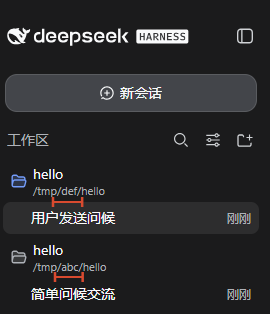
In the DeepSeek Harness web sidebar, workspaces are identified solely by their title. When you have many projects open—or worse, several with identical titles—it is easy to lose track of which entry maps to which directory, and misclicks become more likely.
dsh-plugin-workspace-path renders the full directory path as a subtitle beneath every workspace title, with automatic line wrapping so long paths never overflow the sidebar. Matching is positional rather than title-based, so identically named workspaces each display their own unique path without collision. A MutationObserver combined with a workspace-list subscription keeps every subtitle in sync after reorders or renames, eliminating the need to reload the page. All logic lives in the browser; no server-side behaviour is added.
If you juggle multiple workspaces in the dsh web interface—particularly when titles overlap or the list grows beyond a handful—this plugin turns the sidebar into an at-a-glance directory reference and removes the guesswork of pairing titles to paths.
Screenshots
Use Cases
- Disambiguate multiple workspaces that share the same title by their full directory paths.
- Identify the on-disk folder behind any sidebar entry at a glance.
- Subtitles stay live through reorders and renames without needing a page reload.
Best For
- dsh web users who manage a large number of workspaces simultaneously.
- Developers who frequently work with identically named project directories.
- Researchers who want richer sidebar context to reduce misclicks.
Related Plugins
A service-oriented sidebar framework for DSH, offering a full workbench with file explorer, embedded browser, real terminal, Git panel, and extensible plugin services.

A beautiful, practical Claude Code-style TUI plugin with pixel whale top bar, flowing glow title, real-time status line, streaming thought expansion, time rewind, context progress bar and TPS gauge — zero core changes.

The plugin market for DeepSeek Harness: browse/search/one-click install community plugins and themes, with updates, backup/restore, hot disable, diagnostics, and AI fix.

A persistent whale widget on the DSH web UI that shows DeepSeek balance, today's usage, and per-turn cost, with drag-and-snap and sound effects.