dsh-private-plugins
Run the following command in DeepSeek Harness:
dsh plugin install YINGCHAO-98/dsh-private-plugins
Paste the following prompt into your AI chat to install this plugin:
Run dsh plugin install YINGCHAO-98/dsh-private-plugins in the DeepSeek Harness terminal; the full source is available at https://github.com/YINGCHAO-98/dsh-private-plugins
About this plugin
The DSH Plugin Marketplace covers public npm-registry plugins, but team-internal private Git repositories and locally developed plugins have long lacked a single, intuitive management surface. Every install meant typing CLI commands, and keeping track of what was installed and what needed an update felt fragmented.
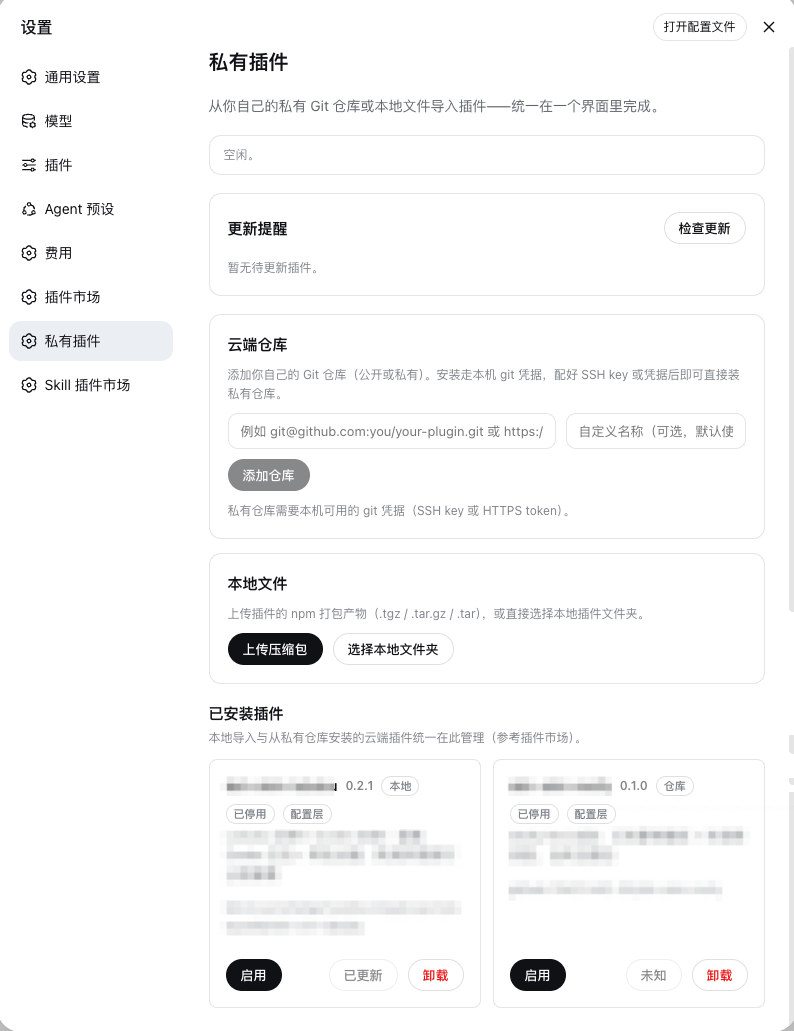
dsh-private-plugins adds a dedicated Private Plugins panel in the Settings sidebar, sitting alongside the Plugin Marketplace. From one screen you can add public or private Git repositories (HTTPS, SSH, github: shorthand, branch and tag pins), upload .tgz archives, or point at a local plugin folder. Installed plugins appear as a unified card list, each offering enable/disable, install, an update-status badge, and an uninstall button. The panel auto-checks for updates on load - Git sources compare remote commits, npm sources query the registry - and surfaces a one-click Update button whenever a newer version is available.
Ideal for developers who maintain internal plugins outside the public registry, iterate locally with frequent import cycles, or want a single dashboard for every DSH plugin source. All changes flow through the standard dsh plugin install chain, fully compatible with Desktop and the marketplace. Built-in safeguards include loopback same-origin request validation, path whitelisting, and filename sanitization for safe use in team environments.
Screenshots
Use Cases
- Install internally developed DSH plugins from a team-private Git repository
- Import locally developed plugins as archives or folders into Harness
- View install, update, and uninstall status of multi-source plugins from a unified dashboard
Best For
- Developers maintaining internal DSH plugins
- Engineers who frequently debug and import plugins locally
- Teams seeking a unified dashboard for plugins from multiple sources
Related Plugins
A service-oriented sidebar framework for DSH, offering a full workbench with file explorer, embedded browser, real terminal, Git panel, and extensible plugin services.

A beautiful, practical Claude Code-style TUI plugin with pixel whale top bar, flowing glow title, real-time status line, streaming thought expansion, time rewind, context progress bar and TPS gauge — zero core changes.

The plugin market for DeepSeek Harness: browse/search/one-click install community plugins and themes, with updates, backup/restore, hot disable, diagnostics, and AI fix.

A persistent whale widget on the DSH web UI that shows DeepSeek balance, today's usage, and per-turn cost, with drag-and-snap and sound effects.