universal-plugin-hub
Run the following command in DeepSeek Harness:
dsh plugin install Ultmebius/universal-plugin-hub
Paste the following prompt into your AI chat to install this plugin:
Run dsh plugin install Ultmebius/universal-plugin-hub in the DeepSeek Harness terminal to install this plugin; source code: https://github.com/Ultmebius/universal-plugin-hub
About this plugin
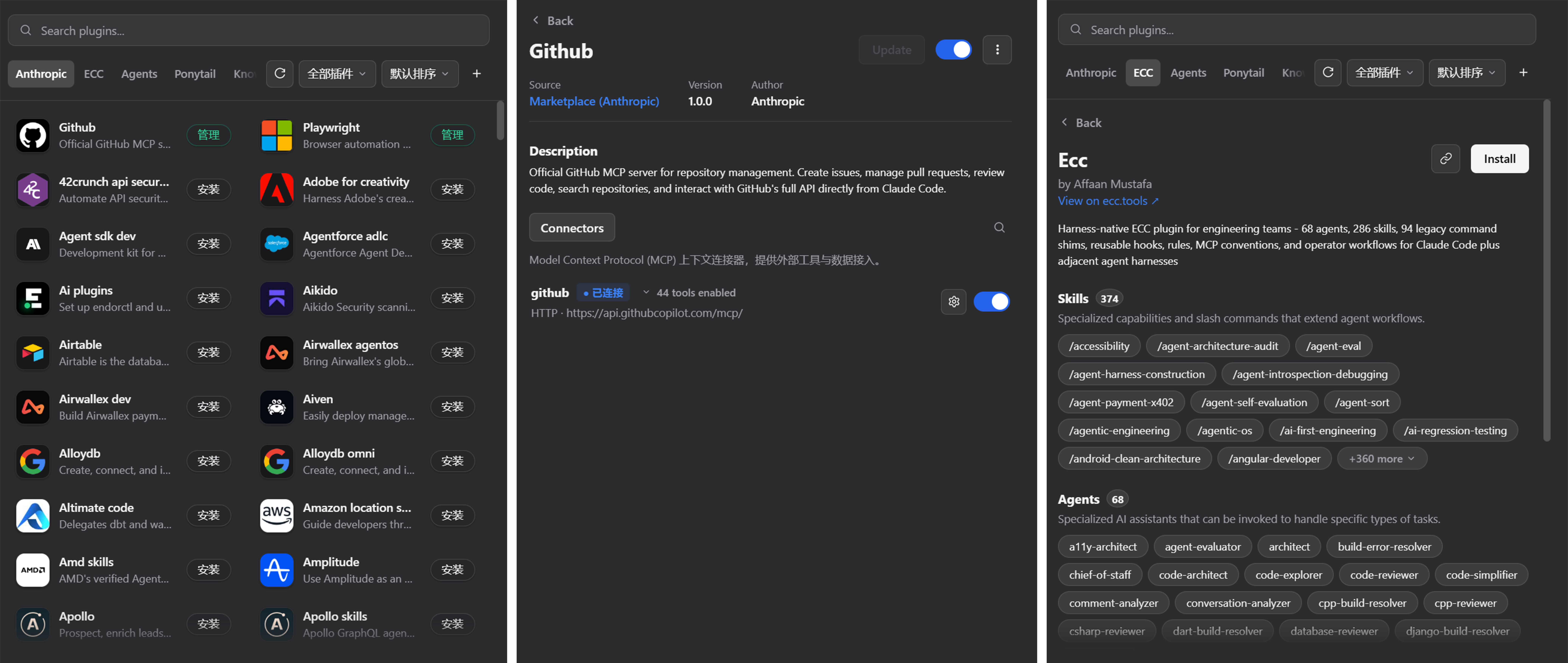
Adopting third-party skills, MCP connectors, or LSP servers in DeepSeek Harness used to mean cloning repos one by one, hand-editing cordis.patch.yml line by line, and wiring hooks manually—a multi-step process that is easy to get wrong. Universal Plugin Hub collapses that entire pipeline into a single visual panel, turning discovery-to-ready into one click.
The panel ships with the official Claude plugin catalog pre-loaded and accepts any Git repository as an additional source. Clicking Install lets the hub mirror skills, compile subagents, register MCP and LSP entries, and bridge Claude Code hooks—all committed to cordis.patch.yml in a single write that DSH hot-reloads within a second. From the manage page you can toggle individual tools, test auth tokens, update or uninstall plugins, all without restarting DSH.
Built for developers who live in the DSH web profile and want to assemble or tweak their skill stack quickly, especially those juggling multiple MCP connectors, language servers, and custom hooks without wanting to hand-write YAML every time.
Screenshots
Use Cases
- Browse and one-click install official Claude or community plugins inside DSH
- Wire up MCP connectors, LSP servers, or custom hooks without hand-editing YAML
- Toggle, auth-test, update, and uninstall installed plugins from a single manage panel
Best For
- Engineers who develop and debug with DSH web profile daily
- Tech teams juggling multiple MCP connectors and language servers
- Users who prefer a visual UI to cut down config friction and boost plugin reuse
Related Plugins
A service-oriented sidebar framework for DSH, offering a full workbench with file explorer, embedded browser, real terminal, Git panel, and extensible plugin services.

A beautiful, practical Claude Code-style TUI plugin with pixel whale top bar, flowing glow title, real-time status line, streaming thought expansion, time rewind, context progress bar and TPS gauge — zero core changes.

The plugin market for DeepSeek Harness: browse/search/one-click install community plugins and themes, with updates, backup/restore, hot disable, diagnostics, and AI fix.

A persistent whale widget on the DSH web UI that shows DeepSeek balance, today's usage, and per-turn cost, with drag-and-snap and sound effects.