dsh-plugin-description
Run the following command in DeepSeek Harness:
dsh plugin install MysaDC/dsh-plugin-description
Paste the following prompt into your AI chat to install this plugin:
Run dsh plugin install MysaDC/dsh-plugin-description (source at https://github.com/MysaDC/dsh-plugin-description), then restart dsh web to activate the plugin.
About this plugin
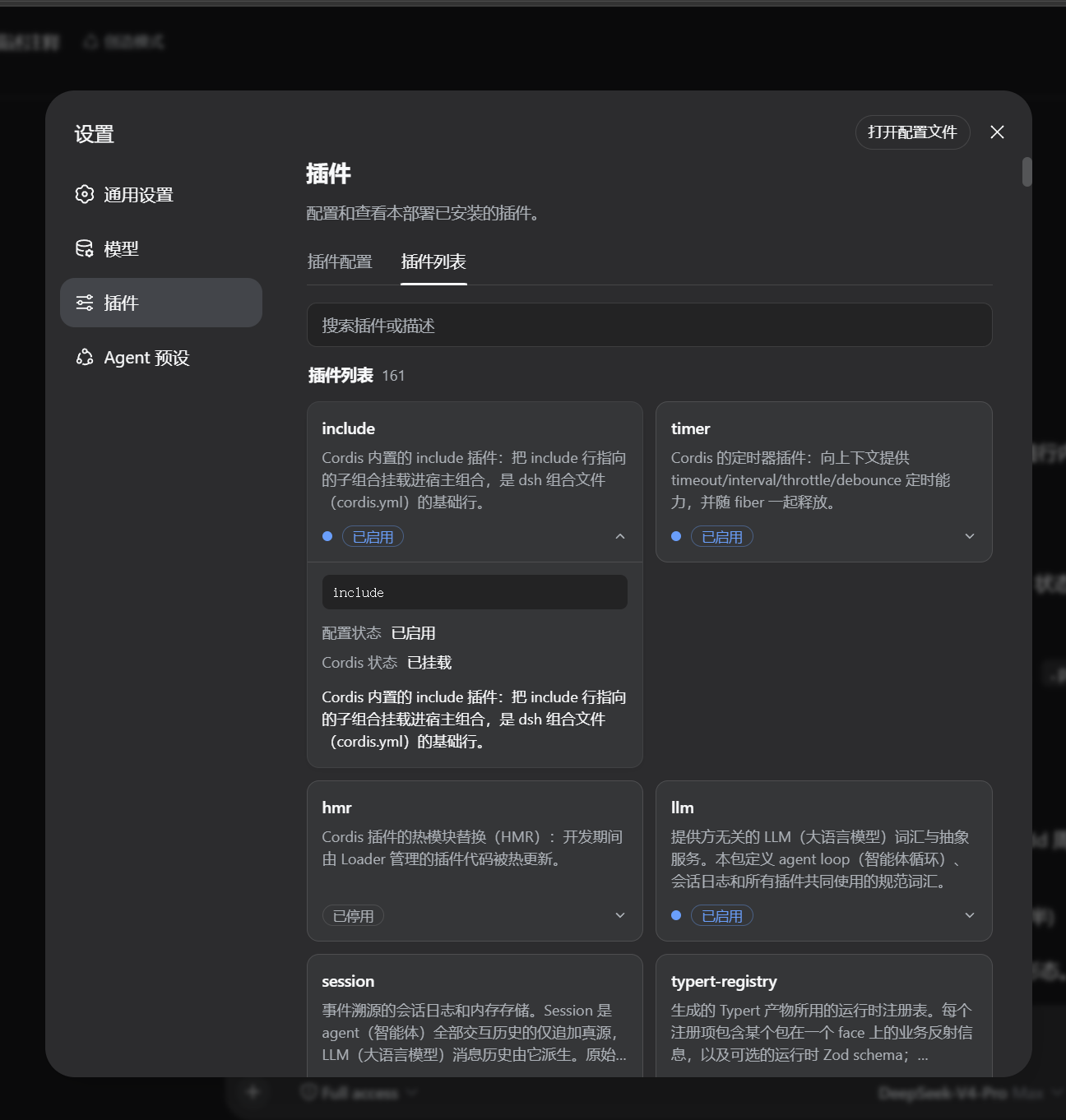
Opening the DSH plugin list shows a wall of cards with only names and no context. Once you have installed a dozen or more plugins, it becomes hard to tell what each one does or which ones are already configured. dsh-plugin-description adds a bilingual feature description to every card so you can scan and pick the right plugin at a glance, without digging through GitHub repos or guessing configuration keys.
The bundled dictionary covers all 134 module names in the default DSH profile, extracted from each official package README and hand-reviewed. Expanding a card reveals the full description, Loader entry id, configuration status, and Cordis mount state; the search box matches plugin names, entry ids, and description text simultaneously, and the language toggles with the UI locale. Descriptions can be edited directly in the UI and persist to a user dictionary file that survives upgrades and reinstalls—no code changes or rebuilds required. The plugin also exposes a pluginDescriptions service, allowing other host-side plugins to register or override descriptions at runtime with higher priority than the built-in dictionary.
This plugin suits two audiences well: regular DSH users who have many plugins installed and want a quick, readable overview of each one, and plugin authors who want their own cards to carry a meaningful description—simply call pluginDescriptions.register from your plugin without modifying any file in this package.
Screenshots
Use Cases
- Quickly understanding what each plugin does after installing many
- Registering bilingual descriptions for custom plugins so team members know their purpose
- Searching the plugin list by feature keywords instead of guessing one by one
Best For
- DSH users with many plugins installed who need quick feature identification
- Plugin authors who want clear descriptions on their plugin cards
- Multilingual teams that need bilingual plugin descriptions
Related Plugins
A service-oriented sidebar framework for DSH, offering a full workbench with file explorer, embedded browser, real terminal, Git panel, and extensible plugin services.

A beautiful, practical Claude Code-style TUI plugin with pixel whale top bar, flowing glow title, real-time status line, streaming thought expansion, time rewind, context progress bar and TPS gauge — zero core changes.

The plugin market for DeepSeek Harness: browse/search/one-click install community plugins and themes, with updates, backup/restore, hot disable, diagnostics, and AI fix.

A persistent whale widget on the DSH web UI that shows DeepSeek balance, today's usage, and per-turn cost, with drag-and-snap and sound effects.