dsh-review-loop
Run the following command in DeepSeek Harness:
dsh plugin install wuxiangru915/dsh-review-loop
Paste the following prompt into your AI chat to install this plugin:
Run dsh plugin install wuxiangru915/dsh-review-loop in a DeepSeek Harness terminal to install; full source code is at https://github.com/wuxiangru915/dsh-review-loop .
About this plugin
When an agent touches a dozen or more files in one task, re-reading the full diff every cycle is slow and re-reviewing unchanged code is pure attention waste. dsh-review-loop turns code review into an incremental closed loop: approving a batch records a checkpoint, and the next review shows only changes made afterward. Reviewed files drop out of the queue until they change again.
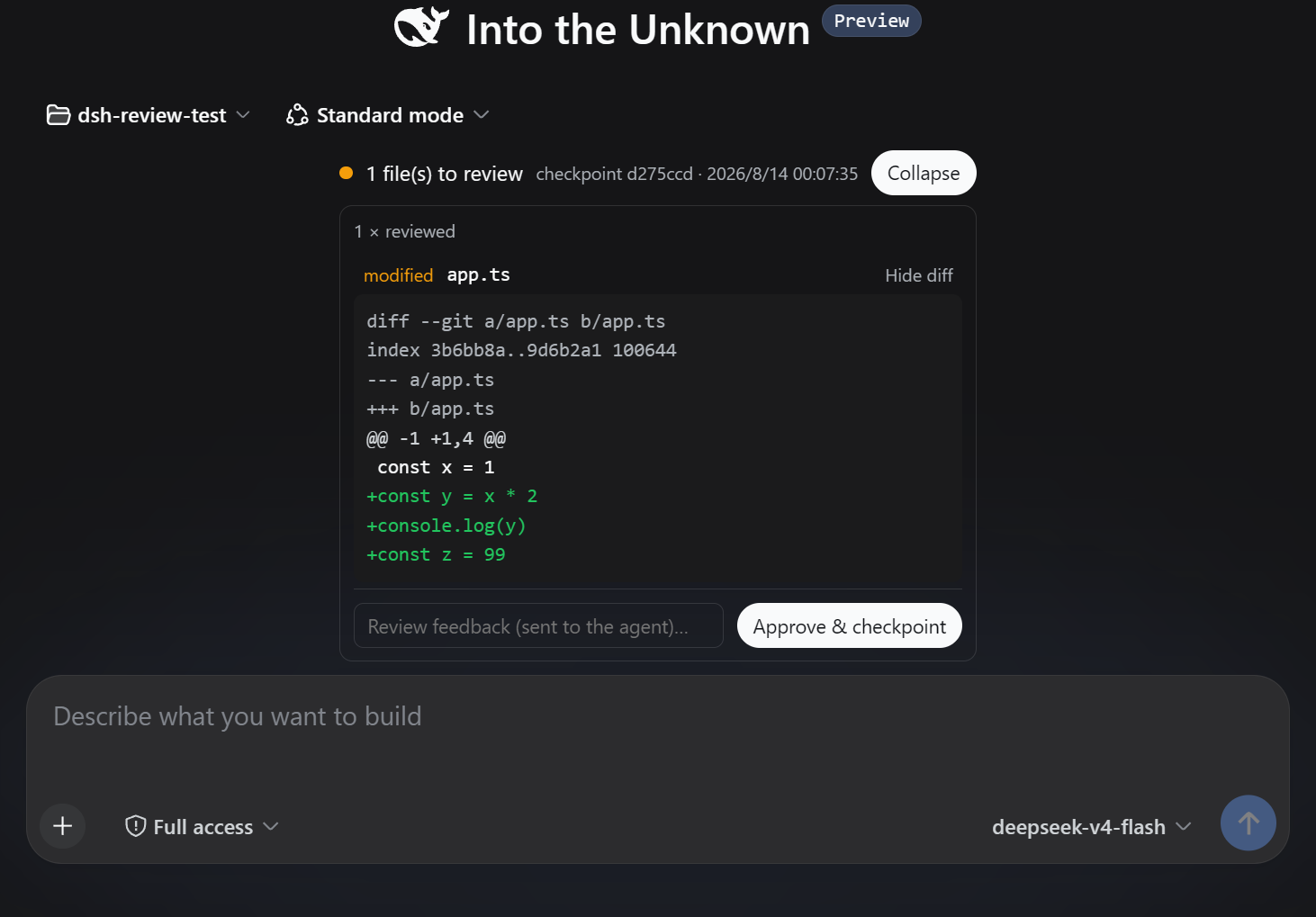
Two entry points share the same checkpoint store: a Web review panel docked above the conversation composer with colorized per-file diffs, an optional feedback field, and a one-click approve button; and a /review command for keyboard-first workflows supporting incremental view, full-tree comparison, and approval with an injected comment. Feedback reaches the agent through the harness messaging channel without interrupting its work. Under the hood the plugin reads the git working tree directly, so changes from the agent, from you, or from any other process are all captured faithfully. Checkpoints are written atomically to an isolated path, never polluting the project git status, and the plugin requires zero core modifications to DeepSeek Harness.
Built for developers who drive agents through DeepSeek Harness on multi-file tasks and want a controllable review cadence, zero re-review overhead, and an uninterrupted agent workflow. Requires a git repository workspace and Node.js 22 or later.
Screenshots
Use Cases
- Agent modifies a dozen files; review only new changes per batch
- Browse diffs, add comments, and approve from the session panel
- Run incremental approvals and feedback injection purely from the terminal
Best For
- Developers driving agents via DeepSeek Harness on multi-file tasks
- Solo engineers who want a controllable review cadence
- Engineering teams that need agent feedback loops without breaking the workflow
Related Plugins
A service-oriented sidebar framework for DSH, offering a full workbench with file explorer, embedded browser, real terminal, Git panel, and extensible plugin services.

A beautiful, practical Claude Code-style TUI plugin with pixel whale top bar, flowing glow title, real-time status line, streaming thought expansion, time rewind, context progress bar and TPS gauge — zero core changes.

The plugin market for DeepSeek Harness: browse/search/one-click install community plugins and themes, with updates, backup/restore, hot disable, diagnostics, and AI fix.

A persistent whale widget on the DSH web UI that shows DeepSeek balance, today's usage, and per-turn cost, with drag-and-snap and sound effects.