dsh-token-activity
Run the following command in DeepSeek Harness:
dsh plugin install SnowNightt/dsh-token-activity
Paste the following prompt into your AI chat to install this plugin:
Run dsh plugin install SnowNightt/dsh-token-activity in your terminal to install the plugin. Repository: https://github.com/SnowNightt/dsh-token-activity
About this plugin
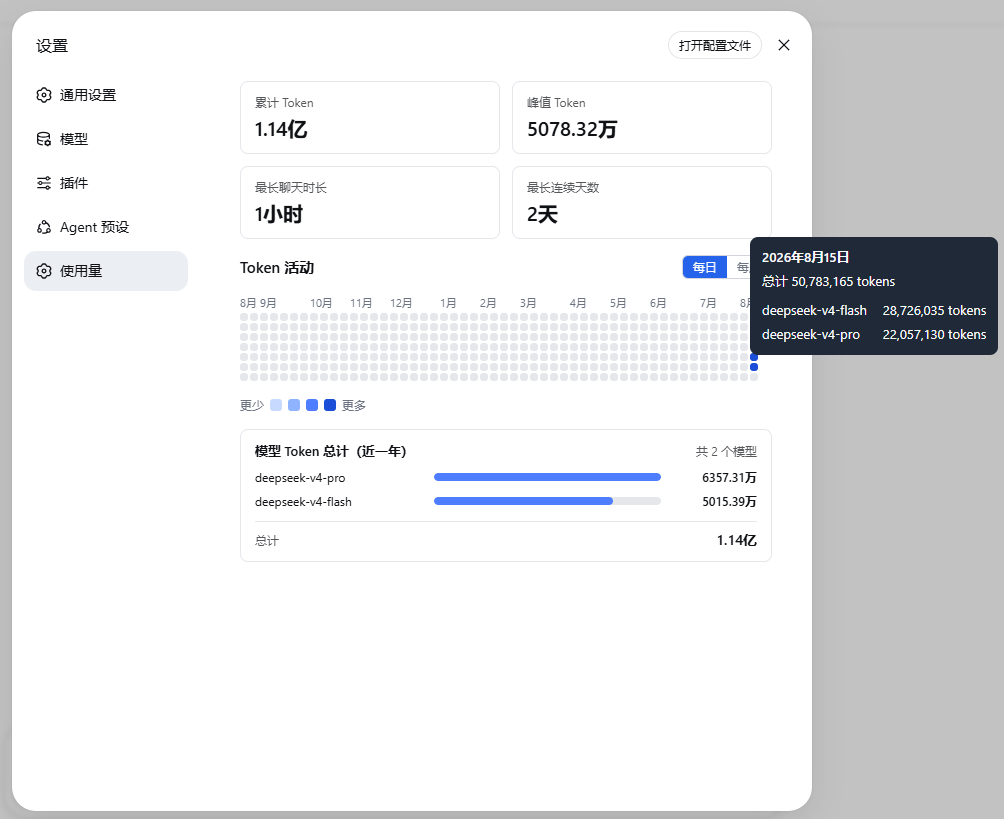
When you route requests across several models in DeepSeek Harness, you probably want to see which days spike and which model drives most of the spend, yet the UI offers no built-in view for that. dsh-token-activity fills the gap by collapsing the last 365 days of daily token consumption into a single heatmap.
Open Settings to Usage and you will find two metric cards for cumulative and peak tokens, followed by a continuous 365-day heatmap that spans year boundaries. Hover any cell to read the daily total and a per-model token breakdown. On first load the plugin back-fills historical sessions with live progress; a single failed session does not halt the rest.
If you run multiple models through DeepSeek Harness and want a local, at-a-glance picture of your token rhythm without logging into a provider dashboard, this plugin gives you that answer in one view.
Screenshots
Use Cases
- After routing to multiple models, quickly spot which days and models consume the most tokens
- Glance at 365-day usage trends locally without logging into a provider dashboard
- Hover a date to see per-model breakdowns and inform routing decisions
Best For
- Developers calling multiple models through DeepSeek Harness
- Engineering teams that want low-friction token spend tracking to avoid billing surprises
- Individual users who prefer a local toolchain over repeatedly switching to provider dashboards
Related Plugins
A service-oriented sidebar framework for DSH, offering a full workbench with file explorer, embedded browser, real terminal, Git panel, and extensible plugin services.

A beautiful, practical Claude Code-style TUI plugin with pixel whale top bar, flowing glow title, real-time status line, streaming thought expansion, time rewind, context progress bar and TPS gauge — zero core changes.

The plugin market for DeepSeek Harness: browse/search/one-click install community plugins and themes, with updates, backup/restore, hot disable, diagnostics, and AI fix.

A persistent whale widget on the DSH web UI that shows DeepSeek balance, today's usage, and per-turn cost, with drag-and-snap and sound effects.