
dsh-goal-mode-enhance
Run the following command in DeepSeek Harness:
dsh plugin install KarlOfLaw/dsh-goal-mode-enhance
Paste the following prompt into your AI chat to install this plugin:
Run dsh plugin install KarlOfLaw/dsh-goal-mode-enhance in the DeepSeek Harness terminal to install (source: https://github.com/KarlOfLaw/dsh-goal-mode-enhance).
About this plugin
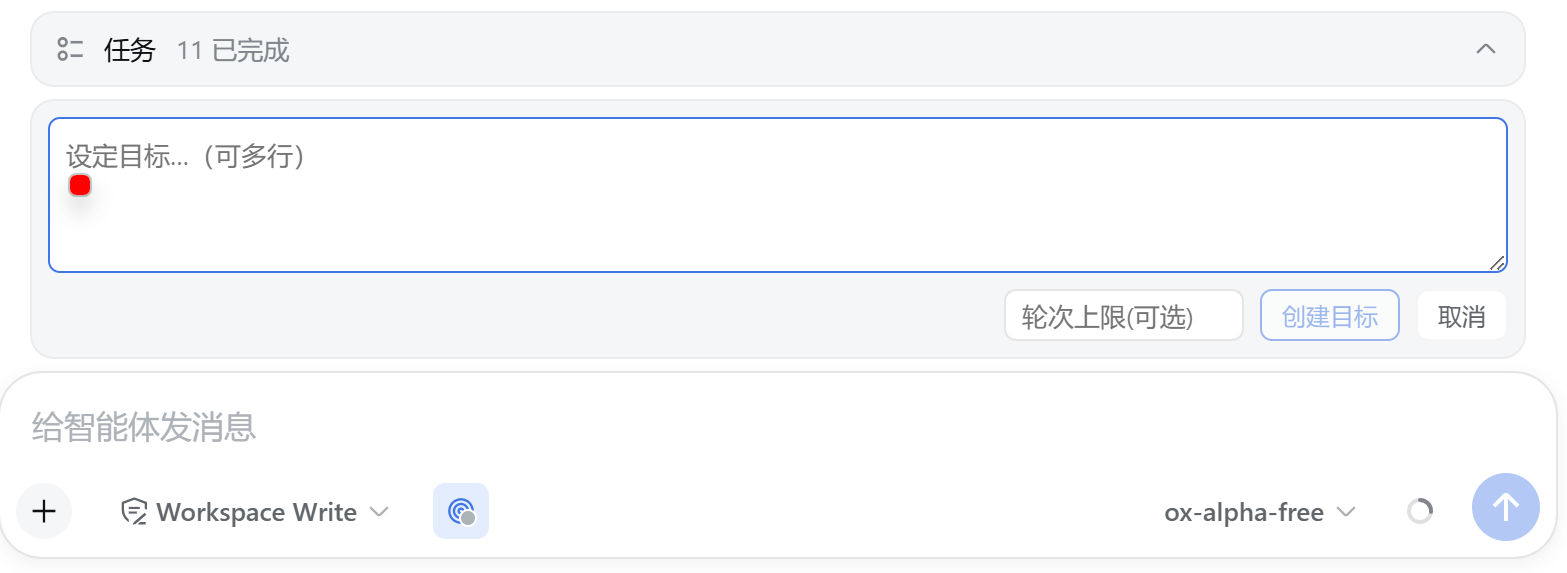
In DeepSeek Harness, the goal system has always lived behind chat commands and model tools. Users could only track progress, status, and round consumption through a single line of text in the conversation, with no way to see the full picture at a glance or switch states quickly. dsh-goal-mode-enhance pulls that hidden mechanism into a visible, interactive panel so you can manage goals with a click instead of memorizing slash commands.
The plugin injects a full lifecycle bar right above the composer. When no goal is set, a single circular button opens a multi-line creation form where you can also define a round limit in the same panel. Once a goal is active, the bar shows a status label, a real-time round progress bar, and a limit badge, with dedicated icon buttons for pause, resume, edit, complete, and clear. A tool-row entry uses a color dot to signal the current phase: green for active, yellow for paused, red for blocked, and the entire bar can collapse into a compact capsule that adapts to its content. When no goal exists, nothing is rendered, keeping the interface completely clean. Under the hood, data flows through real-time projections with zero polling, and all mutations use CAS optimistic concurrency so state stays consistent across multiple tabs or sessions.
This plugin is a great fit for developers and power users who work daily in the DeepSeek Harness Web UI. Whether you are tracking phased objectives in a long conversation, frequently toggling pause and resume, or quickly reviewing completed goals, this visual bar turns a command-driven workflow into a streamlined dashboard experience.
Screenshots

Use Cases
- Phased goal progression in multi-round conversations with quick pause and resume
- Glancing at current goal status, round progress, and limit badges at a time
- Replacing pure command-driven workflow with a visual panel for goal management
Best For
- Developers and power users working daily in the DeepSeek Harness Web UI
- AI workflow users who manage phased goals in long conversations
- Operators who prefer a visual panel over slash-command interaction
Related Plugins
A service-oriented sidebar framework for DSH, offering a full workbench with file explorer, embedded browser, real terminal, Git panel, and extensible plugin services.

A beautiful, practical Claude Code-style TUI plugin with pixel whale top bar, flowing glow title, real-time status line, streaming thought expansion, time rewind, context progress bar and TPS gauge — zero core changes.

The plugin market for DeepSeek Harness: browse/search/one-click install community plugins and themes, with updates, backup/restore, hot disable, diagnostics, and AI fix.

A persistent whale widget on the DSH web UI that shows DeepSeek balance, today's usage, and per-turn cost, with drag-and-snap and sound effects.