dsh-client-shortcuts
Run the following command in DeepSeek Harness:
dsh plugin install blue-a11y/dsh-client-shortcuts
Paste the following prompt into your AI chat to install this plugin:
Run dsh plugin install blue-a11y/dsh-client-shortcuts in the DeepSeek Harness terminal to install this plugin; source code is available at https://github.com/blue-a11y/dsh-client-shortcuts
About this plugin
Switching sessions, toggling panels, and scrolling long threads in the dsh web GUI all demand repeated mouse reach-ins that interrupt your flow. This plugin drops a global keyboard-shortcut layer into the dsh web interface, mapping high-frequency UI actions to key combinations so your hands stay on the keys.
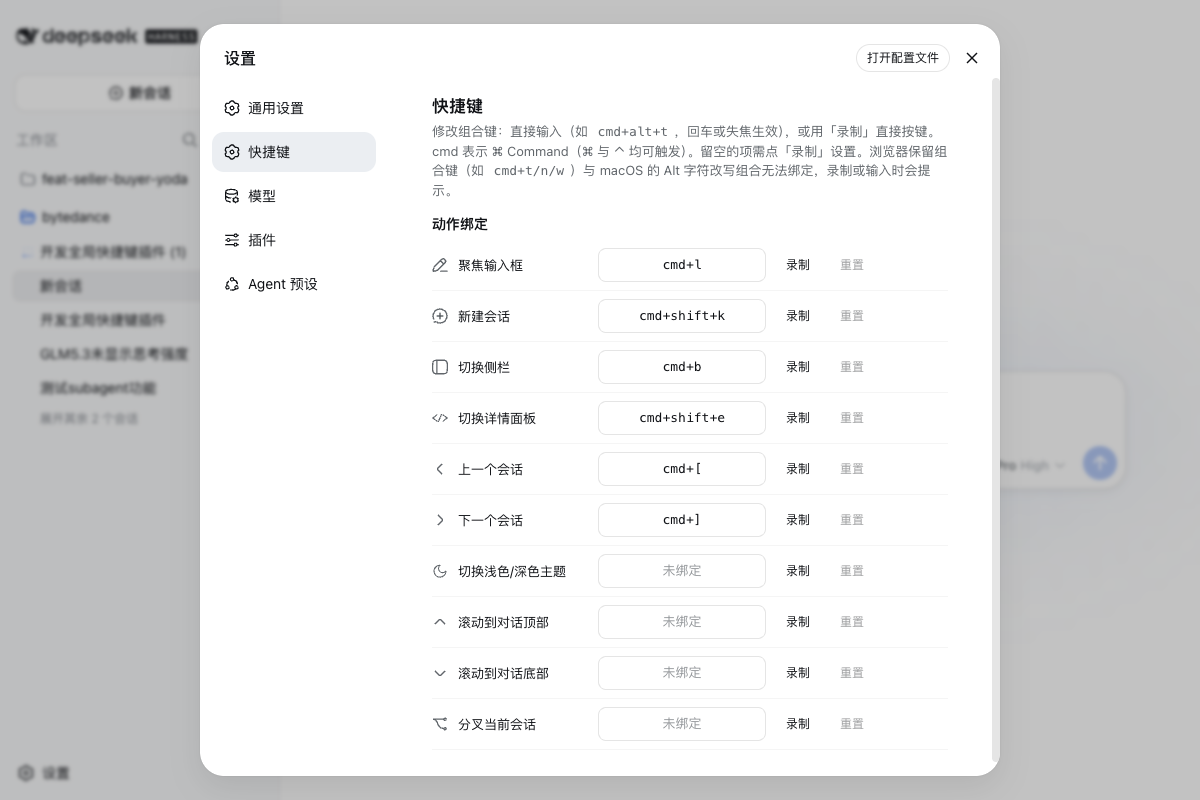
Under the hood, the plugin registers a capture-phase keydown listener on window via the ShortcutRegistry service and dispatches every registered combo. When focus sits inside a text input, shortcuts are suppressed by default unless the binding explicitly opts in. The Settings to Shortcuts page lists every bindable action—focus input, new session, toggle sidebar, toggle detail panel, previous and next session, theme switch, scroll to top or bottom, and fork session—and lets you record a new combination, reset to default, and see conflict warnings in real time. Browser-reserved shortcuts such as Cmd+N and Cmd+T, along with macOS Option-modified combos that rewrite character output, are automatically rejected so you never waste time on bindings that can never fire. Session navigation mirrors the full display order of the sidebar, wraps around at both ends, and skips archived or blank entries.
This is for power users of dsh web who juggle multiple sessions, flip panels, or scroll through long threads without reaching for the mouse, and who want a keyboard-first workflow. A current caveat: custom bindings persist only for the page session and reset to defaults on refresh—persistence is on the roadmap, so treat this as a sandbox for gradually locking in your preferred key layout.
Screenshots
Use Cases
- Jump between multiple sessions without leaving the keyboard
- Toggle sidebar or detail panel with a single keystroke to keep your flow intact
- Scroll to the top or bottom of a long conversation to locate key context instantly
Best For
- Power users of dsh web who prefer keyboard-driven workflows
- Developers juggling multiple sessions and toggling panels frequently
- Workflow optimizers seeking custom key bindings with conflict-aware management
Related Plugins
A service-oriented sidebar framework for DSH, offering a full workbench with file explorer, embedded browser, real terminal, Git panel, and extensible plugin services.

A beautiful, practical Claude Code-style TUI plugin with pixel whale top bar, flowing glow title, real-time status line, streaming thought expansion, time rewind, context progress bar and TPS gauge — zero core changes.

The plugin market for DeepSeek Harness: browse/search/one-click install community plugins and themes, with updates, backup/restore, hot disable, diagnostics, and AI fix.

A persistent whale widget on the DSH web UI that shows DeepSeek balance, today's usage, and per-turn cost, with drag-and-snap and sound effects.