dsh-themes
Run the following command in DeepSeek Harness:
dsh plugin install MangMax/dsh-themes
Paste the following prompt into your AI chat to install this plugin:
Run dsh plugin install MangMax/dsh-themes in the DeepSeek Harness terminal to install the plugin (source at https://github.com/MangMax/dsh-themes), then restart dsh web and go to Settings → Themes to start using it.
About this plugin
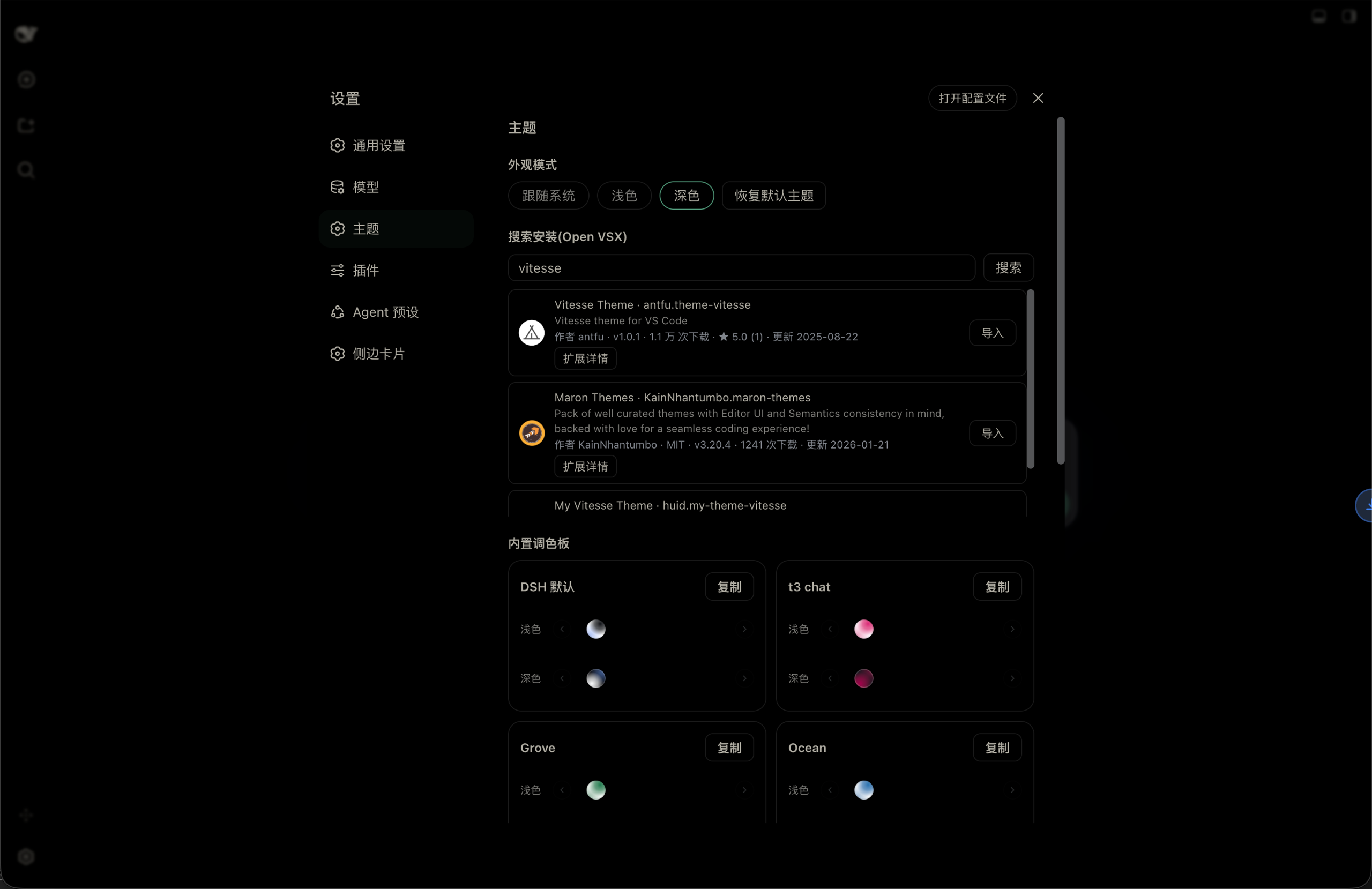
Developers used to picking a VS Code theme before opening a project often find DSH (DeepSeek Harness) visually rigid out of the box. dsh-themes turns DSH's appearance into swappable theme cards, each carrying both a light and a dark variant independently, so your light side can come from one palette while your dark side pulls from another.
Themes can be sourced three ways: search and install directly from Open VSX in a single click; import an existing VS Code extension by scanning local folders, fetching a URL, or pasting raw JSON, with a built-in OKLCH-perceptual engine deriving surface steps and enforcing contrast gates; or duplicate any built-in theme and fine-tune all 95 design tokens inside a semantically grouped color editor. Every imported theme is persisted locally and survives restarts.
It is built for developers who care about interface aesthetics, especially those migrating tooling from the VS Code ecosystem and wanting to keep their existing theme assets. The plugin runs cross-platform on Windows, macOS, and Linux, and its UI text follows DSH's language setting to switch between English and Chinese automatically.
Screenshots
Use Cases
- Import a favorite VS Code theme into DSH for visual consistency
- Search and install a new theme from Open VSX in one click
- Fine-tune all 95 color tokens group by group for a personal palette
Best For
- Developers who care deeply about terminal or web interface aesthetics
- Users migrating from the VS Code ecosystem who want to keep their theme assets
- Front-end or full-stack engineers who need independent light and dark theme assignment
Related Plugins
A service-oriented sidebar framework for DSH, offering a full workbench with file explorer, embedded browser, real terminal, Git panel, and extensible plugin services.

A beautiful, practical Claude Code-style TUI plugin with pixel whale top bar, flowing glow title, real-time status line, streaming thought expansion, time rewind, context progress bar and TPS gauge — zero core changes.

The plugin market for DeepSeek Harness: browse/search/one-click install community plugins and themes, with updates, backup/restore, hot disable, diagnostics, and AI fix.

A persistent whale widget on the DSH web UI that shows DeepSeek balance, today's usage, and per-turn cost, with drag-and-snap and sound effects.