dsh-file-mention
Run the following command in DeepSeek Harness:
dsh plugin install hucj09/dsh-file-mention
Paste the following prompt into your AI chat to install this plugin:
Run dsh plugin install hucj09/dsh-file-mention in your DeepSeek Harness terminal to install this plugin; the source lives at https://github.com/hucj09/dsh-file-mention, then restart dsh web and hard-refresh (Ctrl+F5) your browser to load the new bundle.
About this plugin
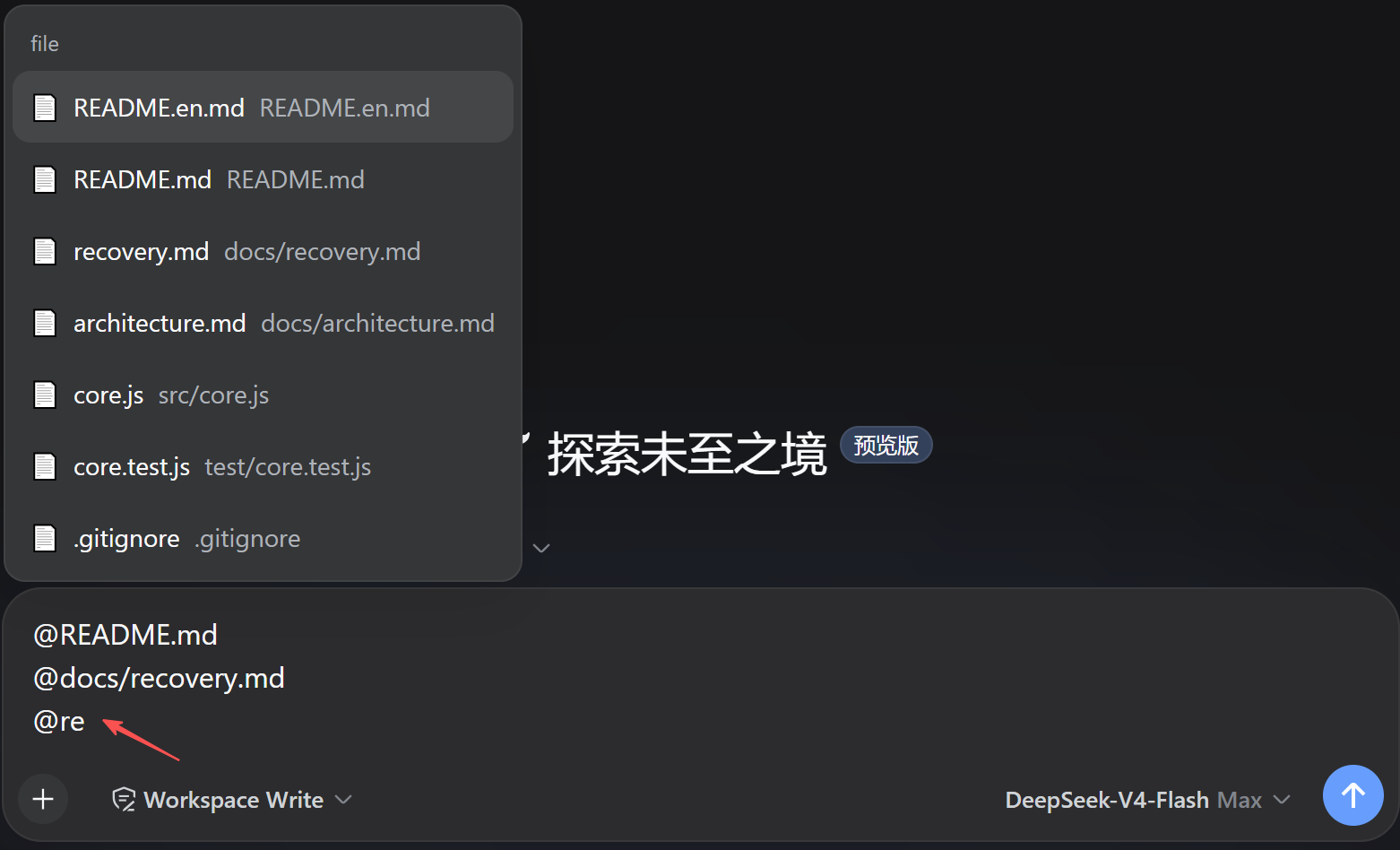
If you have ever found yourself copy-pasting file paths between an editor and a chat window just to tell the model "read this one," dsh-file-mention removes that friction entirely. In the DSH (DeepSeek Harness) Web GUI, typing @ in the message box opens a workspace file menu that filters in real time as you type. Select a file and a relative path such as @src/utils.ts is inserted at your cursor, so the model can read that file on the very next turn — the same one-step @file workflow you already enjoy in Codex CLI or Claude Code CLI, now available in the browser.
File discovery is git-aware by design: tracked files and newly created, non-ignored files appear in the candidate list automatically, while build artifacts and node_modules stay out thanks to .gitignore. For directories you intentionally keep out of version control but still want the AI to access — project docs, local tooling output, log dumps — drop an .aiinclude file (identical syntax to .gitignore) in the workspace root to opt them back in. Subdirectories can carry their own nested .aiinclude for per-folder granularity, and negation rules let you exclude specific sensitive paths.
Performance is a first-class concern. The client uses a stale-while-revalidate cache (30 s TTL, serves the previous list instantly while refreshing in the background), and the host layers caches at the repo-root (60 s), tracked-list (15 s), and change-set (5 s) levels. A warm-up hook pre-populates cache at session start, so the @ menu opens with virtually zero perceived delay. Directory traversal is pruned to only the branches that can match .aiinclude rules — a measured 16 ms for a doc/ scenario versus 822 ms for a full-tree scan. Candidate sorting is carefully tuned: exact match first, recently modified files pinned to the top, directories expand level by level, and single-segment keywords jump straight into deep subdirectories. Both the host and client sides ship with zero external runtime dependencies.
This plugin is built for developers who work in DSH Web GUI and regularly need the model to inspect local source files, documentation, or log output. If your daily workflow already leans on @file references in terminal-based assistants and you are extending that habit into the browser-based interface, dsh-file-mention bridges the gap seamlessly. And if you keep auxiliary files out of version control via .gitignore but still want on-demand AI access, the .aiinclude mechanism gives you a clean, gitignore-syntax way to mark exactly which ignored paths should remain reachable.
Screenshots
Use Cases
- Quickly @-mention local source or log files in DSH Web GUI chat so the model can read and analyze them directly
- Re-include .gitignore-excluded project docs for AI access via an .aiinclude file
- @-mention newly created files in the candidate menu without a prior git add
Best For
- Developers who frequently need the model to read local files within DSH Web GUI
- Users extending their terminal-assistant @file workflow to the browser-based interface
- Project maintainers who keep helper files out of version control yet require on-demand AI access
Related Plugins
A service-oriented sidebar framework for DSH, offering a full workbench with file explorer, embedded browser, real terminal, Git panel, and extensible plugin services.

A beautiful, practical Claude Code-style TUI plugin with pixel whale top bar, flowing glow title, real-time status line, streaming thought expansion, time rewind, context progress bar and TPS gauge — zero core changes.

The plugin market for DeepSeek Harness: browse/search/one-click install community plugins and themes, with updates, backup/restore, hot disable, diagnostics, and AI fix.

A persistent whale widget on the DSH web UI that shows DeepSeek balance, today's usage, and per-turn cost, with drag-and-snap and sound effects.