dsh-update-checker
Run the following command in DeepSeek Harness:
dsh plugin install YZz-S/dsh-update-checker
Paste the following prompt into your AI chat to install this plugin:
Run dsh plugin install YZz-S/dsh-update-checker inside DeepSeek Harness, browse the full source at https://github.com/YZz-S/dsh-update-checker, and restart dsh so the top-bar version badge takes effect automatically.
About this plugin
You work in the dsh Web GUI every day, yet verifying whether a newer release exists means opening another browser tab, copying the package name, and remembering to check at all. dsh-update-checker removes that small but recurring friction.
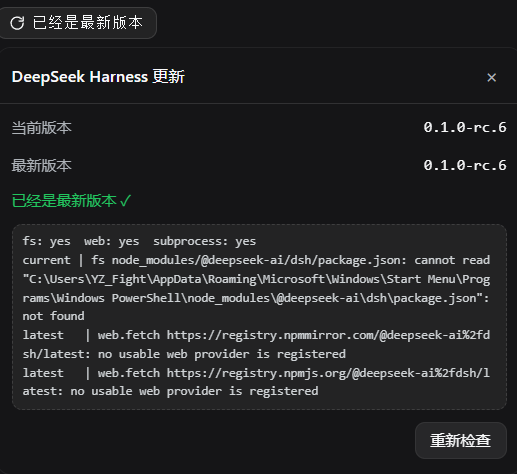
On page load the plugin queries the public npm registry once and pins a compact badge into the session top bar, right beside the title. Three visual states are immediately legible: you are up to date, a newer release is available (highlighted with a red dot), or the lookup failed. Clicking the badge bypasses the 60-second result cache, re-runs the probe on demand, and slides open a comparison panel that lists your current version, the latest published version, the overall update status, and concise upgrade instructions. If any step of the version lookup breaks, a diagnostics block expands in the panel to show the concrete probe result for every stage, turning what would be a blind guess into a quick read.
The privacy footprint is minimal by design. Outbound requests go only to well-known public npm registries and are issued solely when a check is triggered. On the local side the plugin reads the dsh package.json to determine the installed version and nothing more; there is no telemetry, no data collection, no persistent storage, and no file writes. It is aimed at anyone who lives in the dsh Web GUI and wants passive, at-a-glance awareness of the tooling version without pulling up a separate shell or hunting through release notes.
Screenshots
Use Cases
- Verify at a glance whether the dsh installation is current without opening another terminal or browser tab
- When a version probe fails, expand the diagnostics panel to pinpoint exactly which step broke
- Click the top-bar badge to compare current vs. latest release and follow the inline upgrade instructions
Best For
- Developers who live in the dsh Web GUI and want passive, at-a-glase version awareness
- Ops teams managing multiple dsh nodes and needing quick version-consistency checks
- Privacy-sensitive users who prefer lightweight plugins with zero telemetry or data collection
Related Plugins
A service-oriented sidebar framework for DSH, offering a full workbench with file explorer, embedded browser, real terminal, Git panel, and extensible plugin services.

A beautiful, practical Claude Code-style TUI plugin with pixel whale top bar, flowing glow title, real-time status line, streaming thought expansion, time rewind, context progress bar and TPS gauge — zero core changes.

The plugin market for DeepSeek Harness: browse/search/one-click install community plugins and themes, with updates, backup/restore, hot disable, diagnostics, and AI fix.

A persistent whale widget on the DSH web UI that shows DeepSeek balance, today's usage, and per-turn cost, with drag-and-snap and sound effects.