dsh-message-rail
Run the following command in DeepSeek Harness:
dsh plugin install wx-yss/dsh-message-rail
Paste the following prompt into your AI chat to install this plugin:
Install dsh-message-rail in DeepSeek Harness from the full source URL https://github.com/wx-yss/dsh-message-rail by running dsh plugin install wx-yss/dsh-message-rail.
About this plugin
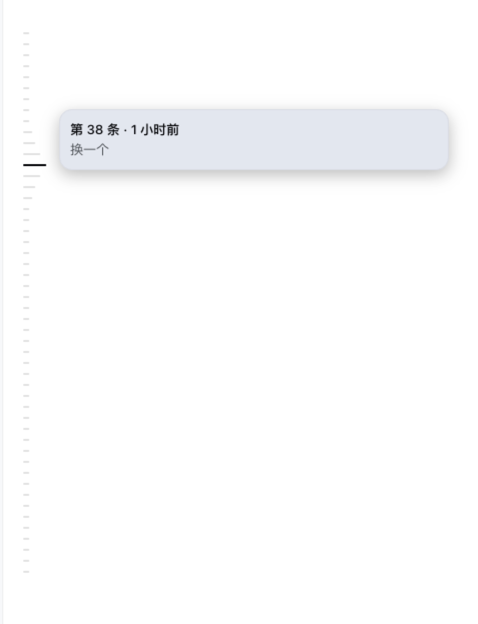
Long conversations often turn the right-hand message stream into a wall of history that is hard to search. If you only want to return to an earlier question, you may have to scroll repeatedly, wait for rendering, or lose your reading position. dsh-message-rail moves message navigation to the left side of DeepSeek Harness Web UI with a Codex-style rail: each user message becomes an equidistant tick, hovering shows a preview with sequence number, relative time, and text, and clicking jumps directly to the message. That makes revisiting history feel much more intuitive.
The plugin goes beyond a simple sidebar indicator. It builds a separate index of user messages through the history API, avoiding clutter from assistant replies or tool calls in the main chat view. The rail uses virtual scrolling, so it renders only the visible range even when many messages are indexed. When a target message has not yet been loaded, it can page through history while protecting the current reading anchor, then highlight or scroll to the found message. Current-position highlighting, pagination estimates, theme adaptation, and reduced-motion behavior all aim to keep the experience stable in very long sessions.
This is useful for people who spend a lot of time in long DeepSeek Harness Web UI conversations, such as debugging, research, code discussion, complex task planning, or simply returning to an earlier question to continue the context. If manual scrolling through huge chat histories has become annoying, this left-side rail gives you a faster and more comfortable way to jump back.
Screenshots
Use Cases
- Quickly find earlier user messages in very long sessions.
- Locate past context while reading without repeated scrolling.
- Preview and jump to a specific message from the left-side rail.
Best For
- Frequent users of the DeepSeek Harness Web UI.
- Developers or researchers who revisit context in long conversations.
- People managing multi-turn questions, debugging, or complex tasks.
Related Plugins
A service-oriented sidebar framework for DSH, offering a full workbench with file explorer, embedded browser, real terminal, Git panel, and extensible plugin services.

A beautiful, practical Claude Code-style TUI plugin with pixel whale top bar, flowing glow title, real-time status line, streaming thought expansion, time rewind, context progress bar and TPS gauge — zero core changes.

The plugin market for DeepSeek Harness: browse/search/one-click install community plugins and themes, with updates, backup/restore, hot disable, diagnostics, and AI fix.

A persistent whale widget on the DSH web UI that shows DeepSeek balance, today's usage, and per-turn cost, with drag-and-snap and sound effects.