dsh-peak-hours
Run the following command in DeepSeek Harness:
dsh plugin install lco117/dsh-peak-hours
Paste the following prompt into your AI chat to install this plugin:
Run dsh plugin install lco117/dsh-peak-hours in the DeepSeek Harness terminal, or install manually from the source repository at https://github.com/lco117/dsh-peak-hours to enable the plugin.
About this plugin
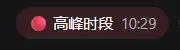
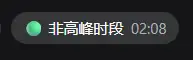
When you are queuing a long prompt in DeepSeek Harness, the first thing you want to know is whether you are hitting a busy window. dsh-peak-hours answers that question with a tiny red-or-green badge pinned to the conversation header. It converts the current system clock to Beijing time (UTC+8) and flags 09:00–12:00 and 14:00–18:00 as peak, everything else as off-peak, showing the exact Beijing time right next to the status dot. Because the conversion is a constant offset, the badge reads correctly regardless of the timezone your machine runs in.
Everything happens on the client side: no network round-trips, no extra model calls, no visible latency. The badge re-evaluates every fifteen seconds, so the color flips almost immediately when a boundary is crossed and you never need to refresh the page. A language toggle under Settings lets you switch the label between Chinese and English, and the choice is persisted for the next session. The badge picks up the shell semantic color tokens, so it blends seamlessly into both light and dark themes.
This is a small, zero-dependency convenience for daily DSH power users who like to schedule their heavier conversations outside the rush. Open any chat, glance at the leftmost header item, and you know at a glance whether the service is in a peak window.
Screenshots
Use Cases
- Glancing at the badge before queuing a long prompt to gauge load
- Maintaining a shared Beijing-time reference while collaborating across time zones
- Scheduling heavy tasks outside peak windows to reduce perceived wait time
Best For
- Developers who send heavy prompts on DSH conversations every day
- Users who prefer lightweight, network-free client-side plugins
- Teams that standardize on Beijing time as their operational clock
Related Plugins

whale-girl is a desktop pet in the DSH Web GUI (bottom-right for instant companionship) — draggable, feedable, playable; completed tasks, sessions and companionship time accrue into seniority levels, titles, and memories.

A WebGPU ocean skin for DeepSeek Harness with five-wave Gerstner waves, translucent theme, day/night cycle, and quick controls, installable as plugin or extension.

A Galgame-style conversation view and visual scene editor for DSH web sessions, with a real-time editing mode.

A native skinning plugin for DeepSeek Harness: 8 designer themes, wallpapers, accent colors, and shareable theme packs, built purely on design tokens.