dsh-token-usage-sidebar
Run the following command in DeepSeek Harness:
dsh plugin install y2zyyr/dsh-token-usage-sidebar
Paste the following prompt into your AI chat to install this plugin:
Run dsh plugin install y2zyyr/dsh-token-usage-sidebar in your DeepSeek Harness terminal; the full source repository is at https://github.com/y2zyyr/dsh-token-usage-sidebar . Restart DSH after installation to see the sidebar summary and Token Usage settings page.
About this plugin
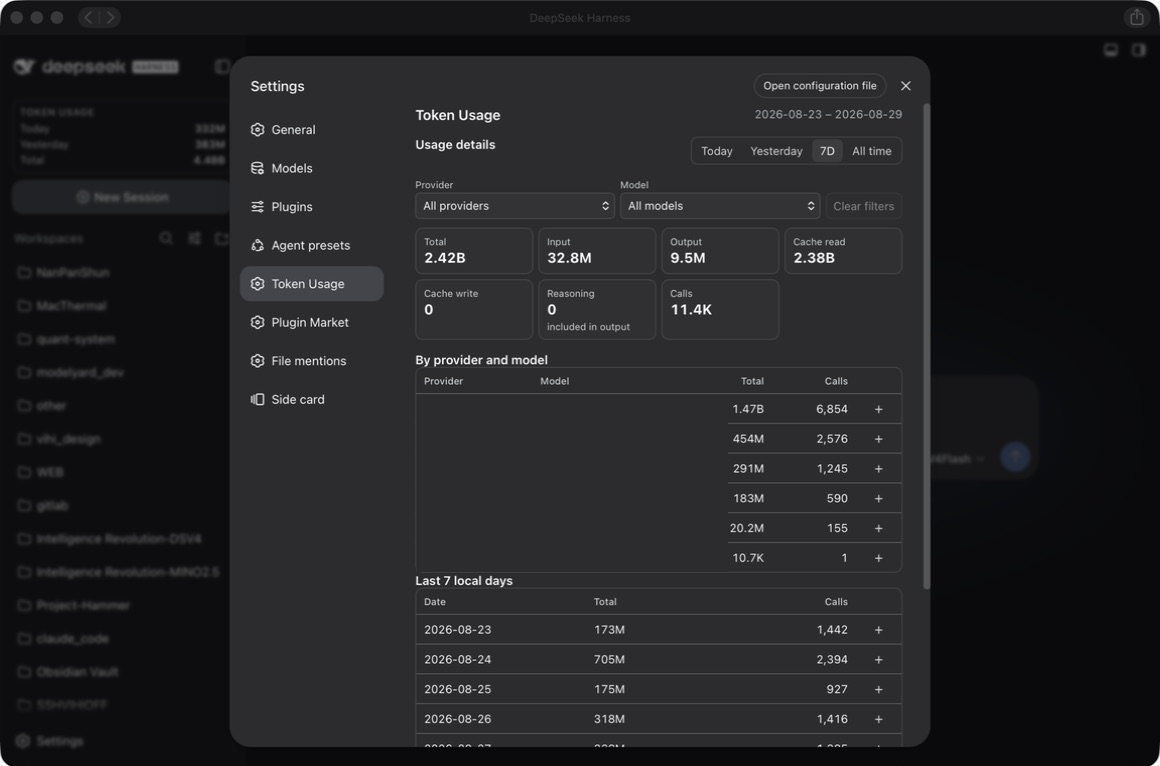
When you switch between providers and models in DeepSeek Harness, token spend is scattered across individual turns with no local, aggregate, retroactive cost view. dsh-token-usage-sidebar solves exactly that: it reads provider-reported usage records, persists them in a local SQLite ledger, and surfaces today, yesterday, 7-day, and lifetime metrics for Input, Output, Cache, Reasoning, and call count.
Two entry points keep the data at your fingertips: a persistent sidebar summary card and a native Settings to Token Usage page. The settings page lets you switch date ranges and filter by whichever providers and models actually appear in that range, with no hard-coded supplier list or alias mapping to maintain. Each invocation is deduplicated by sessionId:turn:step, so exactly-once accounting holds even after restarts or replays.
It is built for DSH users who want local, private token cost tracking. No data leaves your machine, nothing is uploaded, and the ledger survives plugin removal or reinstallation.
Screenshots
Use Cases
- Glancing at the sidebar to see today, yesterday, and 7-day token spend at a glance
- Splitting usage into Input, Output, and Cache buckets by whichever provider and model actually appear
- Keeping a private, durable cost ledger that survives restarts and never leaves the machine
Best For
- DSH daily users who want local, private token cost tracking
- Teams juggling multiple providers and models who need per-source usage breakdowns
- Privacy-focused self-hosting users who never want spend data uploaded to a third party
Related Plugins
A service-oriented sidebar framework for DSH, offering a full workbench with file explorer, embedded browser, real terminal, Git panel, and extensible plugin services.

A beautiful, practical Claude Code-style TUI plugin with pixel whale top bar, flowing glow title, real-time status line, streaming thought expansion, time rewind, context progress bar and TPS gauge — zero core changes.

The plugin market for DeepSeek Harness: browse/search/one-click install community plugins and themes, with updates, backup/restore, hot disable, diagnostics, and AI fix.

A persistent whale widget on the DSH web UI that shows DeepSeek balance, today's usage, and per-turn cost, with drag-and-snap and sound effects.