arcana
Run the following command in DeepSeek Harness:
dsh plugin install GooodWei/arcana
Paste the following prompt into your AI chat to install this plugin:
To install this plugin in DeepSeek Harness, run `dsh plugin install GooodWei/arcana`. Source: https://github.com/GooodWei/arcana
About this plugin
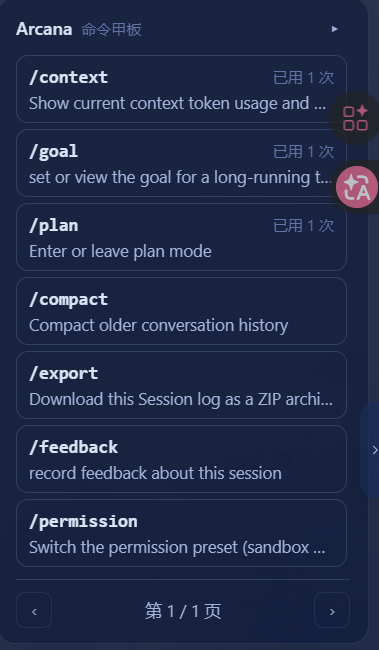
While DeepSeek Harness is powerful, finding specific commands amidst a multitude of built-in and plugin commands within the chat interface can be cumbersome. Users often have to switch contexts frequently or memorize complex parameter formats, which significantly hinders efficiency. Arcana is designed to address this pain point. Acting as a floating "Command Deck" on the right side of the interface, it aggregates all supported / commands into a visual dashboard. By hovering over a button, users can instantly preview descriptions and usage; clicking executes the command directly, with inline input boxes available for parameters. This transforms command invocation into a seamless, visual experience. Furthermore, Arcana features intelligent memory capabilities that automatically sort frequently used commands to the top based on user habits, supports pagination and collapsing for a tidy interface, and adapts to both light and dark themes. Whether you are a power user seeking peak efficiency or a casual user looking for smoother interaction, Arcana significantly enhances the command experience within DeepSeek Harness.
Screenshots
Use Cases
- Quickly invoke all built-in and plugin commands for DeepSeek Harness.
- Hover to view command descriptions and parameters without memorization.
- Automatically sort frequently used commands to boost operational efficiency.
Best For
- Heavy users of DeepSeek Harness.
- Developers seeking peak operational efficiency.
- Users who prefer visual tools over rote memorization of commands.
Related Plugins
A service-oriented sidebar framework for DSH, offering a full workbench with file explorer, embedded browser, real terminal, Git panel, and extensible plugin services.

A beautiful, practical Claude Code-style TUI plugin with pixel whale top bar, flowing glow title, real-time status line, streaming thought expansion, time rewind, context progress bar and TPS gauge — zero core changes.

The plugin market for DeepSeek Harness: browse/search/one-click install community plugins and themes, with updates, backup/restore, hot disable, diagnostics, and AI fix.

A persistent whale widget on the DSH web UI that shows DeepSeek balance, today's usage, and per-turn cost, with drag-and-snap and sound effects.