dsh-plugin-notify
Run the following command in DeepSeek Harness:
dsh plugin install Pasumao/dsh-plugin-notify
Paste the following prompt into your AI chat to install this plugin:
To install this plugin in DeepSeek Harness, please run the command dsh plugin install Pasumao/dsh-plugin-notify. Source: https://github.com/Pasumao/dsh-plugin-notify
About this plugin
When running long tasks or batch scripts in DeepSeek Harness (DSH), users often face the challenge of switching windows while losing real-time control over progress. It is easy to miss critical moments like task completion, errors, or timeouts once you step away from the console. dsh-plugin-notify is designed to bridge this gap, using Windows native notification mechanisms to keep you informed without keeping your screen cluttered.
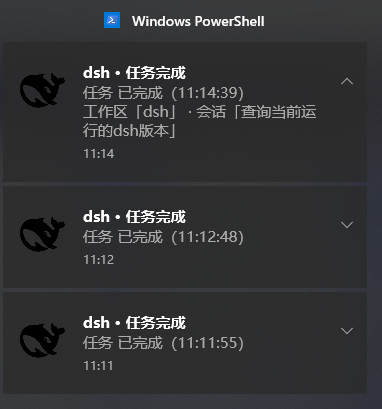
The plugin's core capability lies in providing a zero-dependency, plug-and-play feedback system. It automatically triggers native Toast notifications when an Agent stops, completes, or encounters an error, explicitly labeling the message with "Workspace · Session" for instant identification. Additionally, a persistent whale icon remains in the system tray, allowing you to access the Web interface or exit background mode with a right-click. Its built-in anti-spam mechanism (defaulting to root sessions only) ensures that notifications are clear and not overwhelming.
Whether you are running long LLM generations or managing batch data processing, this plugin is an excellent tool for boosting productivity. It is particularly suitable for users managing multiple sessions or workspaces, enabling you to monitor background status via the tray icon and notifications while handling other tasks, effectively letting you "stay in the know and focus on what matters."
Screenshots
Use Cases
- Receive completion reminders even when switching windows during long generation tasks
- Automatically pop up notifications after batch script execution
- Quickly distinguish the status of different workspaces when running multiple sessions
Best For
- Windows users who frequently need to run DSH in the background
- Developers executing long-running tasks or batch processing
- Workers managing multiple concurrent sessions
Related Plugins
A service-oriented sidebar framework for DSH, offering a full workbench with file explorer, embedded browser, real terminal, Git panel, and extensible plugin services.

A beautiful, practical Claude Code-style TUI plugin with pixel whale top bar, flowing glow title, real-time status line, streaming thought expansion, time rewind, context progress bar and TPS gauge — zero core changes.

The plugin market for DeepSeek Harness: browse/search/one-click install community plugins and themes, with updates, backup/restore, hot disable, diagnostics, and AI fix.

A persistent whale widget on the DSH web UI that shows DeepSeek balance, today's usage, and per-turn cost, with drag-and-snap and sound effects.