dsh-message-navigator
Run the following command in DeepSeek Harness:
dsh plugin install TableRogue/dsh-message-navigator
Paste the following prompt into your AI chat to install this plugin:
Please run the installation command `dsh plugin install TableRogue/dsh-message-navigator` in DeepSeek Harness. The plugin source code is hosted at the GitHub repository [https://github.com/TableRogue/dsh-message-navigator](https://github.com/TableRogue/dsh-message-navigator).
About this plugin
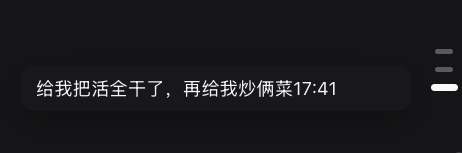
As conversations with DeepSeek grow longer, quickly locating context within a chat history becomes increasingly challenging. dsh-message-navigator offers a lightweight solution for the DeepSeek Harness web interface. It adds a vertical navigation bar to the right side, allowing users to visually browse and click to jump to specific message nodes. The plugin's core strength lies in its smooth interaction and precise synchronization. It not only enables smooth scrolling upon clicking but also features a "reading line" logic that highlights the currently viewed message in real-time, significantly improving the reading experience. It maintains silky smooth performance even with hundreds of messages. Whether you are a developer needing to debug long conversation logic or a user who prefers deep reading, this plugin significantly boosts efficiency. It automatically adapts to the theme color and hides on small screens to keep the interface clean, making it an indispensable tool for long conversations.
Screenshots
Use Cases
- Quickly locate context while debugging long conversation logic
- Avoid scrolling fatigue when reading long documents or model replies
- Quickly jump to key nodes when sharing conversations with a team
Best For
- Developers who need to frequently review history or logic
- Researchers analyzing long outputs
- Senior users accustomed to deep reading of long AI replies
Related Plugins
A service-oriented sidebar framework for DSH, offering a full workbench with file explorer, embedded browser, real terminal, Git panel, and extensible plugin services.

A beautiful, practical Claude Code-style TUI plugin with pixel whale top bar, flowing glow title, real-time status line, streaming thought expansion, time rewind, context progress bar and TPS gauge — zero core changes.

The plugin market for DeepSeek Harness: browse/search/one-click install community plugins and themes, with updates, backup/restore, hot disable, diagnostics, and AI fix.

A persistent whale widget on the DSH web UI that shows DeepSeek balance, today's usage, and per-turn cost, with drag-and-snap and sound effects.