
dsh-ios
Run the following command in DeepSeek Harness:
dsh plugin install ZSeven-W/dsh-ios
Paste the following prompt into your AI chat to install this plugin:
In DeepSeek Harness, run dsh plugin install ZSeven-W/dsh-ios, or install directly from the source repository https://github.com/ZSeven-W/dsh-ios.
About this plugin
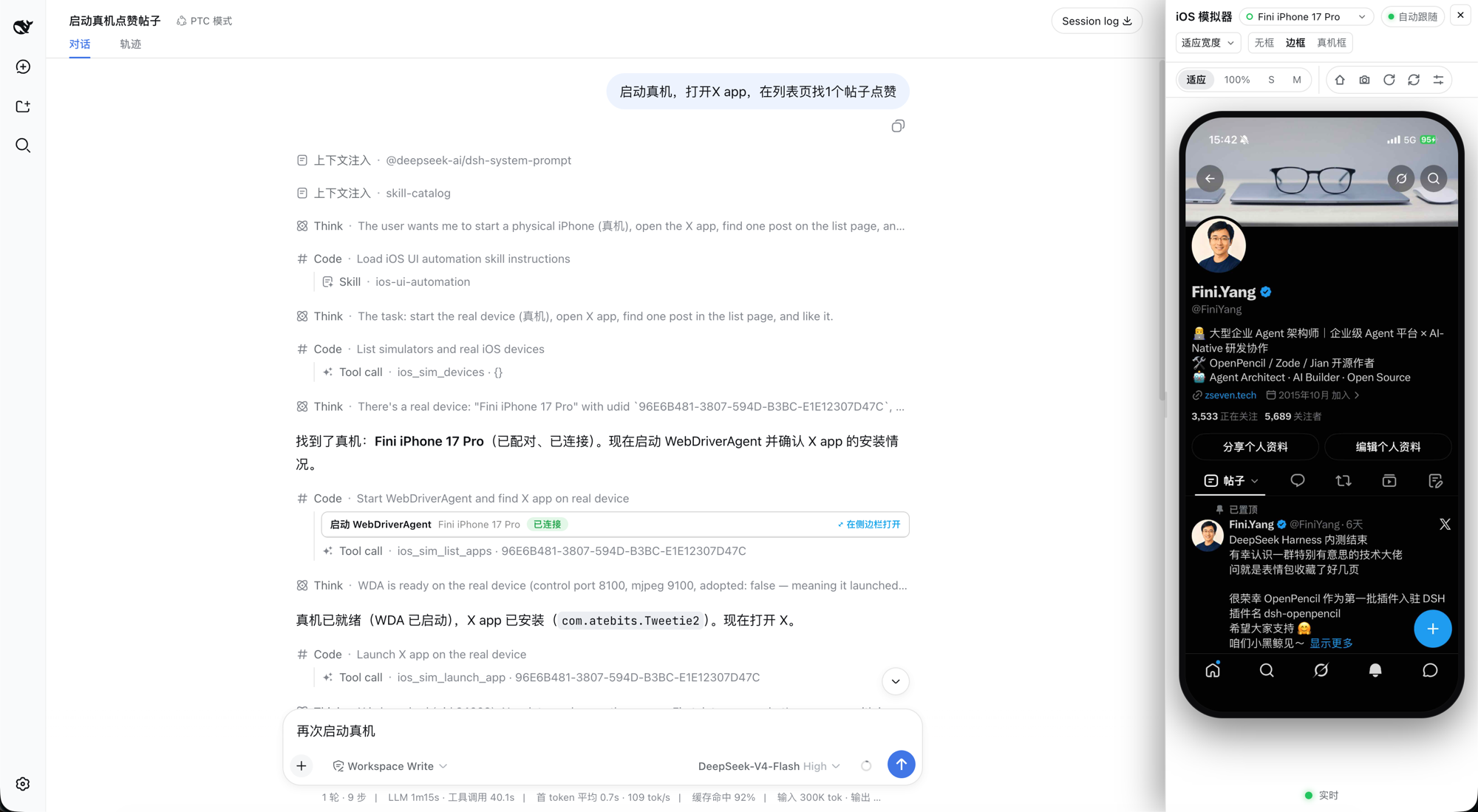
When debugging iOS apps inside an AI conversation, the agent's biggest problem is that it can neither see nor touch: it gets no screen pixels, so it falls back to guessing coordinates or reading screenshot files—slow and unreliable. dsh-ios puts a real iOS Simulator inside a DeepSeek Harness conversation: tool calls on the left, a live device panel on the right, where you can even tap, drag, rotate, and press Home directly on the video. The agent can boot a device, build and run an Xcode project or Swift package, drive the UI by accessibility identity or OCR text, read unified logs, and inspect processes, backtraces, and leaks—while visual bytes reach the UI only through signed, expiring URLs, never as image blocks or recording files.
Core capabilities are solid: 22 agent tools cover device management, screenshots, interaction, build & run, AXe-backed accessibility tree with tap-by-element, Vision OCR find/tap, and SwiftUI preview hot reload (~2–5 s hot swap without relaunching the app). For list/feed apps, deep snapshots turn each row into indexed entries with heuristically parsed counters (e.g. "57 replies"); row taps are then verified by the counter moving exactly ±1—the only reliable confirmation a list app offers. With a real iPhone over USB, the plugin builds and launches WebDriverAgent, tunnels control and screen ports over loopback, and drives the phone with the same panel and tools, while every real-device tap is gated by identify-before-tap rules so a physical device is never used as a probe.
Who is this for? iOS developers who want an AI agent to build, launch, traverse, and reproduce issues inside a conversation; QA and automation engineers who want semantic tools instead of brittle coordinate scripts; and teams exploring conversational coding workflows that need real "agent operates iOS app" infrastructure. Simulator capabilities require macOS; on non-macOS hosts the tools stay registered but fail with a clear explanation rather than failing silently.
Screenshots
Use Cases
- Let the agent build and launch Xcode projects inside the conversation while watching the live simulator
- Semantically traverse and tap list/feed apps, verifying actions through parsed row counters
- Drive a USB-connected iPhone through WebDriverAgent for real-device UI operations
Best For
- Developers who want conversational AI to operate iOS apps
- QA and test engineers needing semantic, verifiable UI automation
- Teams exploring AI agents that drive real iOS devices
Related Plugins
A service-oriented sidebar framework for DSH, offering a full workbench with file explorer, embedded browser, real terminal, Git panel, and extensible plugin services.

A beautiful, practical Claude Code-style TUI plugin with pixel whale top bar, flowing glow title, real-time status line, streaming thought expansion, time rewind, context progress bar and TPS gauge — zero core changes.

The plugin market for DeepSeek Harness: browse/search/one-click install community plugins and themes, with updates, backup/restore, hot disable, diagnostics, and AI fix.

A persistent whale widget on the DSH web UI that shows DeepSeek balance, today's usage, and per-turn cost, with drag-and-snap and sound effects.