dsh-token-cost
Run the following command in DeepSeek Harness:
dsh plugin install PeterZoneZz/dsh-token-cost
Paste the following prompt into your AI chat to install this plugin:
To install the dsh-token-cost plugin in DeepSeek Harness, please run dsh plugin install PeterZoneZz/dsh-token-cost. Source: https://github.com/PeterZoneZz/dsh-token-cost
About this plugin
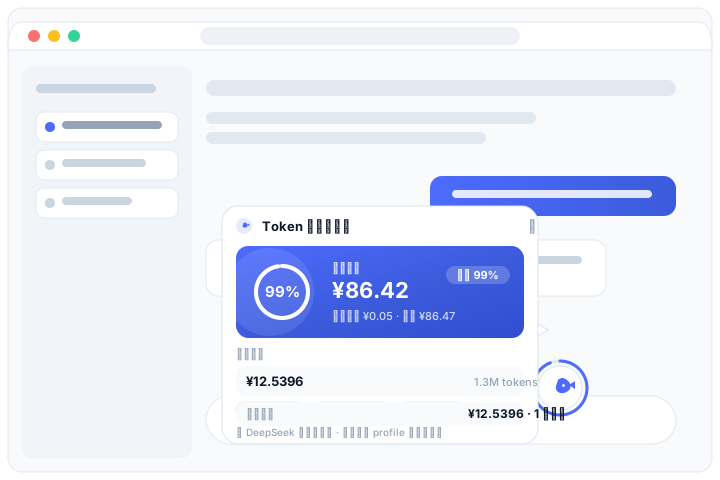
When engaging in frequent conversations with DeepSeek, constantly monitoring token consumption and account balance can be distracting. dsh-token-cost solves this by introducing a floating whale icon that consolidates critical financial and usage metrics into the corner of your screen. By leveraging the DSH API key, it fetches real official balance data and presents it through an intuitive ring progress bar, giving you a clear view of your remaining resources.
The core feature set integrates a fluid interaction experience similar to Doubao. The whale floating ball supports free dragging and automatically snaps to the screen edges, preventing it from obstructing your view. The expanded anchored card displays not only the balance but also detailed statistics for the current session and cumulative costs. The card intelligently selects the expansion direction based on available space, ensuring perfect presentation on any screen size.
Whether you are a developer needing strict cost control or a student engaging in heavy AI interaction, this plugin is a powerful tool to enhance workflow efficiency. It provides constant visual feedback, allowing you to monitor account status without switching tabs, ensuring you can manage every token while enjoying AI assistance.
Screenshots
Use Cases
- Monitor token consumption in real-time during long conversations with DeepSeek
- Developers needing precise knowledge of session and cumulative costs
- Keeping an eye on account balance on screen without obscuring main content
Best For
- Developers frequently using DeepSeek
- Users concerned with token cost budgets
- Users who appreciate fluid UI interaction experiences
Related Plugins
A service-oriented sidebar framework for DSH, offering a full workbench with file explorer, embedded browser, real terminal, Git panel, and extensible plugin services.

A beautiful, practical Claude Code-style TUI plugin with pixel whale top bar, flowing glow title, real-time status line, streaming thought expansion, time rewind, context progress bar and TPS gauge — zero core changes.

The plugin market for DeepSeek Harness: browse/search/one-click install community plugins and themes, with updates, backup/restore, hot disable, diagnostics, and AI fix.

A persistent whale widget on the DSH web UI that shows DeepSeek balance, today's usage, and per-turn cost, with drag-and-snap and sound effects.