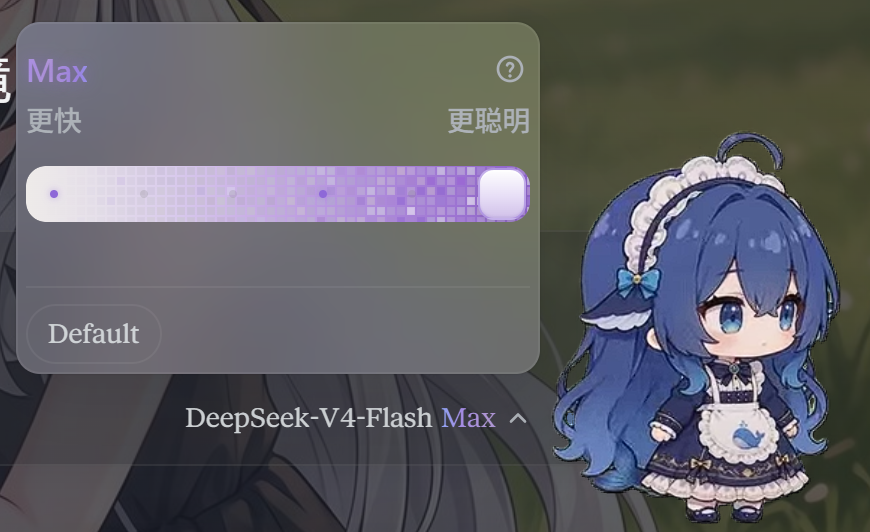
DSH-Claude-Style-Reasoning-Slider
Run the following command in DeepSeek Harness:
dsh plugin install MEMZ-JZY/DSH-Claude-Style-Reasoning-Slider
Paste the following prompt into your AI chat to install this plugin:
To install this plugin in DeepSeek Harness, run `dsh plugin install MEMZ-JZY/DSH-Claude-Style-Reasoning-Slider`, or visit https://github.com/MEMZ-JZY/DSH-Claude-Style-Reasoning-Slider for the source code.
About this plugin
The native interface in DeepSeek Harness often lacks intuitive control over model reasoning depth, making parameter tuning feel too basic. DSH Claude Style Reasoning Slider addresses this by transforming the standard model selector into a sophisticated, Claude-style animated reasoning effort panel. This plugin offers a canonical "Off | Low | Medium | High | Extra | Max" slider with intelligent tolerance for varying naming conventions across providers. It features automatic downgrade logic when switching models and includes playful visual enhancements like the "Liang Calibrator" and "Big Fat Fish" thumb, turning routine adjustments into an engaging experience. Whether you are a power user seeking precise control over reasoning intensity or someone who enjoys visual feedback, this tool is designed for you.
Screenshots
Use Cases
- Scenarios requiring fine-tuning of model reasoning depth
- Scenarios looking to enhance the DeepSeek Harness user experience
- Scenarios seeking Claude-style interactive interfaces
Best For
- Advanced users of DeepSeek Harness
- Developers sensitive to model reasoning parameters
- AI enthusiasts who enjoy custom and fun UIs
Related Plugins
A service-oriented sidebar framework for DSH, offering a full workbench with file explorer, embedded browser, real terminal, Git panel, and extensible plugin services.

A beautiful, practical Claude Code-style TUI plugin with pixel whale top bar, flowing glow title, real-time status line, streaming thought expansion, time rewind, context progress bar and TPS gauge — zero core changes.

The plugin market for DeepSeek Harness: browse/search/one-click install community plugins and themes, with updates, backup/restore, hot disable, diagnostics, and AI fix.

A persistent whale widget on the DSH web UI that shows DeepSeek balance, today's usage, and per-turn cost, with drag-and-snap and sound effects.