dsh-web-search-firecrawl
Run the following command in DeepSeek Harness:
dsh plugin install PionsAI/dsh-web-search-firecrawl
Paste the following prompt into your AI chat to install this plugin:
Use the command `dsh plugin install PionsAI/dsh-web-search-firecrawl` to install this plugin in DeepSeek Harness and enable Firecrawl search. Source: https://github.com/PionsAI/dsh-web-search-firecrawl
About this plugin
While the built-in web_search tool in DeepSeek Harness offers a solid foundation, users seeking higher search quality or the ability to switch sources often find themselves needing more control. The dsh-web-search-firecrawl plugin is designed to address this by injecting powerful search capabilities from Firecrawl directly into the Harness web seam. It acts as a specialized provider that maps Firecrawl's results into the standard WebSearchResult format, ensuring your model can access richer web content seamlessly.
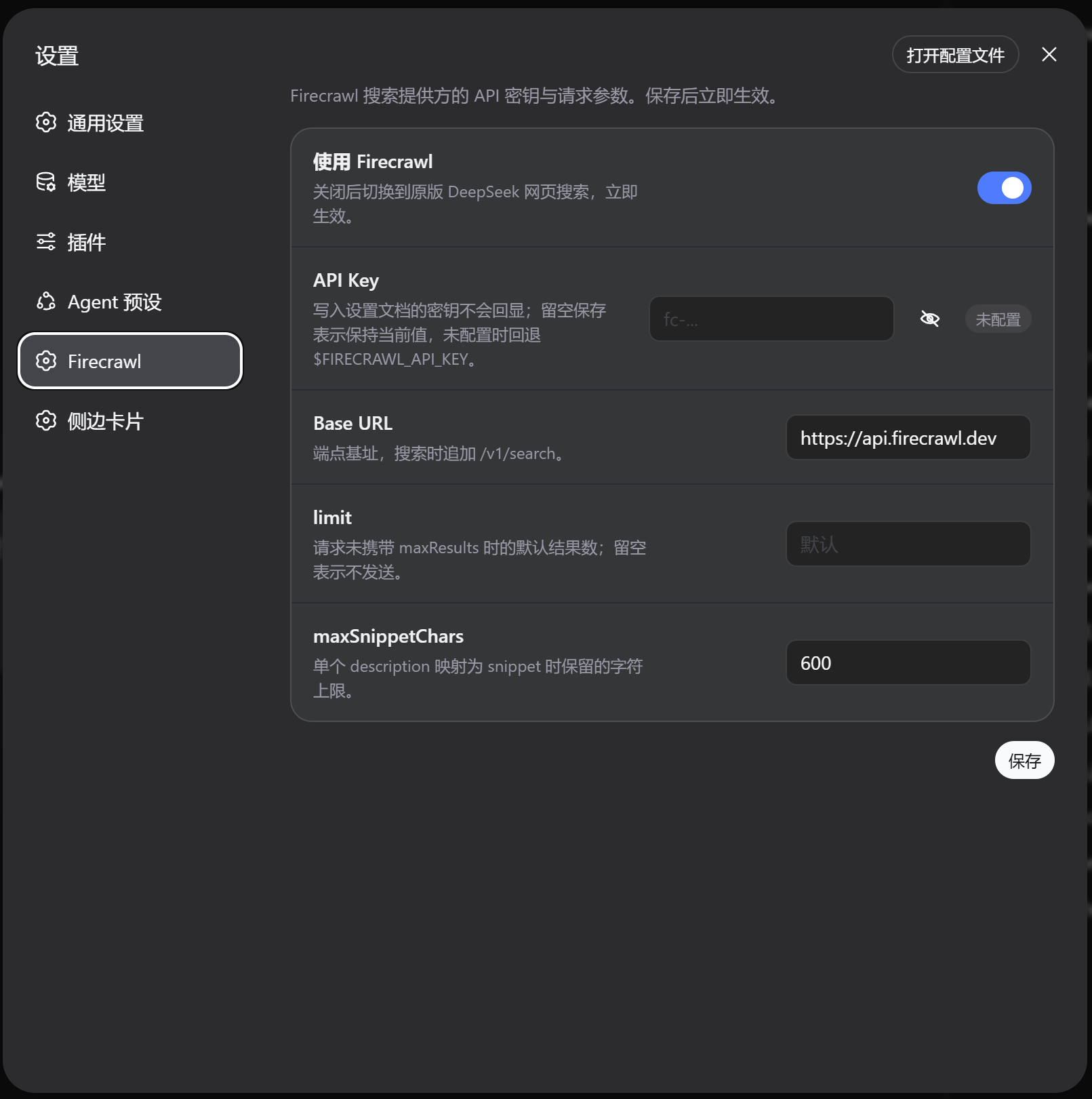
The plugin stands out for its flexible and user-centric architecture. It registers a firecrawl WebSearchProvider that integrates smoothly without replacing the underlying tool schema. A key feature is the ability to toggle providers live in the DSH Settings, allowing you to switch between Firecrawl and the original DeepSeek route instantly. With support for custom API keys and configuration options like snippet limits, it puts granular control back into your hands, making it a robust alternative to the default route.
This plugin is an ideal choice for developers and power users who require precise control over their web search experience. If you have a Firecrawl API key or wish to bypass the default search limitations, this tool provides an immediate upgrade. By enabling better result mapping and configuration flexibility, it enhances the utility of DeepSeek Harness for complex tasks, making it a must-have for anyone looking to optimize their AI agent's information retrieval capabilities.
Screenshots
Use Cases
- When needing higher quality web search results.
- When wanting to flexibly switch between DeepSeek and Firecrawl.
- When needing to customize result snippet length or count limits.
Best For
- DeepSeek Harness developers.
- Users requiring precise control over web search capabilities.
- Advanced users with Firecrawl API keys.
Related Plugins
A service-oriented sidebar framework for DSH, offering a full workbench with file explorer, embedded browser, real terminal, Git panel, and extensible plugin services.

A beautiful, practical Claude Code-style TUI plugin with pixel whale top bar, flowing glow title, real-time status line, streaming thought expansion, time rewind, context progress bar and TPS gauge — zero core changes.

The plugin market for DeepSeek Harness: browse/search/one-click install community plugins and themes, with updates, backup/restore, hot disable, diagnostics, and AI fix.

A persistent whale widget on the DSH web UI that shows DeepSeek balance, today's usage, and per-turn cost, with drag-and-snap and sound effects.