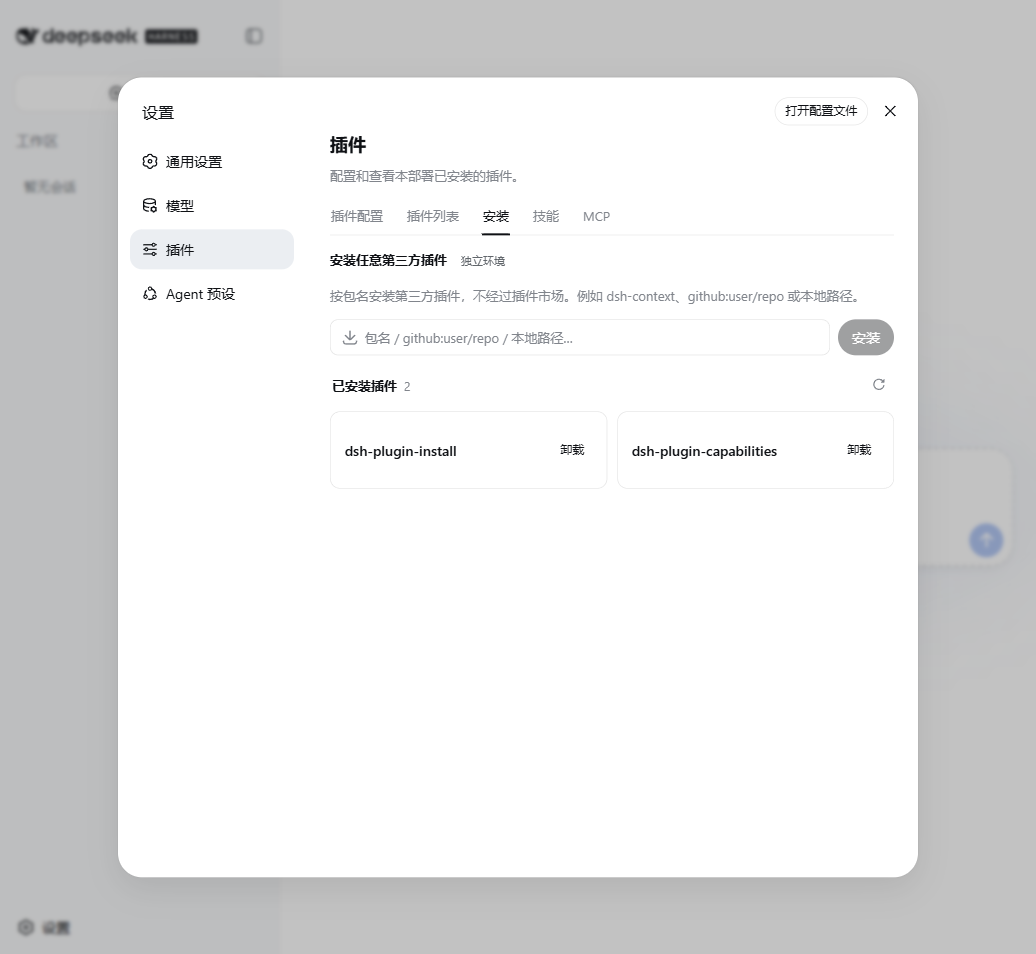
dsh-plugin-install
Run the following command in DeepSeek Harness:
dsh plugin install qinyre/dsh-plugin-install
Paste the following prompt into your AI chat to install this plugin:
In DeepSeek Harness, navigate to the Settings > Install tab and enter the source URL https://github.com/qinyre/dsh-plugin-install to install the plugin.
About this plugin
Traditionally, managing DSH plugins required opening a terminal to execute cumbersome commands and was often limited to packages listed in the plugin market. This plugin shatters that barrier by introducing a dedicated "Install" tab in the Web settings. You no longer need to open a terminal or rely on the plugin marketplace; simply input an npm spec, a GitHub repository link, or a local path directly in your browser to install any third-party plugin, significantly streamlining the development workflow.
Beyond convenient installation, it addresses critical issues regarding state synchronization and version updates. It is fully integrated with the CLI, ensuring that interface actions and command-line states remain perfectly consistent. It features an intelligent version checker that compares against GitHub HEAD and the npm registry, while also enforcing strict non-downgrade rules. Additionally, it intelligently bypasses specific limitations like pnpm's release cooldown, ensuring updates proceed without silent failures.
For developers and power users who value security and flexibility, this is an essential tool. It implements a robust security model with character whitelisting, origin checks, and concurrency locks to prevent injection attacks. It is ideal for DSH Desktop users and Web developers alike, offering seamless one-click restart capabilities and comprehensive plugin management, making plugin development and maintenance simpler than ever before.
Screenshots
Use Cases
- Install third-party plugins not listed in the marketplace
- Manage plugins via Web UI on desktop without opening a terminal
- Quickly verify plugin functionality from local source or GitHub repos
Best For
- DSH Desktop desktop users
- Developers accustomed to configuring via graphical interfaces
- Testers needing to frequently install local or GitHub plugins
Related Plugins
A service-oriented sidebar framework for DSH, offering a full workbench with file explorer, embedded browser, real terminal, Git panel, and extensible plugin services.

A beautiful, practical Claude Code-style TUI plugin with pixel whale top bar, flowing glow title, real-time status line, streaming thought expansion, time rewind, context progress bar and TPS gauge — zero core changes.

The plugin market for DeepSeek Harness: browse/search/one-click install community plugins and themes, with updates, backup/restore, hot disable, diagnostics, and AI fix.

A persistent whale widget on the DSH web UI that shows DeepSeek balance, today's usage, and per-turn cost, with drag-and-snap and sound effects.