dsh-skin-studio
Run the following command in DeepSeek Harness:
dsh plugin install LeemanCheung/dsh-skin-studio
Paste the following prompt into your AI chat to install this plugin:
To install this plugin in DeepSeek Harness, run the installation command: dsh plugin install LeemanCheung/dsh-skin-studio. This plugin is a local-first DSH Skin Studio that allows you to extract colors from images and generate semantic themes. The source code is located at https://github.com/LeemanCheung/dsh-skin-studio.
About this plugin
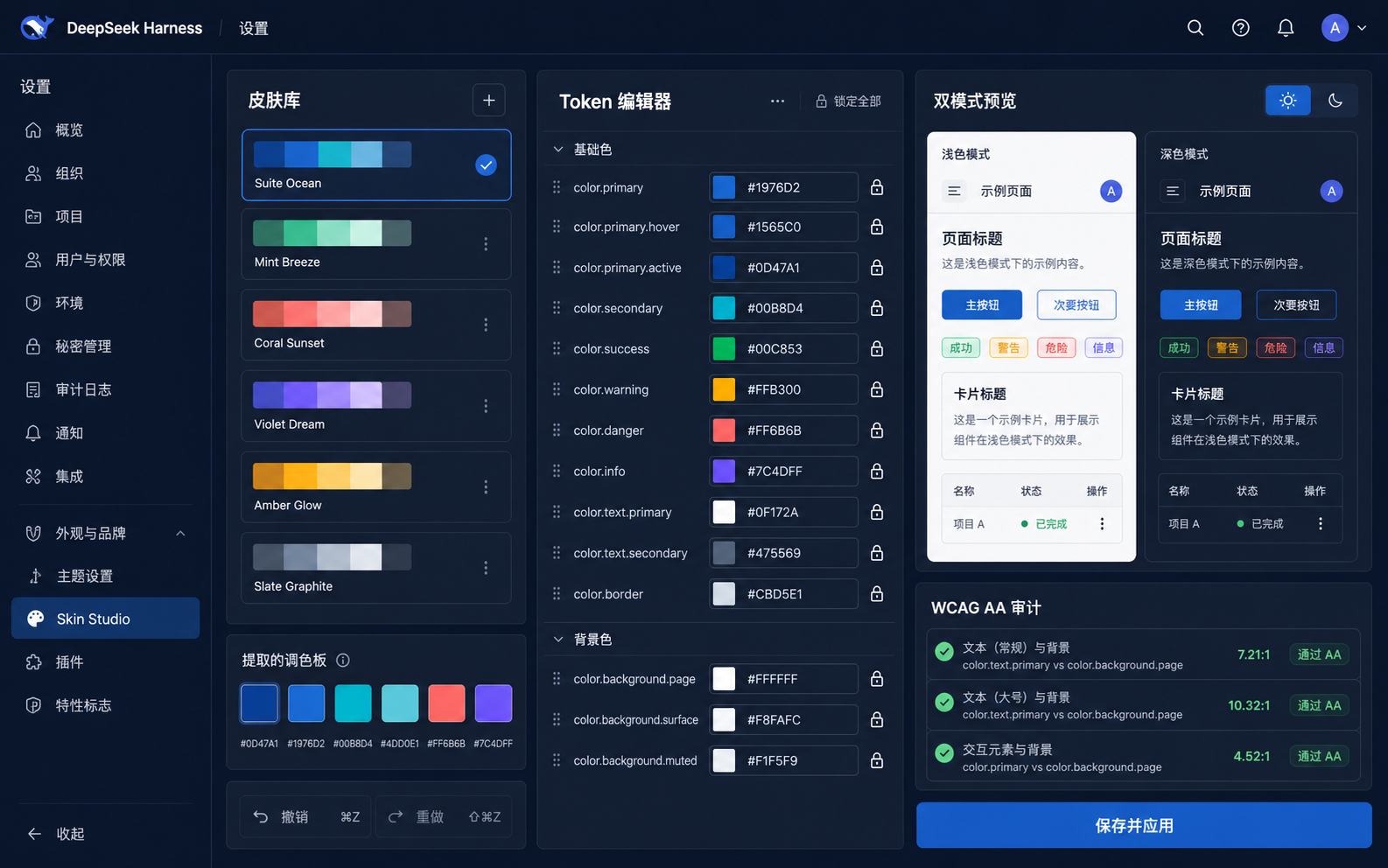
In DSH Web development, manually managing semantic theme tokens can be tedious and error-prone. dsh-skin-studio is designed to address this pain point with a local-first skin studio. It enables developers to extract palettes directly from PNG, JPEG, or WebP images and generate semantic --dsw-alias-* theme configurations. The plugin offers an intuitive responsive editor featuring dual light/dark mode previews, undo/redo capabilities, and token locking to preserve critical design elements. Additionally, it includes a WCAG AA compliance audit tool to automatically check contrast ratios for body text, secondary text, and brand buttons, helping developers optimize accessibility quickly.
This tool is ideal for frontend developers, UI/UX designers, or anyone needing to create or manage themes for DSH Web applications. It not only supports exporting standard .dshskin JSON files but also ensures robust data security by preventing the execution of malicious scripts during import. By providing a localized, secure, and efficient theme management solution, dsh-skin-studio makes theme design more controllable and reusable.
Screenshots
Use Cases
- Extract colors from design images to generate themes
- Check if interface element contrast meets standards
- Manage and export semantic themes for DSH projects
Best For
- Frontend engineers needing to customize DSH Web app visuals
- Designers focusing on accessibility and color standards
- Technical staff maintaining and iterating DSH project themes
Related Plugins

whale-girl is a desktop pet in the DSH Web GUI (bottom-right for instant companionship) — draggable, feedable, playable; completed tasks, sessions and companionship time accrue into seniority levels, titles, and memories.

A WebGPU ocean skin for DeepSeek Harness with five-wave Gerstner waves, translucent theme, day/night cycle, and quick controls, installable as plugin or extension.

A Galgame-style conversation view and visual scene editor for DSH web sessions, with a real-time editing mode.

A native skinning plugin for DeepSeek Harness: 8 designer themes, wallpapers, accent colors, and shareable theme packs, built purely on design tokens.