dsh-timeline-rail
Run the following command in DeepSeek Harness:
dsh plugin install lcthe/dsh-timeline-rail
Paste the following prompt into your AI chat to install this plugin:
To install this plugin in DeepSeek Harness, execute `dsh plugin install lcthe/dsh-timeline-rail` using the source code located at https://github.com/lcthe/dsh-timeline-rail.
About this plugin
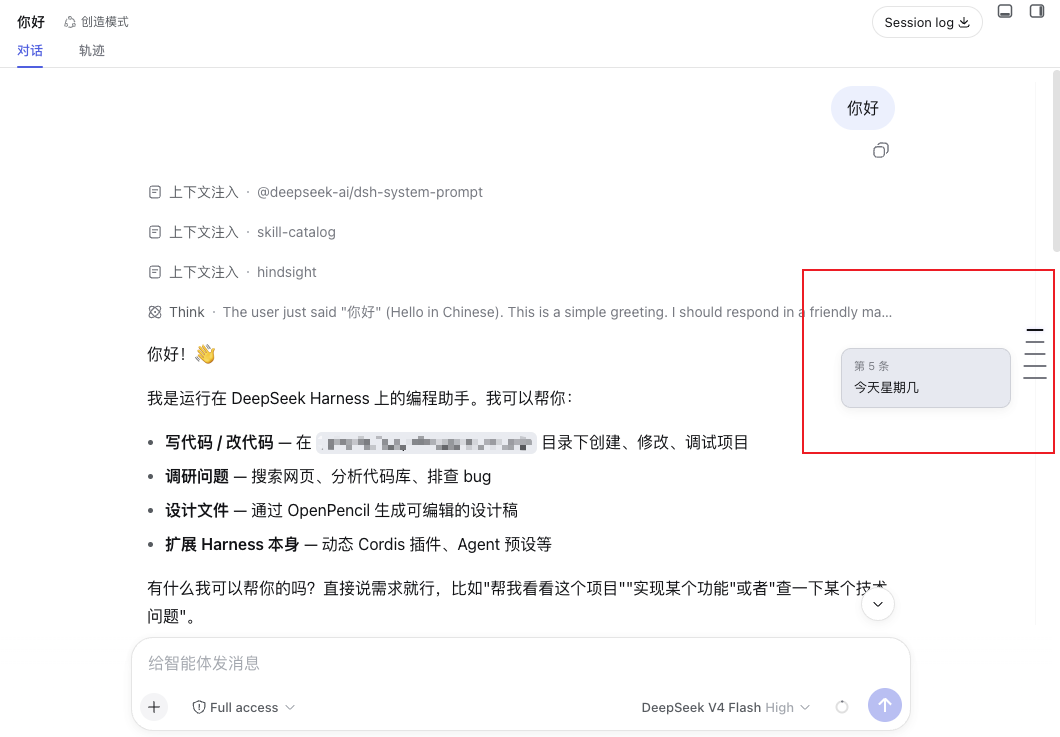
Navigating through lengthy conversations can be tedious and prone to getting lost when scrolling line by line. The dsh-timeline-rail plugin is designed to address this pain point by drawing a visual timeline rail along the left edge of the conversation, providing a convenient navigation aid for the otherwise monotonous text stream. Its core strength lies in its elegant interaction design, generating evenly spaced thin ticks along the left edge, each corresponding to a user message. When users hover over a tick, a compact preview card appears, showing a summary of the user's message and the assistant's reply; clicking the tick instantly jumps the conversation to that point. Notably, it automatically loads older history pages, ensuring that even with extremely long sessions, the tick spacing remains fixed and comfortable rather than becoming cramped. Whether you are a developer needing to review complex dialogue logic or a user accustomed to spending long hours in the DeepSeek Harness desktop or web client, this plugin can significantly enhance your communication efficiency. It not only supports seamless switching between light and dark themes but also adopts a minimalist visual style, ensuring it never obstructs the message content, making it an excellent tool for improving the long conversation management experience.
Screenshots
Use Cases
- Quickly locate key messages in conversations
- Navigate context when reviewing long sessions
- Improve browsing experience for long texts
Best For
- Developers needing to manage large history logs
- Users accustomed to deep desktop conversations
- General users frequently searching for specific replies
Related Plugins
A service-oriented sidebar framework for DSH, offering a full workbench with file explorer, embedded browser, real terminal, Git panel, and extensible plugin services.

A beautiful, practical Claude Code-style TUI plugin with pixel whale top bar, flowing glow title, real-time status line, streaming thought expansion, time rewind, context progress bar and TPS gauge — zero core changes.

The plugin market for DeepSeek Harness: browse/search/one-click install community plugins and themes, with updates, backup/restore, hot disable, diagnostics, and AI fix.

A persistent whale widget on the DSH web UI that shows DeepSeek balance, today's usage, and per-turn cost, with drag-and-snap and sound effects.