dsh-subagent-monitor
Run the following command in DeepSeek Harness:
dsh plugin install Mombrane/dsh-subagent-monitor
Paste the following prompt into your AI chat to install this plugin:
In DeepSeek Harness, install this plugin with dsh plugin install Mombrane/dsh-subagent-monitor; the source code is available at https://github.com/Mombrane/dsh-subagent-monitor.
About this plugin
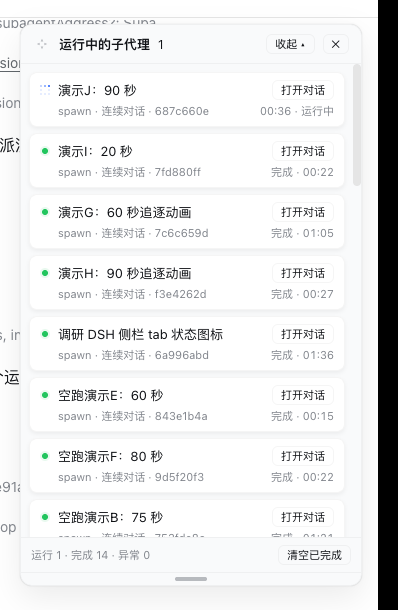
dsh-subagent-monitor addresses the difficulty of observing subagents while working in the DSH web interface. It adds a persistent card-style panel in the upper-right corner that shows the subagents directly spawned by the current session in real time, making it easier to see which ones are running, completed, failed, interrupted, or rejected without switching views.
Beyond a card list, the panel provides an overview dashboard with the current context-window usage of the main session, aggregated cache-hit rates, and status counts for the current layer of subagents. Each card includes usage details such as input and output tokens, cache hits, and context utilization, while quick actions let you open a conversation, move back to the parent session, and inspect nested layers step by step.
The panel can be moved, resized, collapsed in two stages, restored after refresh, and remembered across sessions. It is a good fit for DSH users who debug multi-agent workflows, monitor subtask execution, or want continuous visibility into token usage and context pressure.
Screenshots
Use Cases
- Monitor subagents directly spawned by the current session
- Check context usage, cache hit rates, and status counts
- Drill into nested subagent sessions to inspect failed or interrupted tasks
Best For
- DSH users debugging multi-agent workflows
- Users tracking token usage and context-window pressure
- Developers running DSH Web locally or on internal networks
Related Plugins
A service-oriented sidebar framework for DSH, offering a full workbench with file explorer, embedded browser, real terminal, Git panel, and extensible plugin services.

A beautiful, practical Claude Code-style TUI plugin with pixel whale top bar, flowing glow title, real-time status line, streaming thought expansion, time rewind, context progress bar and TPS gauge — zero core changes.

The plugin market for DeepSeek Harness: browse/search/one-click install community plugins and themes, with updates, backup/restore, hot disable, diagnostics, and AI fix.

A persistent whale widget on the DSH web UI that shows DeepSeek balance, today's usage, and per-turn cost, with drag-and-snap and sound effects.