deepseek-harness-openai-codex
Run the following command in DeepSeek Harness:
dsh plugin install syncended/deepseek-harness-openai-codex
Paste the following prompt into your AI chat to install this plugin:
To install this plugin in DeepSeek Harness, please execute the command dsh plugin install syncended/deepseek-harness-openai-codex. Source: https://github.com/syncended/deepseek-harness-openai-codex
About this plugin
Many users wish to leverage the powerful ChatGPT Codex models within DeepSeek Harness without the hassle of manual configuration or local callback servers. The DeepSeek Harness OpenAI Codex plugin is designed to solve this by seamlessly integrating a ChatGPT Plus or Pro subscription as an available LLM provider.
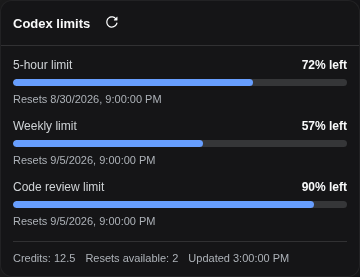
The plugin introduces a secure device-code OAuth login flow, allowing users to authenticate via a browser while managing sessions through Harness's /codex CLI or Web interface. It automatically handles token refreshes to ensure continuous availability and visually displays Codex usage limits in the Web settings, making quota monitoring effortless.
This feature is ideal for developers and engineers already using DeepSeek Harness who possess a ChatGPT Plus or Pro subscription with Codex access. Whether you interact via the command line or the Web UI, the plugin streamlines the onboarding process for Codex models, letting you focus on code generation and intelligent interaction while handling the underlying token management automatically.
Screenshots
Use Cases
- Seamlessly invoke Codex models within DeepSeek Harness
- Securely log in to ChatGPT via device code OAuth flow
- Intuitively monitor Codex usage limits in the Web UI
Best For
- Developers using DeepSeek Harness with a ChatGPT Plus subscription
- Engineers needing to manage Codex credentials via CLI or Web UI
- Users seeking streamlined LLM model switching and auto token management
Related Plugins
A service-oriented sidebar framework for DSH, offering a full workbench with file explorer, embedded browser, real terminal, Git panel, and extensible plugin services.

A beautiful, practical Claude Code-style TUI plugin with pixel whale top bar, flowing glow title, real-time status line, streaming thought expansion, time rewind, context progress bar and TPS gauge — zero core changes.

The plugin market for DeepSeek Harness: browse/search/one-click install community plugins and themes, with updates, backup/restore, hot disable, diagnostics, and AI fix.

A persistent whale widget on the DSH web UI that shows DeepSeek balance, today's usage, and per-turn cost, with drag-and-snap and sound effects.