dsh-hover-approve
Run the following command in DeepSeek Harness:
dsh plugin install wydddddcool/dsh-hover-approve
Paste the following prompt into your AI chat to install this plugin:
In DeepSeek Harness, please run the command `dsh plugin install wydddddcool/dsh-hover-approve` to install, with the source code available at https://github.com/wydddddcool/dsh-hover-approve。
About this plugin
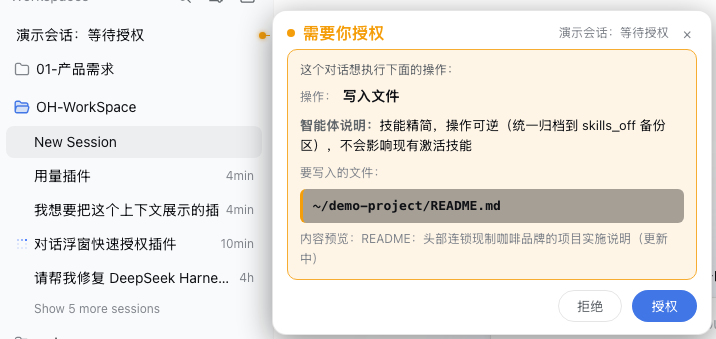
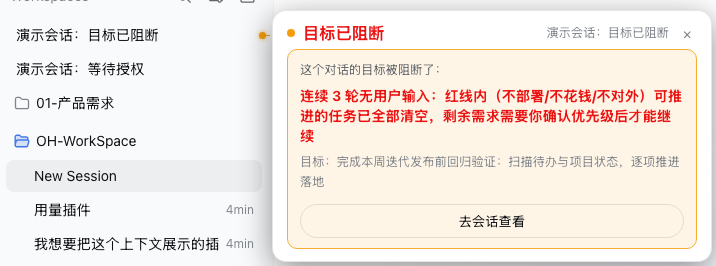
When managing complex tasks in DeepSeek Harness (DSH), you often need to intervene in sessions—such as authorizing file writes, answering questions, or confirming plans. However, the default built-in panel requires you to click into the session and scroll through the chat, a process that is not only tedious but also disrupts your workflow. The dsh-hover-approve plugin is designed to solve this pain point. It automatically anchors a sidebar bubble to the right of the session list row, using a connecting line and dot to clearly identify which session needs attention. Whether it is file writing, command execution, plan confirmation, or a blocked goal, you can respond directly by clicking "Reject" or "Approve" without entering the chat. This plugin is perfect for DSH users who engage in frequent multi-turn interactions and approvals. By handling interactions at the list level, it significantly improves management efficiency, allowing you to stay focused without being interrupted by cumbersome pop-ups.
Screenshots
Use Cases
- When file write permissions are requested
- When an agent needs an answer to a question
- When confirming a complex task plan
Best For
- Daily DSH Web users
- Users managing multiple parallel sessions
- Engineers seeking efficient interaction management
Related Plugins
A service-oriented sidebar framework for DSH, offering a full workbench with file explorer, embedded browser, real terminal, Git panel, and extensible plugin services.

A beautiful, practical Claude Code-style TUI plugin with pixel whale top bar, flowing glow title, real-time status line, streaming thought expansion, time rewind, context progress bar and TPS gauge — zero core changes.

The plugin market for DeepSeek Harness: browse/search/one-click install community plugins and themes, with updates, backup/restore, hot disable, diagnostics, and AI fix.

A persistent whale widget on the DSH web UI that shows DeepSeek balance, today's usage, and per-turn cost, with drag-and-snap and sound effects.