dsh-provider-usage
Run the following command in DeepSeek Harness:
dsh plugin install lizhouai/dsh-provider-usage
Paste the following prompt into your AI chat to install this plugin:
To install this plugin in DeepSeek Harness, please run the command: dsh plugin install lizhouai/dsh-provider-usage. Source: https://github.com/lizhouai/dsh-provider-usage
About this plugin
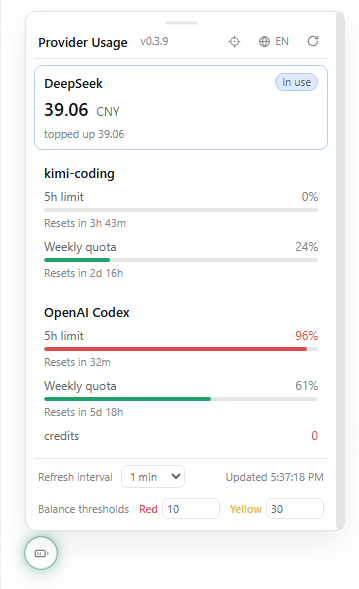
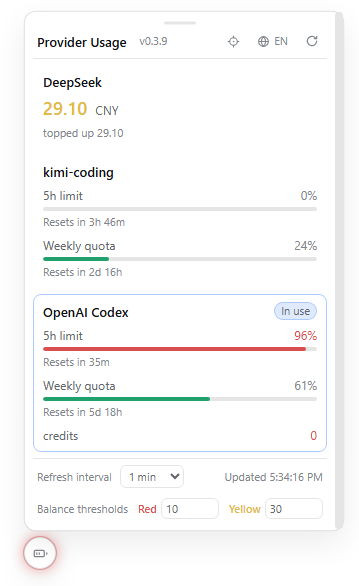
Managing multiple AI service providers can be frustrating when you suddenly find yourself out of credit or quota limits, interrupting your workflow. Frequently switching tabs to log into each provider's console is tedious and disrupts your focus. The dsh-provider-usage plugin solves this by condensing the balance and usage of all providers into a draggable floating ball on your web interface. It supports a wide range of API adapters, automatically detecting registered routes like DeepSeek, Moonshot, and OpenRouter to let you check total and remaining credits with a single glance. Security is a key feature; the plugin does not cache API keys locally but resolves them dynamically via Harness's credential service. It also handles OAuth refreshes transparently for providers requiring authentication, ensuring a smooth experience. Whether you use a single route or a complex multi-route setup, this tool keeps you informed without logging out.
Screenshots
Use Cases
- Check balance anytime during chat to avoid unexpected interruptions.
- Unify management of credits and quotas across multiple AI providers.
- Monitor API usage and remaining time windows in real-time.
Best For
- Developers using multiple AI providers simultaneously.
- Teams needing precise control over API consumption costs.
- End users deeply using DeepSeek Harness.
Related Plugins
A service-oriented sidebar framework for DSH, offering a full workbench with file explorer, embedded browser, real terminal, Git panel, and extensible plugin services.

A beautiful, practical Claude Code-style TUI plugin with pixel whale top bar, flowing glow title, real-time status line, streaming thought expansion, time rewind, context progress bar and TPS gauge — zero core changes.

The plugin market for DeepSeek Harness: browse/search/one-click install community plugins and themes, with updates, backup/restore, hot disable, diagnostics, and AI fix.

A persistent whale widget on the DSH web UI that shows DeepSeek balance, today's usage, and per-turn cost, with drag-and-snap and sound effects.