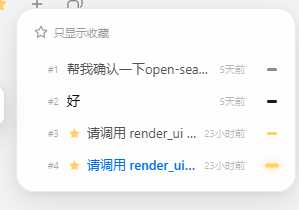
dsh-chat-rail
Run the following command in DeepSeek Harness:
dsh plugin install Max-Null/dsh-chat-rail
Paste the following prompt into your AI chat to install this plugin:
Install dsh-chat-rail plugin for the scrolling rail message navigation in DeepSeek Harness by running `dsh plugin install Max-Null/dsh-chat-rail` (Source code: https://github.com/Max-Null/dsh-chat-rail).
About this plugin
Navigating through long conversations and quickly locating specific historical messages can be a hassle, often marred by sidebars that block views or navigation bars that pop up abruptly. dsh-chat-rail is designed to solve these issues with a unique "scrolling rail" experience. Instead of a jarring popup, it features a smooth, right-to-left expansion animation that keeps your current reading point centered. Beyond basic navigation, it supports message favoriting and quick filling, making long chat management significantly more efficient.
A key strength of this plugin is its deep compatibility with the ecosystem. It works seamlessly with dsh-better-sidebar, automatically avoiding overlap and sharing transition animations to ensure a distraction-free workflow. Whether you are generating long codebases or analyzing complex data, it provides a clear and fluid navigation layer, making it an excellent choice for advanced users seeking a polished desktop experience.
Screenshots

Use Cases
- Quickly jump through extremely long code generation sessions
- Avoid navigation blocking issues when using multi-sidebar plugins
- Save key replies and one-click refill them into the input box
Best For
- Advanced users of DeepSeek Harness seeking efficient chat management
- Developers or analysts handling long technical documents frequently
- Desktop application customizers needing seamless sidebar integration
Related Plugins
A service-oriented sidebar framework for DSH, offering a full workbench with file explorer, embedded browser, real terminal, Git panel, and extensible plugin services.

A beautiful, practical Claude Code-style TUI plugin with pixel whale top bar, flowing glow title, real-time status line, streaming thought expansion, time rewind, context progress bar and TPS gauge — zero core changes.

The plugin market for DeepSeek Harness: browse/search/one-click install community plugins and themes, with updates, backup/restore, hot disable, diagnostics, and AI fix.

A persistent whale widget on the DSH web UI that shows DeepSeek balance, today's usage, and per-turn cost, with drag-and-snap and sound effects.