dsh-qq2006
Run the following command in DeepSeek Harness:
dsh plugin install LaplaceYoung/dsh-qq2006
Paste the following prompt into your AI chat to install this plugin:
Install this plugin in DeepSeek Harness from the source repository https://github.com/LaplaceYoung/dsh-qq2006, then restart the web interface.
About this plugin
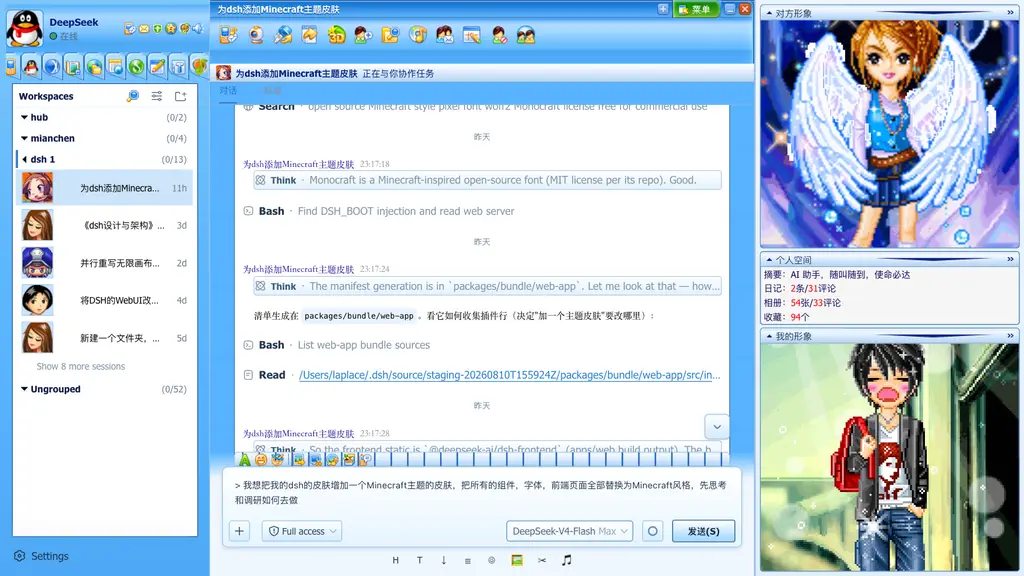
dsh-qq2006 brings the DeepSeek Harness WebUI back to the coral-blue era of QQ in 2006. Rather than applying a superficial background, it uses a skin toggle, global skin tokens, and component-level patches to recreate the look of the login window, main panel, chat window, and message list. The skin can be enabled or disabled from settings, remembers your preference, and can be switched back to the default appearance without polluting the original theme.
It includes presets such as Classic Blue, Pink, Mint Green, and Violet, along with nostalgic details like grid-style title bars, three-state buttons, list-style messages, and a QQ Show side panel. In a full source-based setup, it can deliver even more complete login, panel, chat chrome, and original asset effects. This plugin is ideal for users who want a playful retro skin for DSH, a nostalgic demo, or simply a reminder of the classic QQ atmosphere.
Screenshots


Use Cases
- Give DeepSeek Harness a nostalgic interface makeover
- Experience a 2006 QQ-style chat window
- Use it for fun dress-up or retro theme demos
Best For
- DSH users who like the classic QQ look
- Players who want nostalgic interface easter eggs
- Plugin users looking for fun dress-up examples
Related Plugins

whale-girl is a desktop pet in the DSH Web GUI (bottom-right for instant companionship) — draggable, feedable, playable; completed tasks, sessions and companionship time accrue into seniority levels, titles, and memories.

Renders your local Wallpaper Engine wallpapers as the DSH web background, supporting video, web, and scene wallpapers with a liquid-glass effect and rich customization.

A WebGPU ocean skin for DeepSeek Harness with five-wave Gerstner waves, translucent theme, day/night cycle, and quick controls, installable as plugin or extension.

A Galgame-style conversation view and visual scene editor for DSH web sessions, with a real-time editing mode.