dsh-tui-app
Run the following command in DeepSeek Harness:
dsh plugin install yhfgyyf/dsh-tui-app
Paste the following prompt into your AI chat to install this plugin:
Please execute the installation command in the DeepSeek Harness terminal, or visit the open source address https://github.com/yhfgyyf/dsh-tui-app for details.
About this plugin
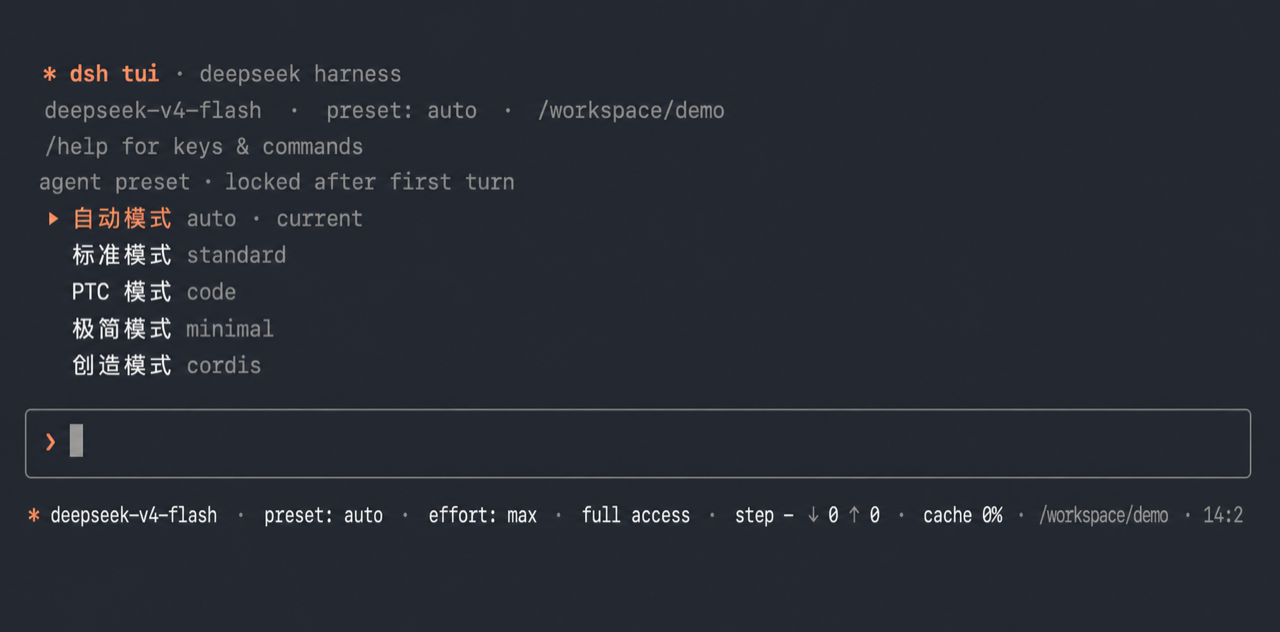
DeepSeek Harness users often crave a more native and lightweight interaction method than just relying on a browser. dsh-tui-app exists to solve this problem, providing an independent, readline-based terminal profile bundle specifically designed for DeepSeek Harness. It not only preserves model, Agent preset, session, and tool services but also builds a smooth chat interface within the terminal, allowing developers to work efficiently in their familiar command-line environment.
In terms of core capabilities, it supports streaming outputs (including reasoning and tool calls), image and video inputs (supporting macOS's Ctrl+V paste), and offers complete session management, Agent preset locking, and permission preset cycling. Additionally, it integrates skill invocation, audit workflows, and local shell escape (!), ensuring robust security control while enjoying the convenience of the terminal.
For developers who enjoy TUI (Terminal User Interface) styles and users who need to deeply customize DeepSeek workflows, this is the perfect choice. It requires no heavy dependencies like React/Ink, runs lightweight, and is highly responsive, satisfying various needs from daily conversation to complex project management, making it the best entry point for experiencing DeepSeek capabilities in the terminal.
Screenshots
Use Cases
- Review and debug code directly with DeepSeek models in the terminal.
- Quickly obtain streaming answers using a TUI interface without opening a browser.
- Manage sessions, presets, and tool calls within the command line environment.
Best For
- Efficient developers accustomed to using command-line tools.
- Users who need to deeply integrate AI assistants in the terminal.
- Terminal users who prefer native TUI interfaces over web-based ones.
Related Plugins
A service-oriented sidebar framework for DSH, offering a full workbench with file explorer, embedded browser, real terminal, Git panel, and extensible plugin services.

A beautiful, practical Claude Code-style TUI plugin with pixel whale top bar, flowing glow title, real-time status line, streaming thought expansion, time rewind, context progress bar and TPS gauge — zero core changes.

The plugin market for DeepSeek Harness: browse/search/one-click install community plugins and themes, with updates, backup/restore, hot disable, diagnostics, and AI fix.

A persistent whale widget on the DSH web UI that shows DeepSeek balance, today's usage, and per-turn cost, with drag-and-snap and sound effects.