dock-git
Run the following command in DeepSeek Harness:
dsh plugin install AKS1st/dock-git
Paste the following prompt into your AI chat to install this plugin:
In DeepSeek Harness, please run `dsh plugin install AKS1st/dock-git` to install the plugin. The source code address is https://github.com/AKS1st/dock-git.
About this plugin
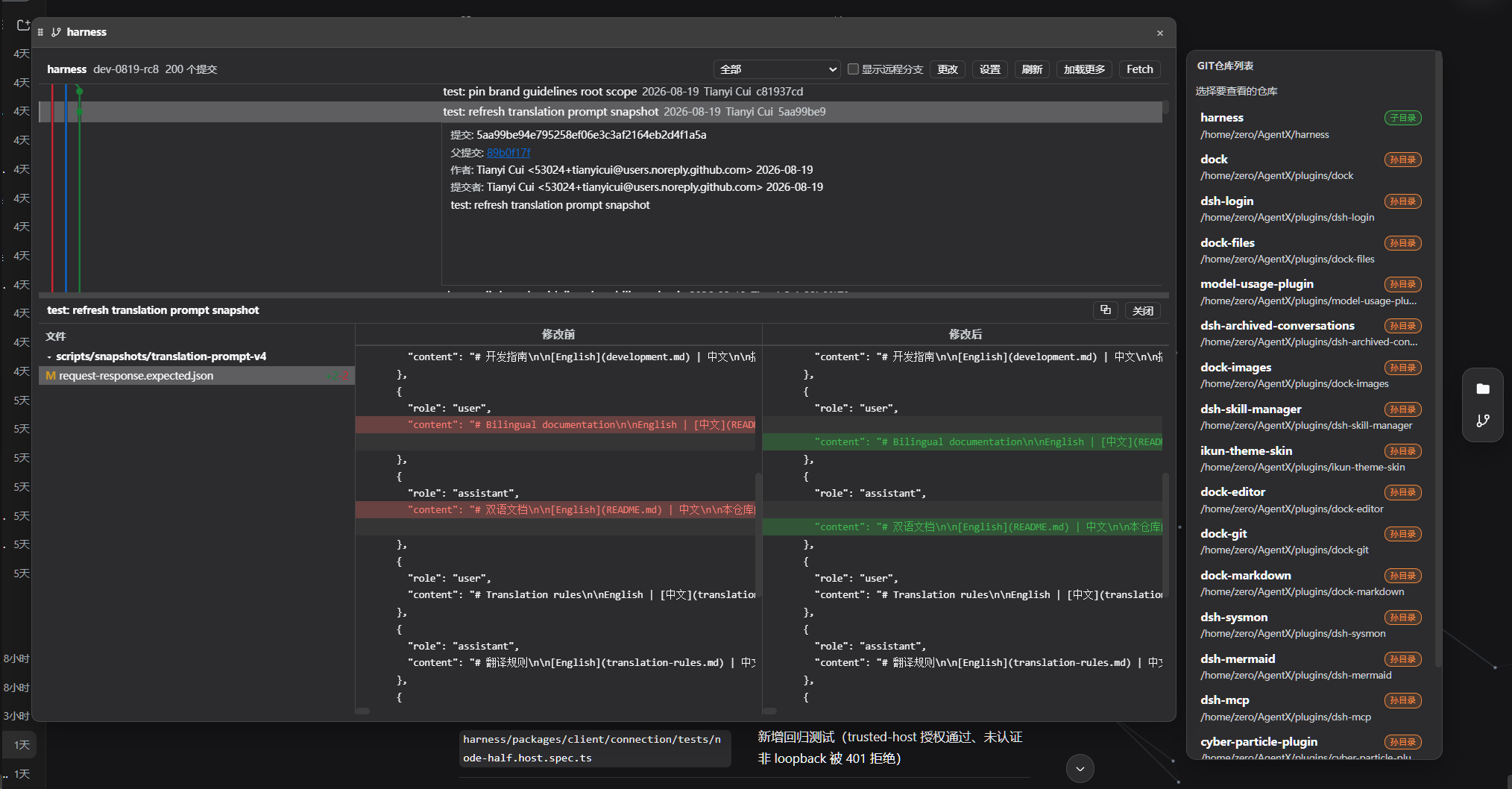
Managing Git repositories within the DSH workbench often requires switching windows or relying on external tools, disrupting your coding flow. dock-git, the premier Git visualization plugin in the DSH ecosystem, aims to seamlessly integrate the powerful experience of VSCode's Git panel into your workspace. By mounting directly to the sidebar, it allows you to intuitively browse commit history, manage branches, and handle tags without leaving your environment, solving the issue of tedious command-line operations lacking visual feedback. The plugin offers a rich set of core capabilities, including a stunning swimlane-style commit graph that clearly displays the evolution of branches and tags. Clicking on a commit reveals detailed information, featuring a three-column Diff view to compare old and new file content. Furthermore, it supports a complete VSCode-style workflow covering staging, committing, pushing, and resetting, while automatically scanning for multiple repositories within the current workspace to keep you informed. This tool is ideal for developers who prefer deep coding within the Web environment, especially those who rely heavily on the DSH workbench for full-stack development. Whether you need to frequently review code changes, coordinate team collaboration, or perform complex branch management, dock-git provides a smooth and secure interaction experience, making it the ultimate weapon for boosting development efficiency.
Screenshots
Use Cases
- Review repository commit history in DSH workbench
- Compare file changes by clicking on commits
- Manage remote repository branches and tags
Best For
- Web developers using DSH workbench
- Teams needing visual Git tools
- Users preferring Web IDE environments
Related Plugins
A service-oriented sidebar framework for DSH, offering a full workbench with file explorer, embedded browser, real terminal, Git panel, and extensible plugin services.

A beautiful, practical Claude Code-style TUI plugin with pixel whale top bar, flowing glow title, real-time status line, streaming thought expansion, time rewind, context progress bar and TPS gauge — zero core changes.

The plugin market for DeepSeek Harness: browse/search/one-click install community plugins and themes, with updates, backup/restore, hot disable, diagnostics, and AI fix.

A persistent whale widget on the DSH web UI that shows DeepSeek balance, today's usage, and per-turn cost, with drag-and-snap and sound effects.