dsh-usage-lite
Run the following command in DeepSeek Harness:
dsh plugin install ericw0315/dsh-usage-lite
Paste the following prompt into your AI chat to install this plugin:
To install this plugin in DeepSeek Harness, run `dsh plugin install ericw0315/dsh-usage-lite` in the terminal. The source code is located at https://github.com/ericw0315/dsh-usage-lite.
About this plugin
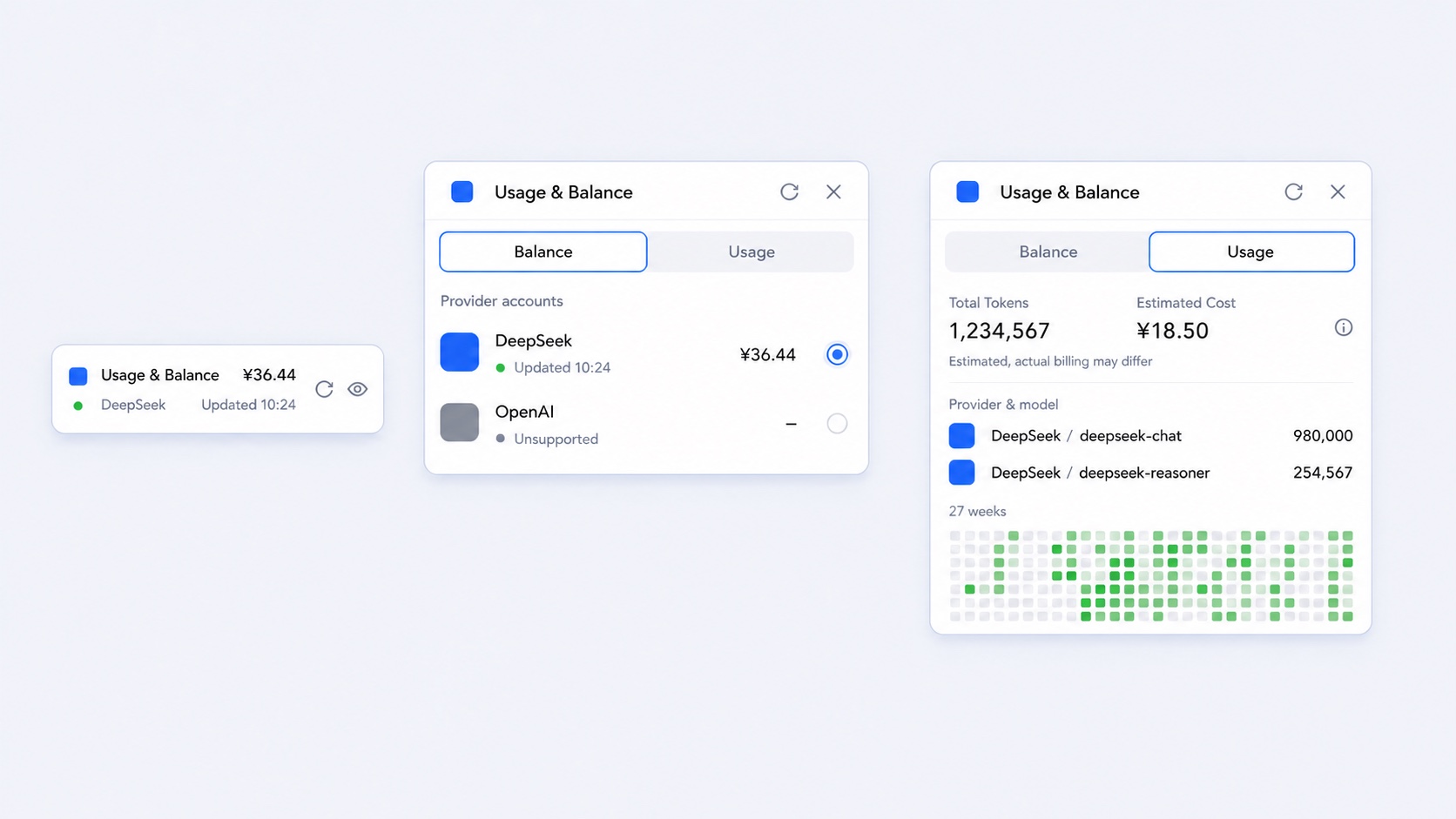
Managing API resources and tracking token consumption within DeepSeek Harness can often be cumbersome, requiring navigation through multiple complex settings. dsh-usage-lite addresses this by integrating essential information directly into the Web UI sidebar, offering a streamlined and elegant experience.
The plugin excels in local aggregation and analytics, automatically discovering configured providers. Beyond simply displaying DeepSeek balances, it aggregates Token usage across dates and providers, featuring a 27-week heatmap to visualize consumption trends clearly.
It is tailored for developers and operators who need precise control over API spending. Whether for quick balance checks or monitoring cost trends via the heatmap, the plugin provides a privacy-first solution where credentials are parsed server-side to ensure data security.
Screenshots
Use Cases
- Quickly check DeepSeek balances and provider status
- Track model token consumption and estimate costs
- Aggregate session data locally without uploading credentials
Best For
- Developers needing precise management of API resources
- Operators monitoring cost and usage trends
- Users valuing data privacy and local processing
Related Plugins
A service-oriented sidebar framework for DSH, offering a full workbench with file explorer, embedded browser, real terminal, Git panel, and extensible plugin services.

A beautiful, practical Claude Code-style TUI plugin with pixel whale top bar, flowing glow title, real-time status line, streaming thought expansion, time rewind, context progress bar and TPS gauge — zero core changes.

The plugin market for DeepSeek Harness: browse/search/one-click install community plugins and themes, with updates, backup/restore, hot disable, diagnostics, and AI fix.

A persistent whale widget on the DSH web UI that shows DeepSeek balance, today's usage, and per-turn cost, with drag-and-snap and sound effects.