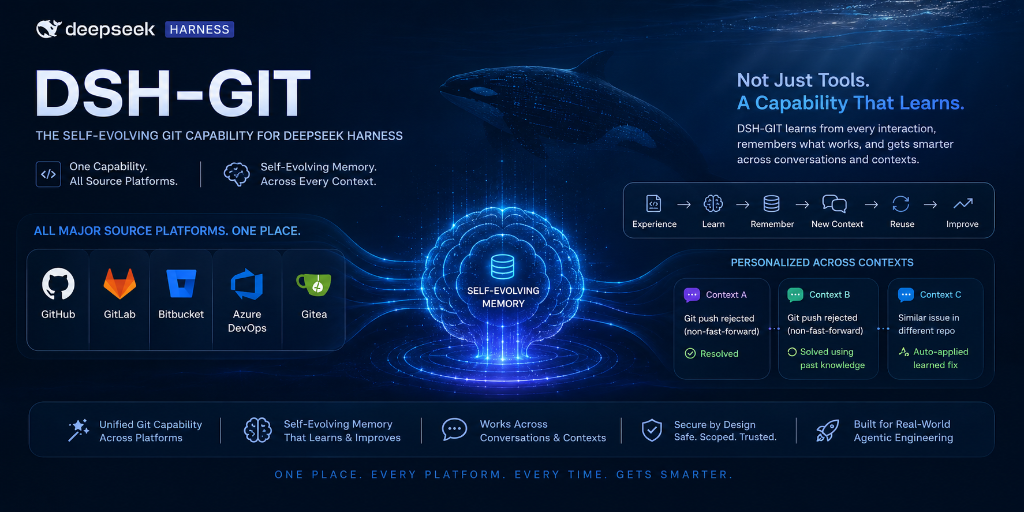
dsh-git-plugins
Run the following command in DeepSeek Harness:
dsh plugin install sakthiveltofficial/dsh-git-plugins
Paste the following prompt into your AI chat to install this plugin:
To install this plugin in DeepSeek Harness, run dsh plugin install sakthiveltofficial/dsh-git-plugins, with the source code located at https://github.com/sakthiveltofficial/dsh-git-plugins.
About this plugin
Managing Git workflows manually is often tedious and error-prone, and without persistent memory, AI agents tend to repeat the same mistakes in similar scenarios. dsh-git-plugins addresses the lack of deep source control capabilities in DeepSeek Harness agents by introducing a unique "self-evolving memory" feature alongside powerful local Git operations. This plugin transforms agents from simple code readers into developers with environmental awareness, allowing AI to truly understand project conventions and history for smoother collaboration.
Screenshots
Use Cases
- Automate code commits and PR management
- Intelligently learn and prevent Git errors
- Unified management of GitHub, GitLab, and other platforms
Best For
- Developers using DeepSeek Harness
- Teams requiring multi-platform repository management
- DevOps engineers seeking agents with memory capabilities
Related Plugins
A service-oriented sidebar framework for DSH, offering a full workbench with file explorer, embedded browser, real terminal, Git panel, and extensible plugin services.

A beautiful, practical Claude Code-style TUI plugin with pixel whale top bar, flowing glow title, real-time status line, streaming thought expansion, time rewind, context progress bar and TPS gauge — zero core changes.

The plugin market for DeepSeek Harness: browse/search/one-click install community plugins and themes, with updates, backup/restore, hot disable, diagnostics, and AI fix.

A persistent whale widget on the DSH web UI that shows DeepSeek balance, today's usage, and per-turn cost, with drag-and-snap and sound effects.