dsh-session-icons
Run the following command in DeepSeek Harness:
dsh plugin install fengb3/dsh-session-icons
Paste the following prompt into your AI chat to install this plugin:
In DeepSeek Harness, run 'dsh plugin install fengb3/dsh-session-icons' to install this plugin from https://github.com/fengb3/dsh-session-icons.
About this plugin
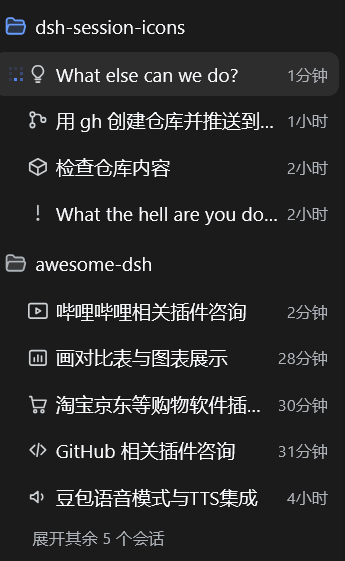
In the DSH Web interface, session titles are typically displayed as plain text in the sidebar list, which can lead to visual monotony and make it difficult for users to quickly distinguish between different sessions. The dsh-session-icons plugin addresses this by automatically generating a 24×24 monochrome SVG icon for each session title. When the model generates a new title, the plugin initiates an auxiliary request using the same route to have the model draw an icon, which is then injected before the title in the list, following the interface's theme color. The icons are also disk-cached, ensuring they persist even after restarting DSH or refreshing the page. This plugin is ideal for all users of the DSH Web interface, especially those managing numerous sessions, as it enhances readability and aesthetics, making session management more intuitive and efficient.
Screenshots
Use Cases
- Automatically creates icons when the model generates a new session title
- Automatically draws icons for old titles missing icons after restart
- Quickly distinguishes and identifies different sessions through icons
Best For
- Developers and researchers using the DSH Web interface
- Data scientists needing efficient management of multiple sessions
- Users seeking to improve the aesthetics and usability of the interface
Related Plugins
A service-oriented sidebar framework for DSH, offering a full workbench with file explorer, embedded browser, real terminal, Git panel, and extensible plugin services.

A beautiful, practical Claude Code-style TUI plugin with pixel whale top bar, flowing glow title, real-time status line, streaming thought expansion, time rewind, context progress bar and TPS gauge — zero core changes.

The plugin market for DeepSeek Harness: browse/search/one-click install community plugins and themes, with updates, backup/restore, hot disable, diagnostics, and AI fix.

A persistent whale widget on the DSH web UI that shows DeepSeek balance, today's usage, and per-turn cost, with drag-and-snap and sound effects.