dsh-windows-notifications
Run the following command in DeepSeek Harness:
dsh plugin install lsq-dsh-plugins/dsh-windows-notifications
Paste the following prompt into your AI chat to install this plugin:
To install this plugin in DeepSeek Harness, run the command: dsh plugin install lsq-dsh-plugins/dsh-windows-notifications. The source code is available at https://github.com/lsq-dsh-plugins/dsh-windows-notifications.
About this plugin
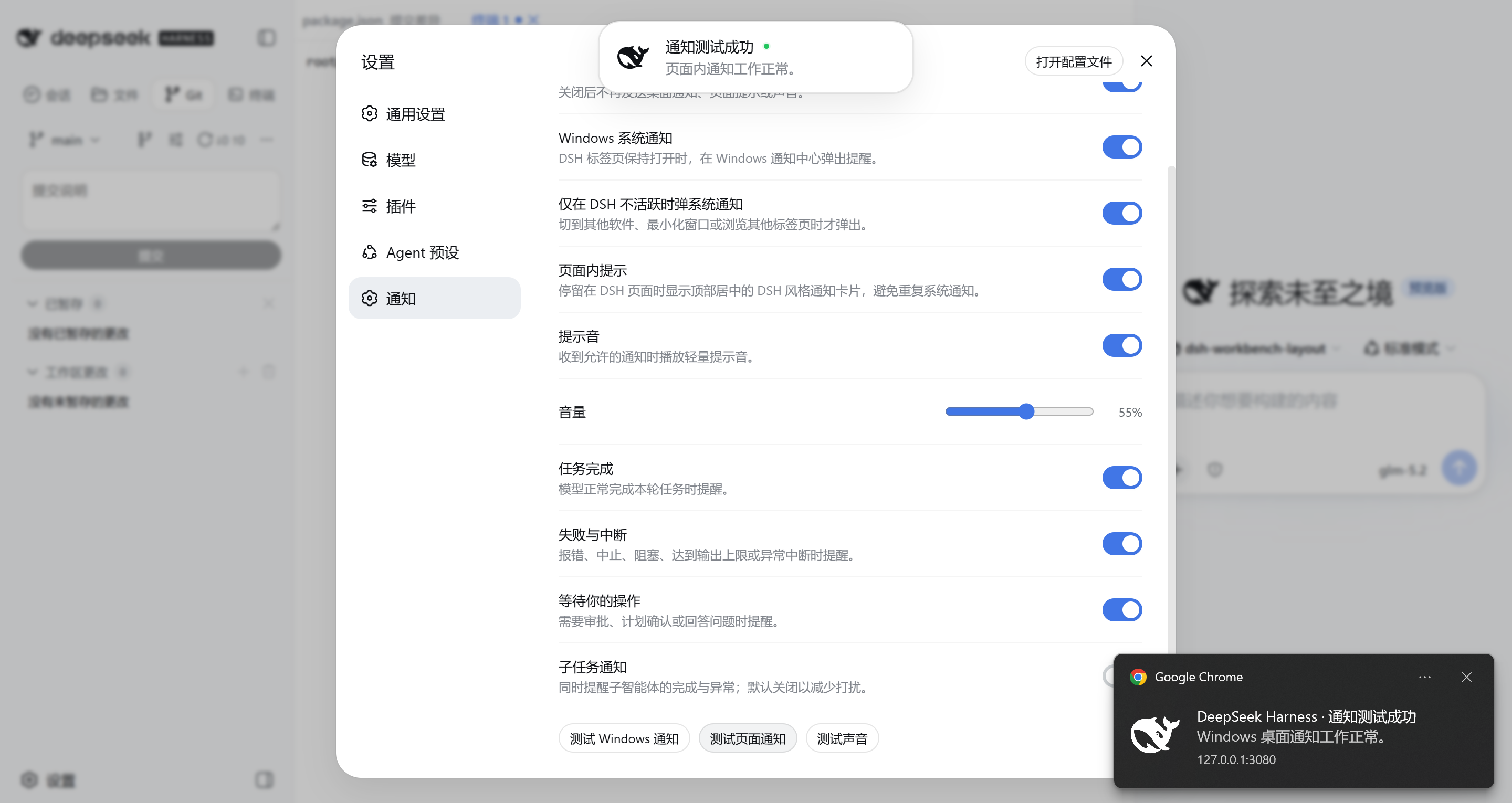
When working with DeepSeek Harness Web, switching between applications often leads to missing critical notifications about task completion or urgent attention requests. The DSH Windows Notifications plugin addresses this by intelligently detecting browser focus and visibility to deliver Windows desktop alerts, optional sounds, or DeepSeek Harness-styled in-page cards at the right moment.
Its core capability lies in adaptive notification strategies: when the DeepSeek Harness tab is visible and focused, it shows in-page cards; when you switch to another program, it seamlessly transitions to system-level desktop notifications, ensuring you never miss key events—whether a task succeeds, fails, or requires your approval. Each notification can be accompanied by a subtle chime to enhance awareness.
This plugin is ideal for anyone using DeepSeek Harness Web for development, research, or automation tasks in a multi-application workflow. Whether you’re a developer immersed in coding or a data scientist managing multiple intelligent agents, it lets you stay updated on DeepSeek Harness progress without constant window switching, preserving your focus and efficiency.
DSH Windows Notifications prioritizes privacy, with all processing handled locally within the browser and operating system—no third-party services involved. It acts as a discreet digital assistant, quietly ensuring timely and reliable information flow to support your work.
Screenshots
Use Cases
- Receive timely notifications for task completion or failure when switching applications.
- Get alerts when DeepSeek Harness awaits approval or answers to questions.
- Maintain workflow continuity in multi-task environments via sound and visual prompts.
Best For
- Users developing or researching with DeepSeek Harness Web.
- Professionals managing multiple intelligent agent tasks simultaneously.
- Users working on Windows desktop in multi-task environments seeking to reduce context switching.
Related Plugins
A service-oriented sidebar framework for DSH, offering a full workbench with file explorer, embedded browser, real terminal, Git panel, and extensible plugin services.

A beautiful, practical Claude Code-style TUI plugin with pixel whale top bar, flowing glow title, real-time status line, streaming thought expansion, time rewind, context progress bar and TPS gauge — zero core changes.

The plugin market for DeepSeek Harness: browse/search/one-click install community plugins and themes, with updates, backup/restore, hot disable, diagnostics, and AI fix.

A persistent whale widget on the DSH web UI that shows DeepSeek balance, today's usage, and per-turn cost, with drag-and-snap and sound effects.