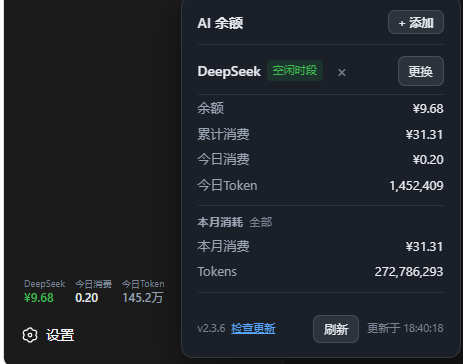
dsh-deepseek-balance-widget
Run the following command in DeepSeek Harness:
dsh plugin install crazy-L118/dsh-deepseek-balance-widget
Paste the following prompt into your AI chat to install this plugin:
In DeepSeek Harness, run the command dsh plugin install https://github.com/crazy-L118/dsh-deepseek-balance-widget to install this plugin.
About this plugin
As AI services become integral to daily work and learning, users often need real-time monitoring of their balances and usage to prevent service interruptions or unexpected overspending. The dsh-deepseek-balance-widget plugin addresses this by displaying AI balances directly in the dsh Web sidebar, making monitoring effortless and seamless.
Its core capabilities lie in its intelligence and convenience: it automatically refreshes data every 30 seconds, supports switching between DeepSeek and MiMo platforms, and provides detailed usage statistics such as daily consumption, monthly usage, and time-slot badges. With simple AI-guided configuration, users can instantly view key metrics without complex setups.
This plugin is particularly useful for professionals who frequently use DeepSeek or MiMo for AI development, research, or everyday conversations. Whether you’re a professional managing budgets or an everyday user avoiding service disruptions, it integrates seamlessly into your workflow, enhancing efficiency and experience.
Screenshots
Use Cases
- Real-time view of AI service balances to avoid unexpected interruptions.
- Monitor daily and monthly consumption for optimized budget management.
- Quickly switch platforms to check usage across different AI services.
Best For
- AI developers who need to manage budgets across multiple platforms.
- Researchers who rely on AI services for daily tasks.
- Everyday users who want easy monitoring of AI usage.
Related Plugins
A service-oriented sidebar framework for DSH, offering a full workbench with file explorer, embedded browser, real terminal, Git panel, and extensible plugin services.

A beautiful, practical Claude Code-style TUI plugin with pixel whale top bar, flowing glow title, real-time status line, streaming thought expansion, time rewind, context progress bar and TPS gauge — zero core changes.

The plugin market for DeepSeek Harness: browse/search/one-click install community plugins and themes, with updates, backup/restore, hot disable, diagnostics, and AI fix.

A persistent whale widget on the DSH web UI that shows DeepSeek balance, today's usage, and per-turn cost, with drag-and-snap and sound effects.