dsh-suggested-replies
Run the following command in DeepSeek Harness:
dsh plugin install Anionex/dsh-suggested-replies
Paste the following prompt into your AI chat to install this plugin:
To install the dsh-suggested-replies plugin, run the command 'dsh plugin install Anionex/dsh-suggested-replies' in DeepSeek Harness, with the full source repository at https://github.com/Anionex/dsh-suggested-replies.
About this plugin
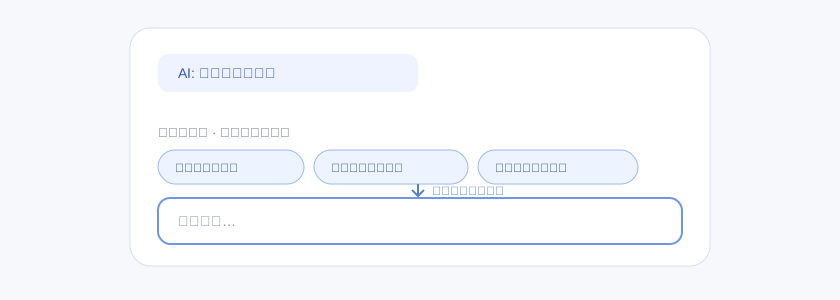
When interacting with AI, users often pause to think about what to ask next after a reply, which can disrupt flow and extend the conversation. The dsh-suggested-replies plugin addresses this by automatically generating predictive reply suggestions after each AI response, displayed prominently above the chat input box. With a single click, the selected suggestion fills the draft, eliminating manual typing and making conversations more fluid and efficient.
The plugin's core capabilities lie in its intelligent generation and intuitive interaction. It analyzes recent dialogue context to suggest relevant next steps—such as actions, verifications, or decisions—ensuring suggestions are language-appropriate, unique, and ready to send. Clicking a suggestion only populates the draft without sending, giving users full control. Additionally, it offers configurable options like suggestion count and model selection, along with fallback and expiration mechanisms to maintain a stable experience.
This plugin is ideal for any DSH Web user seeking to boost productivity, whether for technical discussions, content creation, or casual chats. It's particularly useful for those who want to reduce input effort, speed up decision-making, or explore more conversation avenues. By placing predictive suggestions in a visible, accessible location, it enhances AI interactions to feel more natural and supportive, serving as a valuable tool in your dialogue toolkit.
Screenshots
Use Cases
- Generate next-step message suggestions after AI replies
- Select candidate replies directly above the chat input box
- Click a candidate to fill the draft without auto-sending
Best For
- DSH Web users looking to speed up conversation flow
- Technical discussers or content creators who frequently ask follow-up questions
- All users seeking to reduce input burden and boost interaction efficiency
Related Plugins
A service-oriented sidebar framework for DSH, offering a full workbench with file explorer, embedded browser, real terminal, Git panel, and extensible plugin services.

A beautiful, practical Claude Code-style TUI plugin with pixel whale top bar, flowing glow title, real-time status line, streaming thought expansion, time rewind, context progress bar and TPS gauge — zero core changes.

The plugin market for DeepSeek Harness: browse/search/one-click install community plugins and themes, with updates, backup/restore, hot disable, diagnostics, and AI fix.

A persistent whale widget on the DSH web UI that shows DeepSeek balance, today's usage, and per-turn cost, with drag-and-snap and sound effects.