dsh-usage-meter
Run the following command in DeepSeek Harness:
dsh plugin install cute-baobao/dsh-usage-meter
Paste the following prompt into your AI chat to install this plugin:
To install the dsh-usage-meter plugin, run the command `dsh plugin install cute-baobao/dsh-usage-meter` in the terminal, with the source code available at https://github.com/cute-baobao/dsh-usage-meter.
About this plugin
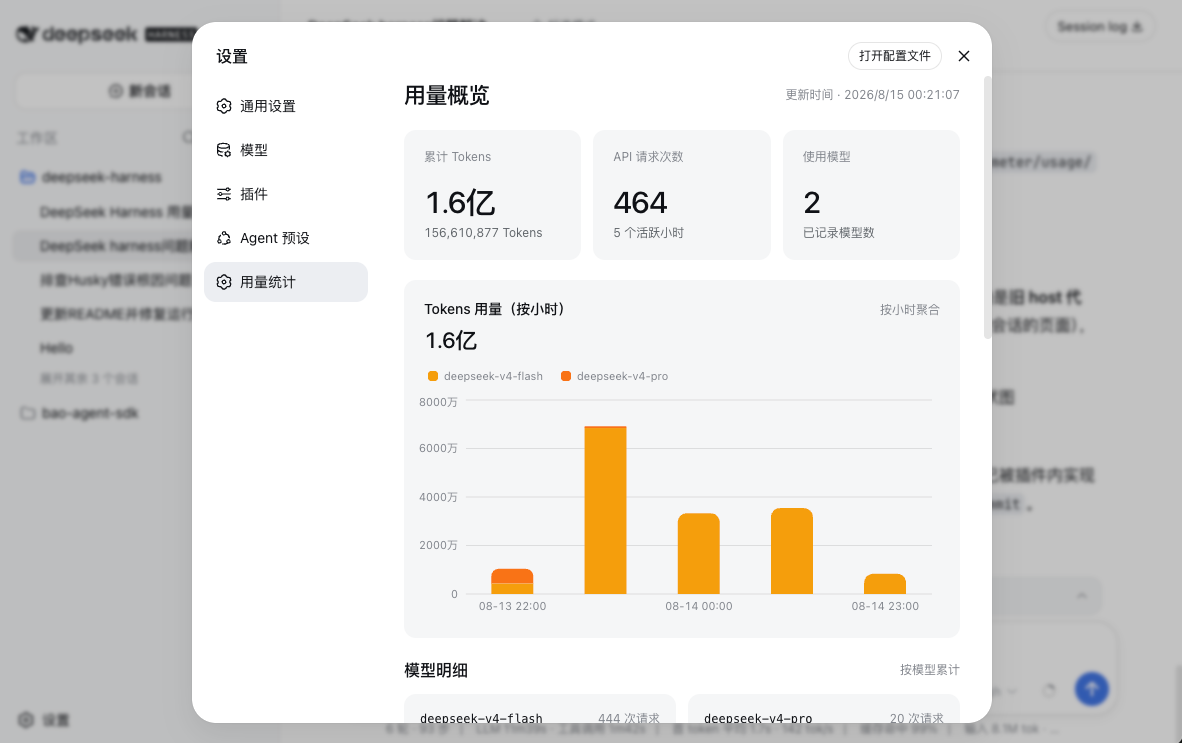
When using DeepSeek Harness for model calls, users often struggle to accurately track token consumption details, which can lead to difficulties in cost management or inability to assess usage efficiency. The dsh-usage-meter plugin is designed to address this problem by providing an automated solution for usage monitoring. Its core capability lies in automatically recording token usage for each model call and aggregating it by model type and hourly intervals. In the Web GUI settings page, the data is visually presented as stacked bar charts, with each bar representing an hour and different colors distinguishing models, allowing users to easily gain insights into usage patterns. This plugin is particularly suitable for active DeepSeek Harness users, such as developers, data scientists, and researchers, who need real-time monitoring of token consumption to optimize costs, enhance performance, or conduct data analysis. The interface supports both Chinese and English, ensuring broad applicability and helping users manage resources efficiently.
Screenshots
Use Cases
- Monitor token consumption for model calls in real-time
- Analyze usage trends over different time periods
- Optimize usage costs for DeepSeek Harness
Best For
- Daily developers using DeepSeek Harness
- Project managers needing to control AI costs
- Data scientists evaluating model performance
Related Plugins
A service-oriented sidebar framework for DSH, offering a full workbench with file explorer, embedded browser, real terminal, Git panel, and extensible plugin services.

A beautiful, practical Claude Code-style TUI plugin with pixel whale top bar, flowing glow title, real-time status line, streaming thought expansion, time rewind, context progress bar and TPS gauge — zero core changes.

The plugin market for DeepSeek Harness: browse/search/one-click install community plugins and themes, with updates, backup/restore, hot disable, diagnostics, and AI fix.

A persistent whale widget on the DSH web UI that shows DeepSeek balance, today's usage, and per-turn cost, with drag-and-snap and sound effects.