long-draft-input
Run the following command in DeepSeek Harness:
dsh plugin install Heyflyingpig/long-draft-input
Paste the following prompt into your AI chat to install this plugin:
To install the long-draft-input plugin in DeepSeek Harness, run the command dsh plugin install Heyflyingpig/long-draft-input or visit the source repository at https://github.com/Heyflyingpig/long-draft-input for details.
About this plugin
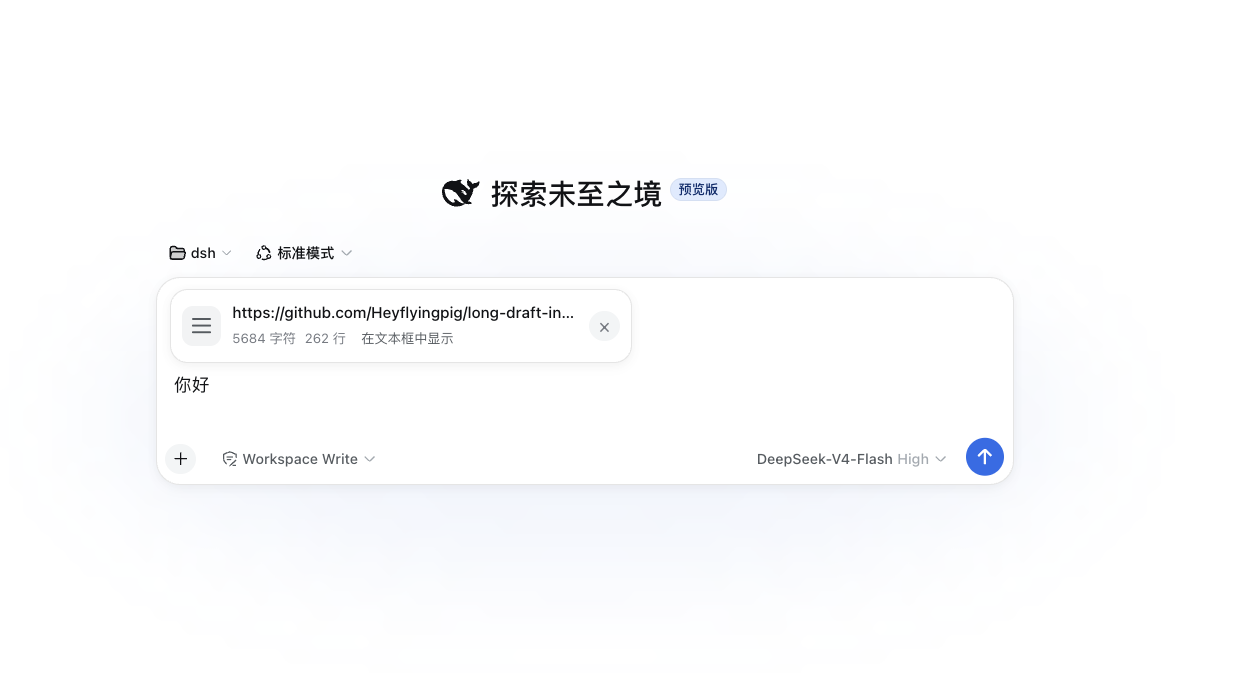
Working with long text inputs in DeepSeek Harness often leads to a cluttered interface where drafts are hard to preview and edit. The long-draft-input plugin tackles this by extending the send box with a summary card when the draft exceeds a threshold (default 2000 characters), displaying a preview, character count, and line count. Users can add supplementary text below the card or restore the original input box with a click, all while the plugin preserves the original draft state and send logic. Ideal for developers, writers, and anyone handling lengthy content, it enhances efficiency and management without disrupting the workflow.
Screenshots
Use Cases
- Automatically preview drafts when writing long technical documents
- Easily manage draft states after inputting large code snippets
- Handle long message sending while preserving original formatting
Best For
- Developers who frequently handle long texts
- Writers or content creators drafting long articles
- Data analysts or recorders inputting large amounts of data
Related Plugins
A service-oriented sidebar framework for DSH, offering a full workbench with file explorer, embedded browser, real terminal, Git panel, and extensible plugin services.

A beautiful, practical Claude Code-style TUI plugin with pixel whale top bar, flowing glow title, real-time status line, streaming thought expansion, time rewind, context progress bar and TPS gauge — zero core changes.

The plugin market for DeepSeek Harness: browse/search/one-click install community plugins and themes, with updates, backup/restore, hot disable, diagnostics, and AI fix.

A persistent whale widget on the DSH web UI that shows DeepSeek balance, today's usage, and per-turn cost, with drag-and-snap and sound effects.