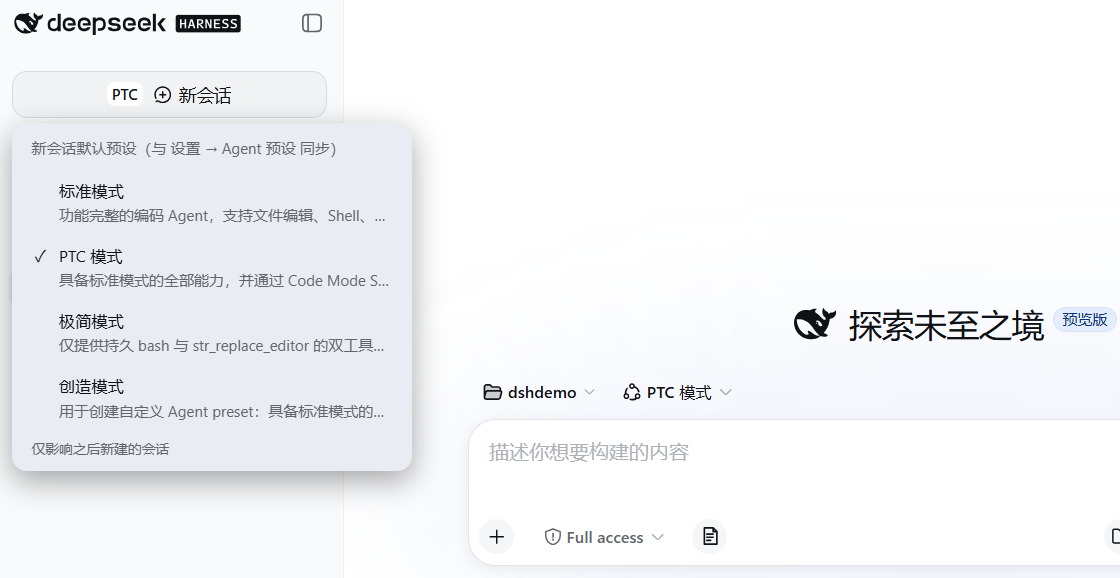
dsh-sidebar-mode
Run the following command in DeepSeek Harness:
dsh plugin install Meredith2328/dsh-sidebar-mode
Paste the following prompt into your AI chat to install this plugin:
Install this plugin by running the command 'dsh plugin install Meredith2328/dsh-sidebar-mode' in DeepSeek Harness. The full source repository is at https://github.com/Meredith2328/dsh-sidebar-mode.
About this plugin
When using DeepSeek Harness, switching between preset modes (like Standard, Creative, or custom presets) often requires navigating to the settings page, which disrupts your workflow and complicates new session creation. The dsh-sidebar-mode plugin cleverly integrates preset switching into the small text label of the new session button—a simple click pops up a menu with all presets, including your custom ones, without needing extra setup. Switching applies the new default immediately to the current blank session and syncs bidirectionally with the official settings panel, keeping everything consistent.
The plugin’s core lies in its seamless integration and smart discovery: it automatically detects all presets, including custom ones added later, and elegantly truncates long names with ellipses to avoid clutter. It fully adheres to DSH's theme and design, hiding automatically when the sidebar collapses to save space. Ideal for DSH users who value efficiency and customization, especially those who frequently switch between creative modes—turning session creation from a multi-step process into a single, effortless touch.
Screenshots
Use Cases
- Quickly switch between creative or standard modes in a new session
- Adjust the global default preset without leaving the current page
- Custom presets automatically appear in the shortcut menu after creation
Best For
- DSH power users who frequently switch between presets
- Content creators seeking streamlined workflows
- Software enthusiasts who prefer customized interfaces and quick actions
Related Plugins
A service-oriented sidebar framework for DSH, offering a full workbench with file explorer, embedded browser, real terminal, Git panel, and extensible plugin services.

A beautiful, practical Claude Code-style TUI plugin with pixel whale top bar, flowing glow title, real-time status line, streaming thought expansion, time rewind, context progress bar and TPS gauge — zero core changes.

The plugin market for DeepSeek Harness: browse/search/one-click install community plugins and themes, with updates, backup/restore, hot disable, diagnostics, and AI fix.

A persistent whale widget on the DSH web UI that shows DeepSeek balance, today's usage, and per-turn cost, with drag-and-snap and sound effects.