
dsh-token-usage
Run the following command in DeepSeek Harness:
dsh plugin install hashdiana/dsh-token-usage
Paste the following prompt into your AI chat to install this plugin:
To install this plugin in DeepSeek Harness, run the command: dsh plugin install hashdiana/dsh-token-usage, with the full source address at https://github.com/hashdiana/dsh-token-usage。
About this plugin
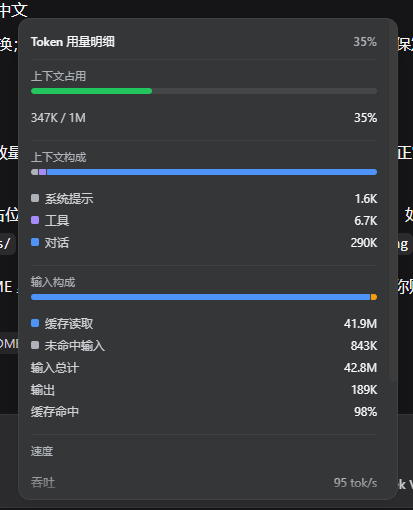
In the DeepSeek Harness web UI, the default token usage display is squeezed into a cramped line of text under the composer, requiring users to decode it manually for understanding token consumption, which reduces readability and efficiency. The dsh-token-usage plugin addresses this issue by providing a clearer, prettier token-usage bar and a details panel, making monitoring intuitive and effortless.
The plugin's core capability lies in displaying key metrics at a glance as chips: context occupancy (with color-coded indicators), input-output breakdown, cache hit rate, decode throughput (tok/s), and average first-token latency (TTFT). Clicking the bar opens a details panel with deeper insights such as context composition, session statistics, and more. The UI adapts to light and dark themes and is fully bilingual in Chinese and English, ensuring ease of use in various environments.
dsh-token-usage is ideal for all DeepSeek Harness web users, from developers and AI researchers to anyone who relies on the tool for conversations or code generation. It enables quick monitoring of token usage and performance metrics, helping to streamline workflows and boost productivity.
Screenshots
Use Cases
- Monitor token consumption in real-time within the DeepSeek Harness web UI.
- Optimize resource allocation and performance tracking during conversations or code generation.
- Quickly view key metrics like context occupancy and cache hit rates.
Best For
- Daily users and developers of DeepSeek Harness.
- AI researchers needing efficient management of model interactions.
- Professionals who frequently rely on the web UI for token usage.
Related Plugins
A service-oriented sidebar framework for DSH, offering a full workbench with file explorer, embedded browser, real terminal, Git panel, and extensible plugin services.

A beautiful, practical Claude Code-style TUI plugin with pixel whale top bar, flowing glow title, real-time status line, streaming thought expansion, time rewind, context progress bar and TPS gauge — zero core changes.

The plugin market for DeepSeek Harness: browse/search/one-click install community plugins and themes, with updates, backup/restore, hot disable, diagnostics, and AI fix.

A persistent whale widget on the DSH web UI that shows DeepSeek balance, today's usage, and per-turn cost, with drag-and-snap and sound effects.