dsh-eyecare
Run the following command in DeepSeek Harness:
dsh plugin install Yummyxl/dsh-eyecare
Paste the following prompt into your AI chat to install this plugin:
Install this plugin in DeepSeek Harness with the command `dsh plugin install Yummyxl/dsh-eyecare`. Full source code URL: https://github.com/Yummyxl/dsh-eyecare.
About this plugin
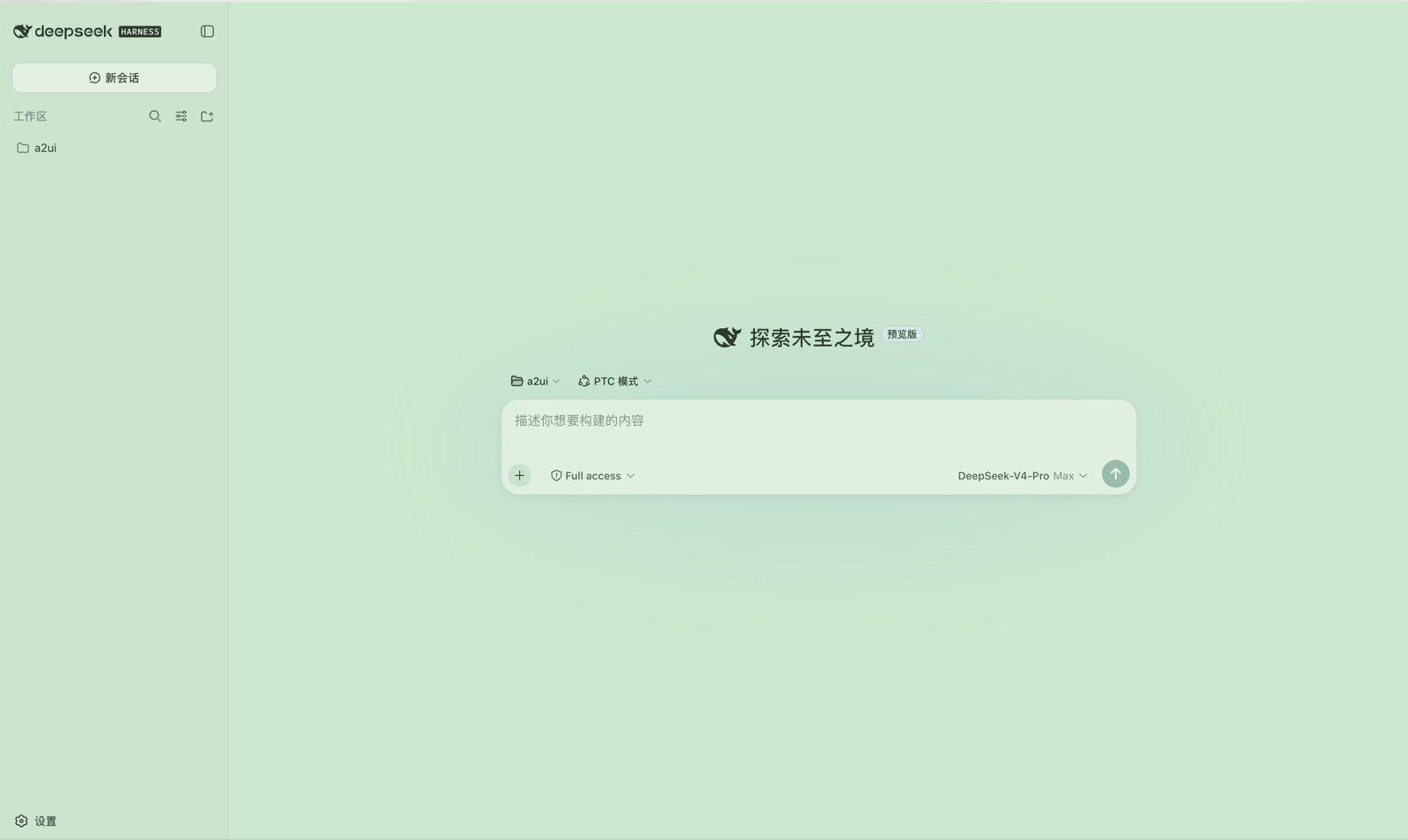
In today's digital age, prolonged exposure to computer screens often leads to eye strain and discomfort. The dsh-eyecare plugin addresses this issue by adding a soothing eye care mode to the DeepSeek Harness Web interface. With a simple toggle, users can switch the entire interface to a scientifically validated bean paste green color scheme, a low-saturation, low-blue-light palette designed to reduce visual fatigue. This mode seamlessly integrates with light, dark, and system-adaptive themes, ensuring consistent eye protection regardless of your preferences.
At its core, dsh-eyecare offers instant switching and remembers the switch state automatically, so your settings persist across page refreshes or browser restarts. The plugin remaps 89 color tokens across UI elements—from input fields to code blocks—to eliminate harsh white surfaces while preserving information hierarchy. Users can also customize the color scheme via a centralized configuration table, with changes applying instantly on refresh, no restart required.
This plugin is ideal for anyone who spends significant time using DeepSeek Harness, such as developers, researchers, or office workers. It's designed to be unobtrusive yet effective, enhancing comfort during extended screen sessions without complicating your workflow. If you care about eye health or find standard interfaces glaring, dsh-eyecare provides a practical, user-friendly solution to make your digital experience more sustainable and pleasant.
Screenshots
Use Cases
- Relieve eye fatigue during long coding sessions
- Switch to dark eye care mode for nighttime work
- Customize interface colors to suit personal preferences
Best For
- Developers who frequently use DeepSeek Harness
- Office workers sensitive to eye health
- Users who enjoy customizing interface appearance
Related Plugins

whale-girl is a desktop pet in the DSH Web GUI (bottom-right for instant companionship) — draggable, feedable, playable; completed tasks, sessions and companionship time accrue into seniority levels, titles, and memories.

Renders your local Wallpaper Engine wallpapers as the DSH web background, supporting video, web, and scene wallpapers with a liquid-glass effect and rich customization.

A WebGPU ocean skin for DeepSeek Harness with five-wave Gerstner waves, translucent theme, day/night cycle, and quick controls, installable as plugin or extension.

A Galgame-style conversation view and visual scene editor for DSH web sessions, with a real-time editing mode.