dsh-writing-pad
Run the following command in DeepSeek Harness:
dsh plugin install linhx1999/dsh-writing-pad
Paste the following prompt into your AI chat to install this plugin:
To install this plugin in DeepSeek Harness, run the command: dsh plugin install linhx1999/dsh-writing-pad, source: https://github.com/linhx1999/dsh-writing-pad.
About this plugin
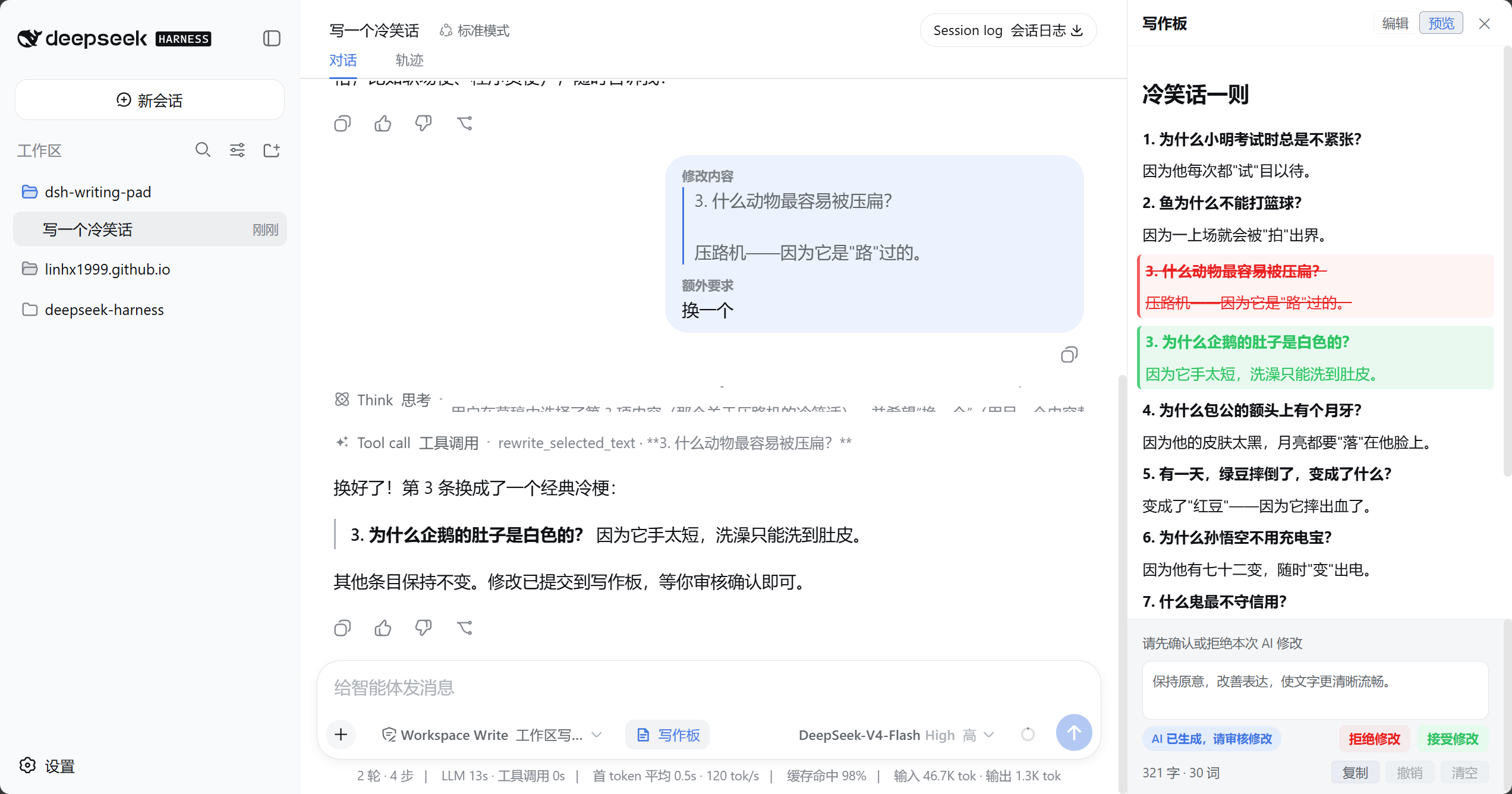
When using AI for writing tasks, constantly switching between chat interfaces and editors disrupts creative flow and hampers efficiency. The dsh-writing-pad plugin offers a seamless solution for DeepSeek Harness Web users: a Markdown writing board docked directly in the conversation sidebar that keeps drafting, previewing, and AI local rewrites within a unified workflow. Users can open the writing pad at any time to input or paste content, and simply select text to request AI revisions—new versions are displayed as clear diffs for easy one-click review. The plugin also supports multi-language interfaces, session-level state persistence, and up to 50 undo steps, with all drafts stored only in memory to avoid interfering with project files. Ideal for content creators, developers, and frequent AI writing tool users, it helps maintain focus and channel more energy into creative expression rather than cumbersome interface navigation.
Screenshots
Use Cases
- Draft and edit Markdown documents in real-time within the conversation sidebar
- Select text to request AI local rewrites and review diffs before accepting
- Stash drafts using the writing pad to maintain an uninterrupted creative workflow
Best For
- Content creators who frequently use AI-assisted tools for writing
- Developers needing efficient document editing and version control
- Researchers relying on DeepSeek Harness Web for text generation and modification
Related Plugins
A service-oriented sidebar framework for DSH, offering a full workbench with file explorer, embedded browser, real terminal, Git panel, and extensible plugin services.

A beautiful, practical Claude Code-style TUI plugin with pixel whale top bar, flowing glow title, real-time status line, streaming thought expansion, time rewind, context progress bar and TPS gauge — zero core changes.

The plugin market for DeepSeek Harness: browse/search/one-click install community plugins and themes, with updates, backup/restore, hot disable, diagnostics, and AI fix.

A persistent whale widget on the DSH web UI that shows DeepSeek balance, today's usage, and per-turn cost, with drag-and-snap and sound effects.