dsh-recap
Run the following command in DeepSeek Harness:
dsh plugin install Howardzhangdqs/dsh-recap
Paste the following prompt into your AI chat to install this plugin:
In DeepSeek Harness, you can install the plugin by running the command 'dsh plugin install Howardzhangdqs/dsh-recap' or by visiting the GitHub repository at https://github.com/Howardzhangdqs/dsh-recap.
About this plugin
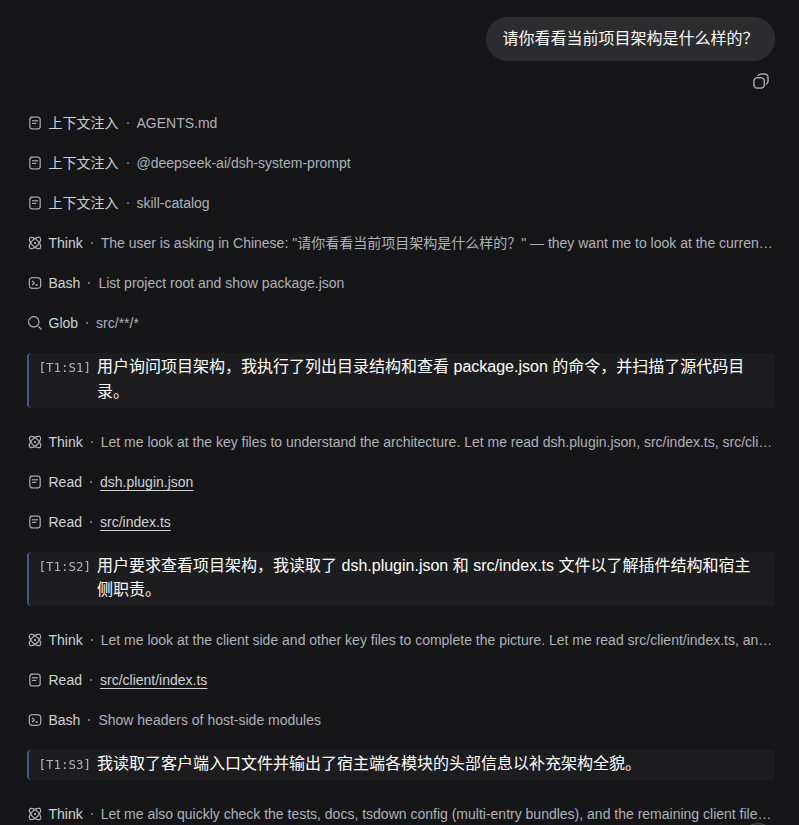
When using DeepSeek Harness for extended sessions, users often struggle to quickly review conversation history. Traditional replay methods are time-consuming and risk exceeding context window limits. The dsh-recap plugin addresses this by intelligently summarizing new data from each model request into concise sentences, woven chronologically into a 'recap chain'. This chain is inserted directly into the conversation flow, allowing you to grasp the session's progress without replaying the entire dialogue.
The plugin's core strengths lie in its efficient and non-intrusive design. It employs a cache-friendly incremental generation approach, where each summary request adds only a few new tokens, significantly saving computational resources. It remains zero-intrusive to the main conversation loop by listening read-only to session events and generating summaries in parallel, ensuring no disruption to your interactions. Summary routing is customizable, letting you designate a low-cost model for summarization to optimize expenses. All generations default to no thinking process, guaranteeing swift responses.
User experience is enhanced through inline recap lines and a flexible settings page. Summary sentences appear in real-time after their corresponding model requests, creating a natural reading flow. The settings page allows you to adjust summary frequency, enable/disable states, and select models, with changes taking effect instantly. This makes the plugin both powerful and highly adaptable.
Whether you're a heavy DeepSeek Harness user, a developer analyzing conversation histories, or a general user seeking efficient session management, dsh-recap offers a lightweight solution. It's particularly suited for complex or long-term interactions, helping you save time and maintain clear contextual understanding.
Screenshots
Use Cases
- Quickly review conversation progress in long sessions.
- Analyze historical dialogues for debugging or research.
- Manage context in complex sessions without replaying the entire dialogue.
Best For
- Heavy users of DeepSeek Harness dealing with long sessions.
- Developers or researchers needing to analyze conversation histories.
- General users seeking efficient management of session content.
Related Plugins
A service-oriented sidebar framework for DSH, offering a full workbench with file explorer, embedded browser, real terminal, Git panel, and extensible plugin services.

A beautiful, practical Claude Code-style TUI plugin with pixel whale top bar, flowing glow title, real-time status line, streaming thought expansion, time rewind, context progress bar and TPS gauge — zero core changes.

The plugin market for DeepSeek Harness: browse/search/one-click install community plugins and themes, with updates, backup/restore, hot disable, diagnostics, and AI fix.

A persistent whale widget on the DSH web UI that shows DeepSeek balance, today's usage, and per-turn cost, with drag-and-snap and sound effects.