dsh-open-explorer
Run the following command in DeepSeek Harness:
dsh plugin install YooRarely/dsh-open-explorer
Paste the following prompt into your AI chat to install this plugin:
To install this plugin in DeepSeek Harness, use the command: dsh plugin install YooRarely/dsh-open-explorer, or visit the GitHub repository for details: https://github.com/YooRarely/dsh-open-explorer.
About this plugin
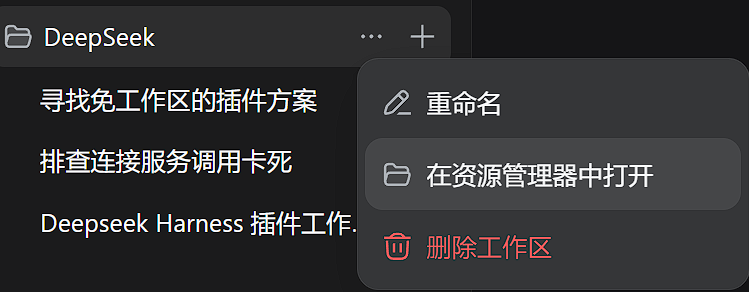
When using the DeepSeek Harness (DSH) Web GUI, users often need to access the physical location of their Workspace folder, but DSH lacks a convenient built-in way to open the system file manager directly, which can disrupt workflow and reduce efficiency. The dsh-open-explorer plugin addresses this problem by adding a clear folder button to the right of the session title and integrating an 'Open in File Manager' option in the workspace menu. It leverages DSH's public Client Connection Host RPC to request the host to open the current Workspace root directory with a single click, without modifying or depending on DSH source code. The plugin's core capability lies in providing one-click file access, supporting multiple platforms including Windows, macOS, Linux, and WSL, and ensuring stability through ARIA-semantic-based compatibility adaptation. It is ideal for developers, data scientists, or any DSH users who frequently manage Workspace files, aiming to simplify file access steps, boost productivity, and make the interface interaction more fluid and user-friendly.
Screenshots

Use Cases
- Quickly open the Workspace folder in the DSH Web interface to access source code.
- Conveniently open the current Workspace root directory via the session title button for file operations.
- Open the Workspace directory directly on the host machine when accessing DSH remotely to manage data files.
Best For
- Daily users of the DeepSeek Harness Web interface.
- Software developers who need to manage Workspace files.
- Data scientists handling data analysis workflows.
Related Plugins
A service-oriented sidebar framework for DSH, offering a full workbench with file explorer, embedded browser, real terminal, Git panel, and extensible plugin services.

A beautiful, practical Claude Code-style TUI plugin with pixel whale top bar, flowing glow title, real-time status line, streaming thought expansion, time rewind, context progress bar and TPS gauge — zero core changes.

The plugin market for DeepSeek Harness: browse/search/one-click install community plugins and themes, with updates, backup/restore, hot disable, diagnostics, and AI fix.

A persistent whale widget on the DSH web UI that shows DeepSeek balance, today's usage, and per-turn cost, with drag-and-snap and sound effects.