dsh-scope
Run the following command in DeepSeek Harness:
dsh plugin install helloxkk/dsh-scope
Paste the following prompt into your AI chat to install this plugin:
In DeepSeek Harness, you can install this plugin by running 'dsh plugin install helloxkk/dsh-scope' via command line, or visit https://github.com/helloxkk/dsh-scope for more details.
About this plugin
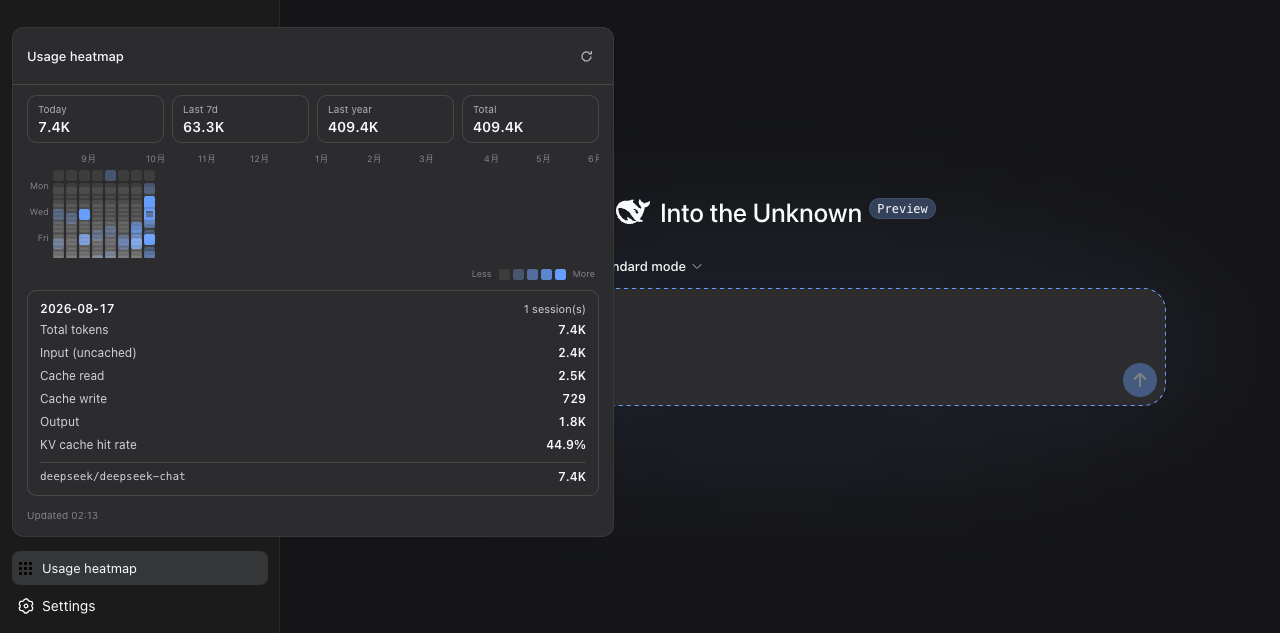
DeepSeek Harness is a powerful AI development tool, but its default Web UI lacks visualization for context occupancy and usage history, which is a pain point during debugging and optimization. The dsh-scope plugin addresses these gaps with two core capabilities: Context Lens provides real-time monitoring of context window occupancy, displaying a segmented bar for system, tools, and messages composition, along with per-bucket totals and KV-cache hit rate; Usage Heatmap presents a GitHub-contribution-graph-style rolling 53-week token usage grid, where users can click to see detailed stats. This plugin is ideal for all DeepSeek Harness users, especially developers, AI researchers, and data scientists who need to track token usage deeply to enhance session efficiency and cost management.
Screenshots
Use Cases
- View real-time context window occupancy during AI session debugging
- Analyze long-term token usage trends via heatmap for cost optimization
- Enhance session performance visualization in DeepSeek Harness
Best For
- Developers debugging and optimizing AI applications
- Data scientists monitoring model token consumption
- Researchers tracking and improving session efficiency
Related Plugins
A service-oriented sidebar framework for DSH, offering a full workbench with file explorer, embedded browser, real terminal, Git panel, and extensible plugin services.

A beautiful, practical Claude Code-style TUI plugin with pixel whale top bar, flowing glow title, real-time status line, streaming thought expansion, time rewind, context progress bar and TPS gauge — zero core changes.

The plugin market for DeepSeek Harness: browse/search/one-click install community plugins and themes, with updates, backup/restore, hot disable, diagnostics, and AI fix.

A persistent whale widget on the DSH web UI that shows DeepSeek balance, today's usage, and per-turn cost, with drag-and-snap and sound effects.